Sign In Start Free Trial
Account

Add to playlist

Create a Playlist

Modal Close icon
You need to login to use this feature.
  • Book Overview & Buying Azure Networking Cookbook
  • Table Of Contents Toc
Azure Networking Cookbook

Azure Networking Cookbook

By : Mustafa Toroman
4 (3)
close
close
Azure Networking Cookbook

Azure Networking Cookbook

4 (3)
By: Mustafa Toroman

Overview of this book

Microsoft provides organizations with an effective way of managing their network with Azure's networking services. No matter the size of your organization, Azure provides a way to highly reliable performance and secure connectivity with its networking services. The book starts with an introduction to the Azure networking like creating Azure virtual networks, designing address spaces and subnets. Then you will learn to create and manage network security groups, application security groups, and IP addresses in Azure. Gradually, we move on to various aspects like S2S, P2S, and Vnet2Vnet connections, DNS and routing, load balancers and traffic manager. This book will cover every aspect and function required to deliver practical recipes to help readers learn from basic cloud networking practices to planning, implementing, and securing their infrastructure network with Azure. Readers will not only be able to upscale their current environment but will also learn to monitor, diagnose, and ensure secure connectivity. After learning to deliver a robust environment readers will also gain meaningful insights from recipes on best practices. By the end of this book, readers will gain hands-on experience in providing cost-effective solutions that benefit organizations.
Table of Contents (13 chapters)
close
close

Changing the subnet size

Similar to the virtual network address space, we can change the size of a subnet at any time.

Getting ready

How to do it...

In order to change subnet size using the Azure portal, we must use the following steps:

  1. In a virtual network blade, select the Subnets option.
  2. Select the subnet you want to change.
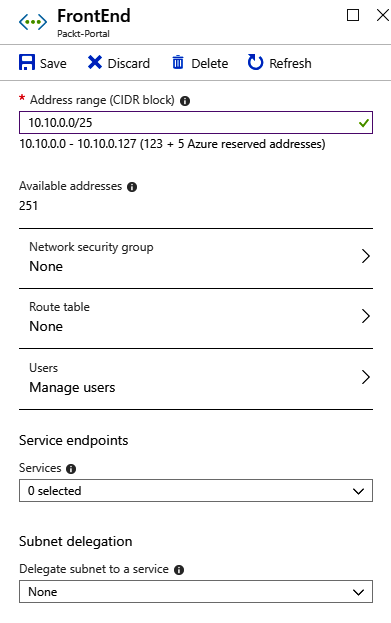
  3. In the Subnets option, enter a new value for the subnet size under Address range. An example of how to do this is shown in the following screenshot:
  1. After entering a new value, click on Save.
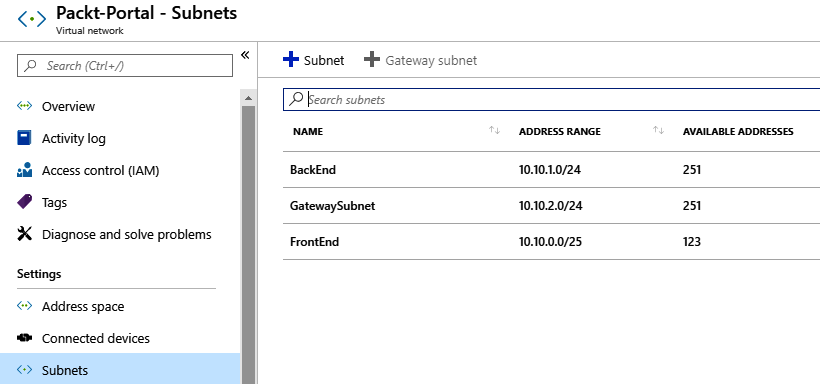
  2. In the Subnets list, you can see the changes applied and the address space has changed, as shown in the following screenshot:

How it works...

When changing subnet size, there are some rules that must be followed. You can't change the address space if it's not within the virtual network address space range and the subnet range can't overlap with other subnets in a virtual network. If devices are assigned to this subnet, you can't change the subnet to exclude the addresses that these devices are already assigned to.

CONTINUE READING
83
Tech Concepts
36
Programming languages
73
Tech Tools
Icon Unlimited access to the largest independent learning library in tech of over 8,000 expert-authored tech books and videos.
Icon Innovative learning tools, including AI book assistants, code context explainers, and text-to-speech.
Icon 50+ new titles added per month and exclusive early access to books as they are being written.
Azure Networking Cookbook
notes
bookmark Notes and Bookmarks search Search in title playlist Add to playlist download Download options font-size Font size

Change the font size

margin-width Margin width

Change margin width

day-mode Day/Sepia/Night Modes

Change background colour

Close icon Search
Country selected

Close icon Your notes and bookmarks

Confirmation

Modal Close icon
claim successful

Buy this book with your credits?

Modal Close icon
Are you sure you want to buy this book with one of your credits?
Close
YES, BUY

Submit Your Feedback

Modal Close icon
Modal Close icon
Modal Close icon