Sign In Start Free Trial
Account

Add to playlist

Create a Playlist

Modal Close icon
You need to login to use this feature.
  • Book Overview & Buying Microsoft SQL Server 2008 R2 Master Data Services
  • Table Of Contents Toc
Microsoft SQL Server 2008 R2 Master Data Services

Microsoft SQL Server 2008 R2 Master Data Services

By : Jeremy Kashel, Tim Kent
4.3 (4)
close
close
Microsoft SQL Server 2008 R2 Master Data Services

Microsoft SQL Server 2008 R2 Master Data Services

4.3 (4)
By: Jeremy Kashel, Tim Kent

Overview of this book

Packed with templates, checklists, and real-life examples, this user-friendly guide will provide you with the insights and guidance of an expert consultant, for a fraction of the price. You’ll follow a clearly laid out path from Change Management novice to confident and prepared change manager. You’ll be introduced to the Five Pillars of Change: Sponsorship, Stakeholder Management, Communication, Training, and Organization Design.  You will work step-by-step through templates in each pillar to build and run a comprehensive Change Management plan tailor-made to your project and organization.
Table of Contents (12 chapters)
close
close
11
Index

Installing sample models

Although not required to work through the examples in the rest of this book, Master Data Services ships with three sample models, namely Customer, Product, and Chart of Accounts. These can be installed on your own server as a final, optional, step to this chapter.

The samples come in the form of *.pkg files, which can be found at \Program Files\Microsoft SQL Server\Master Data Services\Samples\Packages.

In order to install the sample models, carry out the following steps:

  1. Open Master Data Manager through a web browser.
  2. From the home page, click on System Administration.
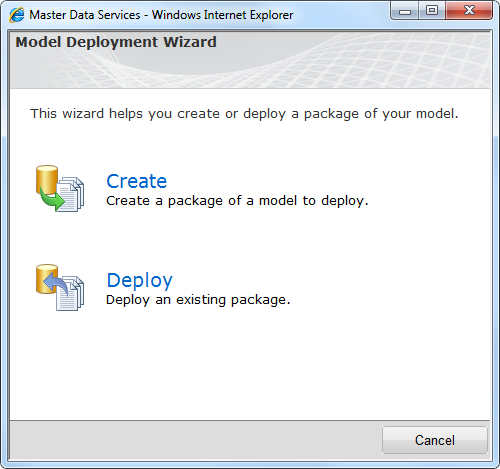
  3. Choose the Deployment option from the System menu at the top of the screen. This will display the following Model Deployment Wizard:
    Installing sample models
  4. Click on the Deploy option.
  5. The wizard will move on one step and prompt you to browse to a *.pkg file. Browse to the aforementioned path and choose chartofaccounts_en.pkg.
  6. Click on Next, which will prepare the package for deployment.
  7. In the screen that follows, click on Next...
CONTINUE READING
83
Tech Concepts
36
Programming languages
73
Tech Tools
Icon Unlimited access to the largest independent learning library in tech of over 8,000 expert-authored tech books and videos.
Icon Innovative learning tools, including AI book assistants, code context explainers, and text-to-speech.
Icon 50+ new titles added per month and exclusive early access to books as they are being written.
Microsoft SQL Server 2008 R2 Master Data Services
notes
bookmark Notes and Bookmarks search Search in title playlist Add to playlist font-size Font size

Change the font size

margin-width Margin width

Change margin width

day-mode Day/Sepia/Night Modes

Change background colour

Close icon Search
Country selected

Close icon Your notes and bookmarks

Confirmation

Modal Close icon
claim successful

Buy this book with your credits?

Modal Close icon
Are you sure you want to buy this book with one of your credits?
Close
YES, BUY

Submit Your Feedback

Modal Close icon
Modal Close icon
Modal Close icon