Sign In Start Free Trial
Account

Add to playlist

Create a Playlist

Modal Close icon
You need to login to use this feature.
  • Book Overview & Buying IBM Cognos TM1 Developer's Certification guide
  • Table Of Contents Toc
IBM Cognos TM1 Developer's Certification guide

IBM Cognos TM1 Developer's Certification guide

By : James D. Miller
4.3 (4)
close
close
IBM Cognos TM1 Developer's Certification guide

IBM Cognos TM1 Developer's Certification guide

4.3 (4)
By: James D. Miller

Overview of this book

IBM Cognos TM1 is enterprise planning software that provides a complete, dynamic environment for developing timely, reliable and personalized forecasts and budgets. It is a real time, in memory tool that helps any sized business perform planning, budgeting and forecasting as well as other financial exercises. This book prepares you to master COG-310 certification using an example-driven method that is easy to understand. The IBM Cognos TM1 Developer's Certification guide provides key technical details and background to clear the current IBM Cognos TM1 Developer (test COG-310) certification exam. This certification book covers all the modules of the certification clearly and in depth. The initial chapters cover in detail the components that make up Cognos TM1 and designing and creating dimensions and cubes. The book then dives deep into basic and advanced scripting using TurboIntegrator and then we learn to understand and write basic Rules. We then learn about the drill-through functionality of TM1, virtual and lookup cubes and lastly Time, and presenting and reporting data
Table of Contents (15 chapters)
close
close
IBM Cognos TM1 Developer's Certification Guide
Credits
About the Author
About the Reviewer
www.PacktPub.com
Preface
Lock Free Chapter
1
The Components of TM1

Formatting view cells


The most common features provided by TM1 to format data displayed in a cube view are:

  • Zero suppression

  • Cell formatting

  • Column orientations

Zero suppression

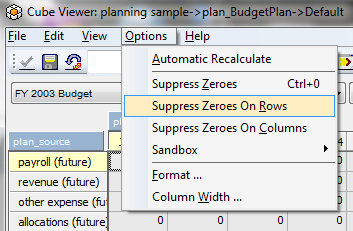
You can turn off rows and/or columns that are zero. The steps to accomplish this are as follows:

For row suppression, click on Options | Suppress Zeroes On Rows:

For column suppression, click on Options | Suppress Zeroes On Columns:

Cell formatting

To customize the display of data within a cube view cell, the Format attribute can be used. The Format attribute is a special type of element attribute that determines how data is displayed. The value of the format attribute can be applied to column elements, row elements, or title elements.

An even more basic method of formatting cube views is to set view options directly within Cube Viewer itself.

Column orientations

Column elements are displayed left to right by default in TM1. You may change it from right to left by clicking on the menu option Layout Right to Left (or...

CONTINUE READING
83
Tech Concepts
36
Programming languages
73
Tech Tools
Icon Unlimited access to the largest independent learning library in tech of over 8,000 expert-authored tech books and videos.
Icon Innovative learning tools, including AI book assistants, code context explainers, and text-to-speech.
Icon 50+ new titles added per month and exclusive early access to books as they are being written.
IBM Cognos TM1 Developer's Certification guide
notes
bookmark Notes and Bookmarks search Search in title playlist Add to playlist font-size Font size

Change the font size

margin-width Margin width

Change margin width

day-mode Day/Sepia/Night Modes

Change background colour

Close icon Search
Country selected

Close icon Your notes and bookmarks

Confirmation

Modal Close icon
claim successful

Buy this book with your credits?

Modal Close icon
Are you sure you want to buy this book with one of your credits?
Close
YES, BUY

Submit Your Feedback

Modal Close icon
Modal Close icon
Modal Close icon