Sign In Start Free Trial
Account

Add to playlist

Create a Playlist

Modal Close icon
You need to login to use this feature.
  • Book Overview & Buying Implementing VMware vCenter Server
  • Table Of Contents Toc
Implementing VMware vCenter Server

Implementing VMware vCenter Server

By : Kostantin Kuminsky
4 (3)
close
close
Implementing VMware vCenter Server

Implementing VMware vCenter Server

4 (3)
By: Kostantin Kuminsky

Overview of this book

Table of Contents (16 chapters)
close
close
Implementing VMware vCenter Server
Credits
About the Author
About the Reviewers
www.PacktPub.com
Preface
1
Index

vSphere component layers


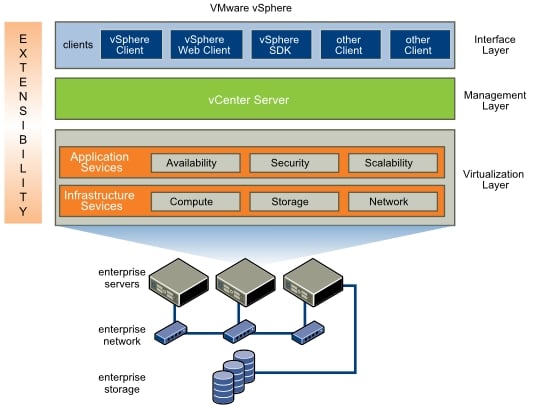
The VMware software stack consists of three layers: virtualization, management, and interface. The relationship between these layers is shown in the following figure:

The virtualization layer of VMware vSphere consists of infrastructure services and application services. Infrastructure services abstract, aggregate, and allocate all hardware and other resources. Infrastructure services include:

  • Compute services: These services are VMware capabilities that abstract away from underlying server resources. Compute services also aggregate these resources across many servers and assign them to consumers such as virtual machines.

  • Storage services: These services are a set of technologies that are used to provide the most efficient use and management of storage resources across your virtual environment.

  • Network services: These services are a set of technologies that simplify and enhance networking for virtual environments.

Application services are designed to ensure availability, security, and scalability for applications; for example, features such as vSphere High Availability and Fault Tolerance.

The management layer is represented by VMware vCenter Server, which is the main central point for configuring, provisioning, and managing your virtual environment.

The interface layer is where user access to vSphere happens. Users can access the environment using GUI clients such as vSphere Client or vSphere Web Client. Also, users can access the datacenter using command-line interfaces or SDKs for automated management or third-party product connections.

CONTINUE READING
83
Tech Concepts
36
Programming languages
73
Tech Tools
Icon Unlimited access to the largest independent learning library in tech of over 8,000 expert-authored tech books and videos.
Icon Innovative learning tools, including AI book assistants, code context explainers, and text-to-speech.
Icon 50+ new titles added per month and exclusive early access to books as they are being written.
Implementing VMware vCenter Server
notes
bookmark Notes and Bookmarks search Search in title playlist Add to playlist font-size Font size

Change the font size

margin-width Margin width

Change margin width

day-mode Day/Sepia/Night Modes

Change background colour

Close icon Search
Country selected

Close icon Your notes and bookmarks

Confirmation

Modal Close icon
claim successful

Buy this book with your credits?

Modal Close icon
Are you sure you want to buy this book with one of your credits?
Close
YES, BUY

Submit Your Feedback

Modal Close icon
Modal Close icon
Modal Close icon