Sign In Start Free Trial
Account

Add to playlist

Create a Playlist

Modal Close icon
You need to login to use this feature.
  • Book Overview & Buying Reporting in TFS
  • Table Of Contents Toc
Reporting in TFS

Reporting in TFS

By : Dipti Chhatrapati
4 (1)
close
close
Reporting in TFS

Reporting in TFS

4 (1)
By: Dipti Chhatrapati

Overview of this book

This book is intended for developers, testers, architects, and project managers who want to explore and make use of the reporting facilities of Team Foundation Server 2013. Although no previous experience of reporting is required, a basic understanding of the Team Foundation Components and project templates would be a plus.
Table of Contents (7 chapters)
close
close

Flat queries

A flat query list of work items is used when you want to perform the following tasks:

  • Finding a work item with an unknown ID
  • Checking the status or other columns of work items
  • Finding work items that you want to link to other work items
  • Exporting work items to Microsoft Office, Microsoft Excel, and Office Project for bulk updates to column fields
  • Generating a report about a set of work items

As a general practice, to easily find work items, a team member can create Shared Queries, which are predefined queries shared across the team. They can be created, modified, and saved as a new query too.

The following steps demonstrate how to open a flat query list and create a new query list:

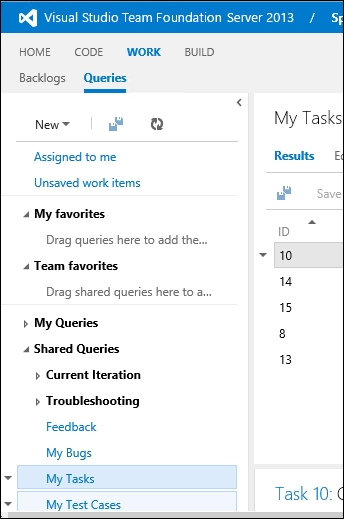
  1. In the team project web portal, expand Shared Query List located on the left-hand side and click on the My Tasks query, as shown in the following screenshot:
    Flat queries
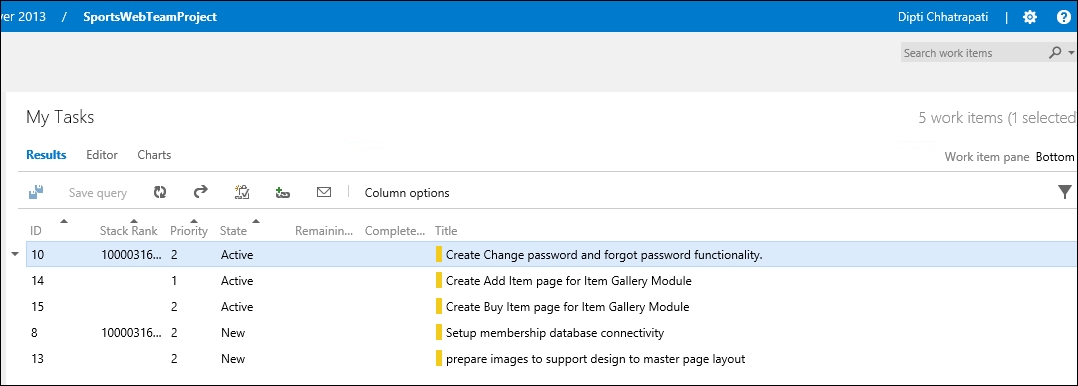
  2. The resulting work items generated by the My Tasks query will be shown in the Work item pane, as shown in the following screenshot:
    Flat queries
  3. As there are now...
CONTINUE READING
83
Tech Concepts
36
Programming languages
73
Tech Tools
Icon Unlimited access to the largest independent learning library in tech of over 8,000 expert-authored tech books and videos.
Icon Innovative learning tools, including AI book assistants, code context explainers, and text-to-speech.
Icon 50+ new titles added per month and exclusive early access to books as they are being written.
Reporting in TFS
notes
bookmark Notes and Bookmarks search Search in title playlist Add to playlist font-size Font size

Change the font size

margin-width Margin width

Change margin width

day-mode Day/Sepia/Night Modes

Change background colour

Close icon Search
Country selected

Close icon Your notes and bookmarks

Confirmation

Modal Close icon
claim successful

Buy this book with your credits?

Modal Close icon
Are you sure you want to buy this book with one of your credits?
Close
YES, BUY

Submit Your Feedback

Modal Close icon
Modal Close icon
Modal Close icon