-
Book Overview & Buying
-
Table Of Contents
Pentaho Data Integration Cookbook - Second Edition - Second Edition
By :
While working with source database systems, developers have to remain constantly vigilant for new system changes as they happen. Utilizing the source metadata that can be found within the database system can help generate SQL statements that remain constantly up-to-date. This will allow for source data to be captured even if the rest of an ETL transformation fails due to the new changes.
In this recipe you will create a dynamic data extracting transformation that will extract data from the books database created earlier in the chapter.
For this recipe you will need the database which can be created and filled by running the script books.sql. This can be found in the code for this chapter.
As the recipe will read metadata from the books database, before proceeding, explore the database's metadata repository to see what is inside. In particular, run these statements and pay attention to the results:
SELECT TABLE_NAME , TABLE_TYPE , ENGINE , VERSION , ROW_FORMAT , TABLE_ROWS , AVG_ROW_LENGTH , DATA_LENGTH FROM information_schema.TABLES WHERE TABLE_SCHEMA = 'books'; +--------------+------------+--------+---------+------------+------------+----------------+-------------+ | TABLE_NAME | TABLE_TYPE | ENGINE | VERSION | ROW_FORMAT | TABLE_ROWS | AVG_ROW_LENGTH | DATA_LENGTH | +--------------+------------+--------+---------+------------+------------+----------------+-------------+ | authors | BASE TABLE | InnoDB | 10 | Compact | 13 | 1260 | 16384 | | books | BASE TABLE | InnoDB | 10 | Compact | 34 | 481 | 16384 | +--------------+------------+--------+---------+------------+------------+----------------+-------------+ 2 rows in set (0.00 sec) SELECT TABLE_NAME , COLUMN_NAME , ORDINAL_POSITION , COLUMN_DEFAULT , IS_NULLABLE , DATA_TYPE FROM information_schema.COLUMNS WHERE TABLE_SCHEMA = 'books'; +--------------+-------------+------------------+----------------+-------------+-----------+ | TABLE_NAME | COLUMN_NAME | ORDINAL_POSITION | COLUMN_DEFAULT | IS_NULLABLE | DATA_TYPE | +--------------+-------------+------------------+----------------+-------------+-----------+ | authors | lastname | 1 | NULL | NO | tinytext | | authors | firstname | 2 | NULL | NO | tinytext | | authors | nationality | 3 | unknown | YES | varchar | | authors | birthyear | 4 | 1900 | YES | int | | authors | id_author | 5 | NULL | NO | char | | books | id_title | 1 | NULL | NO | char | | books | title | 2 | NULL | NO | tinytext | | books | id_author | 3 | NULL | NO | tinytext | | books | price | 4 | 0 | YES | double | | books | genre | 5 | unknown | YES | varchar | +--------------+-------------+------------------+----------------+-------------+-----------+ 10 rows in set (0.00 sec)
The preceding statement is written with the MySQL syntax. Please review and fix it if needed if you are using a different DBMS.
Compare how the data in the information_schema database matches the CREATE DDL statements found in the books.sql file. Notice how the same parameters in the statements used to create the tables translate into the TABLES and COLUMNS tables.
information_schema database.TABLE_NAME and COLUMN_NAME columns from the COLUMNS table, making sure to filter only on the books TABLE_SCHEMA.grouper with type Integer and value of 1. Create a hop from the Table Input step to the Add constants step:
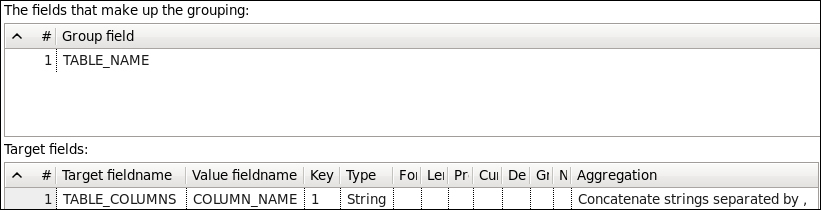
TABLE_NAME. Fill in the Target fields: information like the following:
books database, you should see a record with a comma-separated list of column names.
SELECT ${column_list_par}
FROM ${table_name_par}table_name_par as the file's name. The Text file output step will store whatever data is in the stream without declaring any Fields, so leave the Fields tab empty.column_list_par and table_name_par with the Set Variables step. The Set Variables step should be filled in like the following:

information_schema database. The Job step will be pointing to the job we created previously. Make sure that the Execute for every input row? checkbox is checked under the Advanced tab for the job. Your final job should look similar to the following:
books database.Most databases have a metadata repository that details tables and columns. This can be used to build dynamic queries to extract data for further processing. In this instance, once the books database was created, the database application stored the metadata inside the information_schema database. We then queried that database and used a Row denormaliser step to merge the column details into a single field so that our query would execute properly.
Change the font size
Change margin width
Change background colour