Sign In Start Free Trial
Account

Add to playlist

Create a Playlist

Modal Close icon
You need to login to use this feature.
  • Book Overview & Buying Learning SciPy for Numerical and Scientific Computing Second Edition
  • Table Of Contents Toc
Learning SciPy for Numerical and Scientific Computing Second Edition

Learning SciPy for Numerical and Scientific Computing Second Edition - Second Edition

4.3 (10)
close
close
Learning SciPy for Numerical and Scientific Computing Second Edition

Learning SciPy for Numerical and Scientific Computing Second Edition

4.3 (10)

Overview of this book

This book targets programmers and scientists who have basic Python knowledge and who are keen to perform scientific and numerical computations with SciPy.
Table of Contents (10 chapters)
close
close
9
Index

Scientific visualization

At this point, we would like to introduce you to another resource that we will be using to generate graphs, namely the matplotlib libraries. It may be downloaded from its official web page, http://matplotlib.org/, and installed following the standard Python commands. There is a good online documentation in the official web page, and we encourage the reader to dig deeper than the few commands that we will use in this book. For instance, the excellent monograph Matplotlib for Python Developers, Sandro Tosi, Packt Publishing, provides all that we would need and more. Other plotting libraries are available (commercial or otherwise that aim to very different and specific applications. The degree of sophistication and ease of use of matplotlib makes it one of the best options to generate graphics in scientific computing.

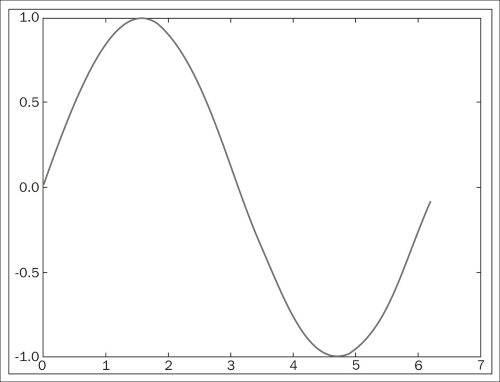
Once installed, it may be imported using import matplotlib. Among all its modules, we will focus on pyplot that provides a comfortable interface with the plotting libraries. For example, if we desire to plot a cycle of the sine function, we could execute the following code snippet:

>>> import numpy
>>> import matplotlib.pyplot as plt
>>> x=numpy.linspace(0,2*numpy.pi,32)
>>> fig = plt.figure()
>>> plt.plot(x, numpy.sin(x))
>>> plt.show()
>>> fig.savefig('sine.png')

We obtain the following plot:

Scientific visualization

Let us explain each command from the previous session. The first two commands are used to import numpy and matplotlib.pyplot as usual. We define an array x of 32 uniformly spaced floating point values from 0 to 2π, and define y to be the array containing the sine of the values from x. The command figure creates space in the memory to store the subsequent plots and puts in place an object of the matplotlib.figure.Figure form. The plt.plot(x, numpy.sin(x)) command creates an object of the matplotlib.lines.Line2D form containing data with the plot of x against numpy.sin(x) together with a set of axes attached to it and labeled according to the ranges of the variables. This object is stored in the previous Figure object and is displayed on the screen via the plt.show()command. The last command in the session, fig.savefig(), saves the Figure object to whatever valid image format we desire (in this case, a Portable Network Graphics (PNG) image). From now on, in any code that deals with matplotlib commands, we will leave the option of showing/saving open.

There are, of course, commands that control the style of axes, aspect ratio between axes, labeling, colors, legends, the possibility of managing several figures at the same time (subplots), and many more features to display all sorts of data. We will be discovering these as we progress with examples throughout the book.

CONTINUE READING
83
Tech Concepts
36
Programming languages
73
Tech Tools
Icon Unlimited access to the largest independent learning library in tech of over 8,000 expert-authored tech books and videos.
Icon Innovative learning tools, including AI book assistants, code context explainers, and text-to-speech.
Icon 50+ new titles added per month and exclusive early access to books as they are being written.
Learning SciPy for Numerical and Scientific Computing Second Edition
notes
bookmark Notes and Bookmarks search Search in title playlist Add to playlist font-size Font size

Change the font size

margin-width Margin width

Change margin width

day-mode Day/Sepia/Night Modes

Change background colour

Close icon Search
Country selected

Close icon Your notes and bookmarks

Confirmation

Modal Close icon
claim successful

Buy this book with your credits?

Modal Close icon
Are you sure you want to buy this book with one of your credits?
Close
YES, BUY

Submit Your Feedback

Modal Close icon
Modal Close icon
Modal Close icon