Sign In Start Free Trial
Account

Add to playlist

Create a Playlist

Modal Close icon
You need to login to use this feature.
  • Book Overview & Buying Mastering Python for Data Science
  • Table Of Contents Toc
Mastering Python for Data Science

Mastering Python for Data Science

By : Samir Madhavan
3.6 (10)
close
close
Mastering Python for Data Science

Mastering Python for Data Science

3.6 (10)
By: Samir Madhavan

Overview of this book

Data science is a relatively new knowledge domain which is used by various organizations to make data driven decisions. Data scientists have to wear various hats to work with data and to derive value from it. The Python programming language, beyond having conquered the scientific community in the last decade, is now an indispensable tool for the data science practitioner and a must-know tool for every aspiring data scientist. Using Python will offer you a fast, reliable, cross-platform, and mature environment for data analysis, machine learning, and algorithmic problem solving. This comprehensive guide helps you move beyond the hype and transcend the theory by providing you with a hands-on, advanced study of data science. Beginning with the essentials of Python in data science, you will learn to manage data and perform linear algebra in Python. You will move on to deriving inferences from the analysis by performing inferential statistics, and mining data to reveal hidden patterns and trends. You will use the matplot library to create high-end visualizations in Python and uncover the fundamentals of machine learning. Next, you will apply the linear regression technique and also learn to apply the logistic regression technique to your applications, before creating recommendation engines with various collaborative filtering algorithms and improving your predictions by applying the ensemble methods. Finally, you will perform K-means clustering, along with an analysis of unstructured data with different text mining techniques and leveraging the power of Python in big data analytics.
Table of Contents (14 chapters)
close
close
7
7. Estimating the Likelihood of Events
13
Index

Data operations

Once the missing data is handled, various operations can be performed on the data.

Aggregation operations

There are a number of aggregation operations, such as average, sum, and so on, which you would like to perform on a numerical field. These are the methods used to perform it:

  • Average: To find out the average number of students in the ELEMENTARY school who are obese, we'll first filter the ELEMENTARY data with the following command:
    >>> data = d[d['GRADE LEVEL'] == 'ELEMENTARY']
    213.41593780369291
    

    Now, we'll find the mean using the following command:

    >>> data['NO. OBESE'].mean()
    

    The elementary grade level data is filtered and stored in the data object. The NO. OBESE column is selected, which contains the number of obese students and using the mean() method, the average is taken out.

  • SUM: To find out the total number of elementary students who are obese across all the school, use the following command:
    >>> data['NO. OBESE'].sum()
    219605.0
    
  • MAX: To get the maximum number of students that are obese in an elementary school, use the following command:
    >>> data['NO. OBESE'].max()
    48843.0
    
  • MIN: To get the minimum number of students that are obese in an elementary school, use the following command:
    >>> data['NO. OBESE'].min()
    5.0
    
  • STD: To get the standard deviation of the number of obese students, use the following command:

    >>> data['NO. OBESE'].std()
    1690.3831128098113
    
  • COUNT: To count the total number of schools with the ELEMENTARY grade in the DELAWARE county, use the following command:
    >>> data = df[(d['GRADE LEVEL'] == 'ELEMENTARY') & (d['COUNTY'] == 'DELAWARE')]
    >>> data['COUNTY'].count()
    19
    

    The table is filtered for the ELEMENTARY grade and the DELAWARE county. Notice that the conditions are enclosed in parentheses. This is to ensure that individual conditions are evaluated and if the parentheses are not provided, then Python will throw an error.

Joins

SQL-like joins can be performed on the DataFrame using pandas. Let's define a lookup DataFrame, which assigns levels to each of the grades using the following command:

>>> grade_lookup = {'GRADE LEVEL': pd.Series(['ELEMENTARY', 'MIDDLE/HIGH', 'MISC']),
               'LEVEL': pd.Series([1, 2, 3])}

>>> grade_lookup = DataFrame(grade_lookup)

Let's take the first five rows of the GRADE data column as an example for performing the joins:

>>> df[['GRADE LEVEL']][0:5]
     GRADE LEVEL
0  DISTRICT TOTAL
1      ELEMENTARY
2     MIDDLE/HIGH
3  DISTRICT TOTAL
4      ELEMENTARY

The inner join

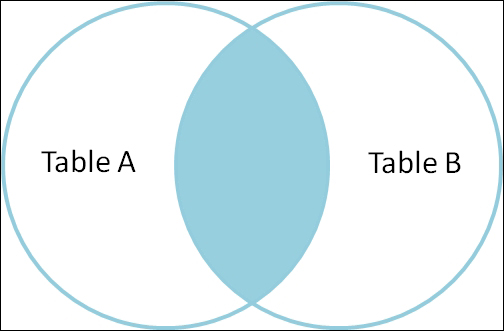
The following image is a sample of an inner join:

The inner join

An inner join can be performed with the following command:

>>> d_sub = df[0:5].join(grade_lookup.set_index(['GRADE LEVEL']), on=['GRADE LEVEL'], how='inner')
>>> d_sub[['GRADE LEVEL', 'LEVEL']]

  GRADE LEVEL  LEVEL
1   ELEMENTARY      1
4   ELEMENTARY      1
2  MIDDLE/HIGH      2

The join takes place with the join() method. The first argument takes the DataFrame on which the lookup takes place. Note that the grade_lookup DataFrame's index is being set by the set_index() method. This is essential for a join, as without it, the join method won't know on which column to join the DataFrame to.

The second argument takes a column of the d DataFrame to join the data. The third argument defines the join as an inner join.

The left outer join

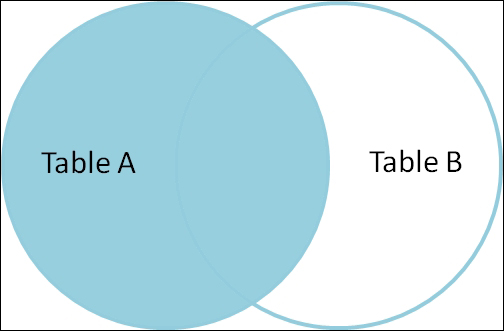
The following image is a sample of a left outer join:

The left outer join

A left outer join can be performed with the following commands:

>>> d_sub = df[0:5].join(grade_lookup.set_index(['GRADE LEVEL']), on=['GRADE LEVEL'], how='left')
>>> d_sub[['GRADE LEVEL', 'LEVEL']]

      GRADE LEVEL  LEVEL
0  DISTRICT TOTAL    NaN
1      ELEMENTARY      1
2     MIDDLE/HIGH      2
3  DISTRICT TOTAL    NaN
4      ELEMENTARY      1

You can notice that DISTRICT TOTAL has missing values for a level column, as the grade_lookup DataFrame does not have an instance for DISTRICT TOTAL.

The full outer join

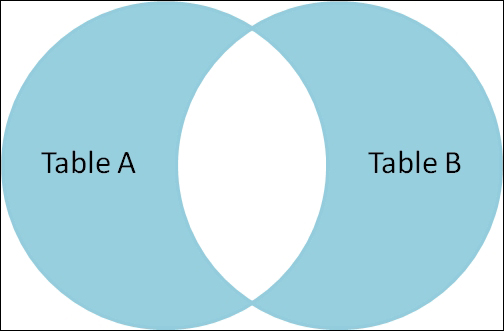
The following image is a sample of a full outer join:

The full outer join

The full outer join can be performed with the following commands:

>>> d_sub = df[0:5].join(grade_lookup.set_index(['GRADE LEVEL']), on=['GRADE LEVEL'], how='outer')
>>> d_sub[['GRADE LEVEL', 'LEVEL']]

     GRADE LEVEL  LEVEL
0  DISTRICT TOTAL    NaN
3  DISTRICT TOTAL    NaN
1      ELEMENTARY      1
4      ELEMENTARY      1
2     MIDDLE/HIGH      2
4            MISC      3

The groupby function

It's easy to do an SQL-like group by operation with pandas. Let's say, if you want to find the sum of the number of obese students in each of the grades, then you can use the following command:

>>> df['NO. OBESE'].groupby(d['GRADE LEVEL']).sum()
GRADE LEVEL
DISTRICT TOTAL    127101
ELEMENTARY         72880
MIDDLE/HIGH        53089

This command chooses the number of obese students column, then uses the group by method to group the data-based group level, and finally, the sum method sums up the number. The same can be achieved by the following function too:

>>> d['NO. OBESE'].groupby(d['GRADE LEVEL']).aggregate(sum)

Here, the aggregate method is utilized. The sum function is passed to obtain the required results.

It's also possible to obtain multiple kinds of aggregations on the same metric. This can be achieved by the following command:

>>> df['NO. OBESE'].groupby(d['GRADE LEVEL']).aggregate([sum, mean, std])
                  sum        mean         std
GRADE LEVEL                                   
DISTRICT TOTAL  127101  128.384848  158.933263
ELEMENTARY       72880   76.958817  100.289578
MIDDLE/HIGH      53089   59.251116   65.905591
CONTINUE READING
83
Tech Concepts
36
Programming languages
73
Tech Tools
Icon Unlimited access to the largest independent learning library in tech of over 8,000 expert-authored tech books and videos.
Icon Innovative learning tools, including AI book assistants, code context explainers, and text-to-speech.
Icon 50+ new titles added per month and exclusive early access to books as they are being written.
Mastering Python for Data Science
notes
bookmark Notes and Bookmarks search Search in title playlist Add to playlist font-size Font size

Change the font size

margin-width Margin width

Change margin width

day-mode Day/Sepia/Night Modes

Change background colour

Close icon Search
Country selected

Close icon Your notes and bookmarks

Confirmation

Modal Close icon
claim successful

Buy this book with your credits?

Modal Close icon
Are you sure you want to buy this book with one of your credits?
Close
YES, BUY

Submit Your Feedback

Modal Close icon
Modal Close icon
Modal Close icon