Sign In Start Free Trial
Account

Add to playlist

Create a Playlist

Modal Close icon
You need to login to use this feature.
  • Book Overview & Buying DynamoDB Cookbook
  • Table Of Contents Toc
DynamoDB Cookbook

DynamoDB Cookbook

By : Tanmay Deshpande
3.9 (8)
close
close
DynamoDB Cookbook

DynamoDB Cookbook

3.9 (8)
By: Tanmay Deshpande

Overview of this book

AWS DynamoDB is an excellent example of a production-ready NoSQL database. In recent years, DynamoDB has been able to attract many customers because of its features like high-availability, reliability and infinite scalability. DynamoDB can be easily integrated with massive data crunching tools like Hadoop /EMR, which is an essential part of this data-driven world and hence it is widely accepted. The cost and time-efficient design makes DynamoDB stand out amongst its peers. The design of DynamoDB is so neat and clean that it has inspired many NoSQL databases to simply follow it. This book will get your hands on some engineering best practices DynamoDB engineers use, which can be used in your day-to-day life to build robust and scalable applications. You will start by operating with DynamoDB tables and learn to manipulate items and manage indexes. You will also discover how to easily integrate applications with other AWS services like EMR, S3, CloudSearch, RedShift etc. A couple of chapters talk in detail about how to use DynamoDB as a backend database and hosting it on AWS ElasticBean. This book will also focus on security measures of DynamoDB as well by providing techniques on data encryption, masking etc. By the end of the book you’ll be adroit in designing web and mobile applications using DynamoDB and host it on cloud.
Table of Contents (12 chapters)
close
close
11
Index

Setting up the Eclipse IDE

Eclipse is an IDE, which is used mostly for Java development. In order to avoid switching screens between Eclipse and your browser, you can simply install the AWS plugin for Eclipse. In this recipe, we are going to see how to set up this plugin, and how to use it to perform various DynamoDB operations.

Getting ready

The first thing you need to do is install Eclipse on your laptop/desktop. The latest version from Eclipse can be downloaded from https://eclipse.org/downloads/. You need to select the Eclipse IDE for Java developers. Simply extract the ZIP file, and you are ready to go.

How to do it…

To install the AWS Explore plugin in Eclipse, we need to perform the following steps:

  1. Open Eclipse, and go to Help | Install New Software.
  2. In the Work with box, type http://aws.amazon.com/eclipse, and press Enter.
  3. Select AWS Toolkit for Eclipse, and install the plugin:
    How to do it…
  4. Once done, it will prompt you to restart Eclipse. On restart, it will give you a popup to enter your AWS Access Key and Secret Key. We have already seen how to get the AWS Access Key and Secret Key for your account. Enter this information, and you are ready to use the AWS Explorer.
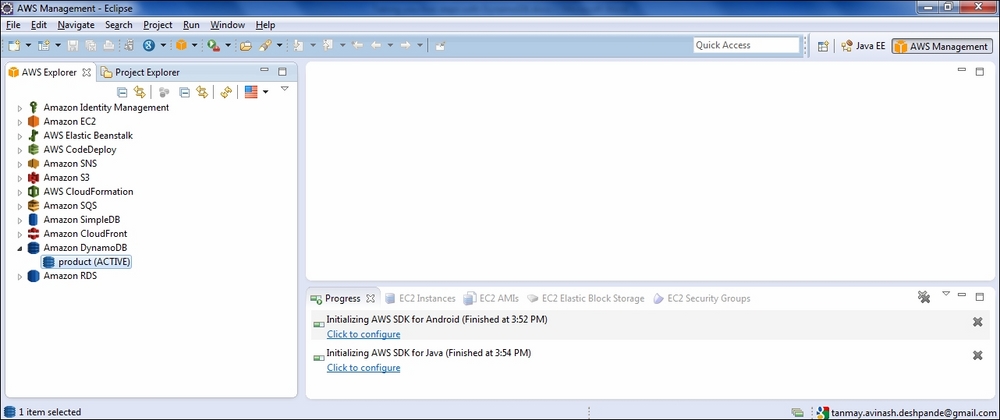
  5. Now, you can open the AWS Explorer. By selecting Amazon DynamoDB, you will be able to see the table that we created earlier:
    How to do it…
  6. Now, we can perform the Scan operation by specifying the conditions. For example, to get all the items of the type book, we can do something like this:
    How to do it…

    Now you can perform the various queries using this AWS Explorer.

How it works…

The AWS Explorer for Eclipse uses the Java SDK internally to make calls to DynamoDB and shows the results to us. It authenticates each call using the Access Key and Secret Key that we provided at the time of configuration.

CONTINUE READING
83
Tech Concepts
36
Programming languages
73
Tech Tools
Icon Unlimited access to the largest independent learning library in tech of over 8,000 expert-authored tech books and videos.
Icon Innovative learning tools, including AI book assistants, code context explainers, and text-to-speech.
Icon 50+ new titles added per month and exclusive early access to books as they are being written.
DynamoDB Cookbook
notes
bookmark Notes and Bookmarks search Search in title playlist Add to playlist font-size Font size

Change the font size

margin-width Margin width

Change margin width

day-mode Day/Sepia/Night Modes

Change background colour

Close icon Search
Country selected

Close icon Your notes and bookmarks

Confirmation

Modal Close icon
claim successful

Buy this book with your credits?

Modal Close icon
Are you sure you want to buy this book with one of your credits?
Close
YES, BUY

Submit Your Feedback

Modal Close icon
Modal Close icon
Modal Close icon