Sign In Start Free Trial
Account

Add to playlist

Create a Playlist

Modal Close icon
You need to login to use this feature.
  • Book Overview & Buying QlikView Essentials
  • Table Of Contents Toc
QlikView Essentials

QlikView Essentials

By : Sinha
4.1 (12)
close
close
QlikView Essentials

QlikView Essentials

4.1 (12)
By: Sinha

Overview of this book

This guide demonstrates just how easy it is to get started with QlikView and create your own BI application. Featuring an introduction to its core features before exploring how to load data and model it, you’ll soon become more confident that you can take full advantage of QlikView’s capabilities.. You will also learn how to use QVD files with QlikView – and how they offer a simpler way of handling data. After digging deeper into data handling, as you learn how to use mapping tables and create a master calendar, you’ll then find out how to get the most from QlikView’s visualization features – vital if you are to use your data insights effectively. From accessible and user friendly dashboards to strategies and best practices for subjecting data to further analysis, you can be confident that you’ll be prepared to get the most out of your data with QlikView. With details on how to finally secure your application and deploy it for a successful integration in your organization, QlikView Essentials underlines exactly why QlikView is becoming more and more popular for businesses that understand the value of data.
Table of Contents (10 chapters)
close
close
9
Index

Crosstable essentials

In your downloaded folder, look at EmployeeSalesTarget.xls. This file is located in C:\QlikViewEssentials\Data.

Crosstable essentials

Some of the properties of this file are as follows:

  1. A file of this format is called a Crosstable. A Crosstable is a special format of data in which some of the fields are displayed in rows and some in columns.
  2. If this table is loaded in QlikView using a regular load statement, it will load each of the fields separately.
    Crosstable essentials
  3. The problem with this kind of structure is that the table can grow very large, if each of the fields is stored separately. Performing aggregation on such a table will be difficult. You have do to Sum(2005) + Sum(2006) … to get the total sales.
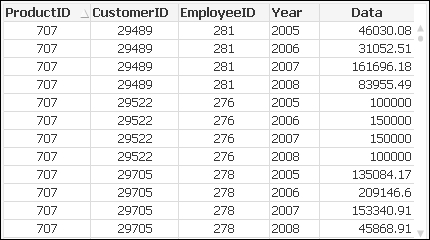
  4. It would be better for QlikView applications to load a table in the following format:
    Crosstable essentials

    In this format, the aggregation of data will be much easier.

  5. Use the cross table prefix to load a cross table in QlikView.
CONTINUE READING
83
Tech Concepts
36
Programming languages
73
Tech Tools
Icon Unlimited access to the largest independent learning library in tech of over 8,000 expert-authored tech books and videos.
Icon Innovative learning tools, including AI book assistants, code context explainers, and text-to-speech.
Icon 50+ new titles added per month and exclusive early access to books as they are being written.
QlikView Essentials
notes
bookmark Notes and Bookmarks search Search in title playlist Add to playlist font-size Font size

Change the font size

margin-width Margin width

Change margin width

day-mode Day/Sepia/Night Modes

Change background colour

Close icon Search
Country selected

Close icon Your notes and bookmarks

Confirmation

Modal Close icon
claim successful

Buy this book with your credits?

Modal Close icon
Are you sure you want to buy this book with one of your credits?
Close
YES, BUY

Submit Your Feedback

Modal Close icon
Modal Close icon
Modal Close icon