Sign In Start Free Trial
Account

Add to playlist

Create a Playlist

Modal Close icon
You need to login to use this feature.
  • Book Overview & Buying OpenCV with Python By Example
  • Table Of Contents Toc
OpenCV with Python By Example

OpenCV with Python By Example

By : Prateek Joshi
3.5 (10)
close
close
OpenCV with Python By Example

OpenCV with Python By Example

3.5 (10)
By: Prateek Joshi

Overview of this book

Computer vision is found everywhere in modern technology. OpenCV for Python enables us to run computer vision algorithms in real time. With the advent of powerful machines, we are getting more processing power to work with. Using this technology, we can seamlessly integrate our computer vision applications into the cloud. Web developers can develop complex applications without having to reinvent the wheel. This book will walk you through all the building blocks needed to build amazing computer vision applications with ease. We start off with applying geometric transformations to images. We then discuss affine and projective transformations and see how we can use them to apply cool geometric effects to photos. We will then cover techniques used for object recognition, 3D reconstruction, stereo imaging, and other computer vision applications. This book will also provide clear examples written in Python to build OpenCV applications. The book starts off with simple beginner’s level tasks such as basic processing and handling images, image mapping, and detecting images. It also covers popular OpenCV libraries with the help of examples. The book is a practical tutorial that covers various examples at different levels, teaching you about the different functions of OpenCV and their actual implementation.
Table of Contents (14 chapters)
close
close
13
Index

Projective transformations

Affine transformations are nice, but they impose certain restrictions. A projective transformation, on the other hand, gives us more freedom. It is also referred to as homography. In order to understand projective transformations, we need to understand how projective geometry works. We basically describe what happens to an image when the point of view is changed. For example, if you are standing right in front of a sheet of paper with a square drawn on it, it will look like a square. Now, if you start tilting that sheet of paper, the square will start looking more and more like a trapezoid. Projective transformations allow us to capture this dynamic in a nice mathematical way. These transformations preserve neither sizes nor angles, but they do preserve incidence and cross-ratio.

Note

You can read more about incidence and cross-ratio at http://en.wikipedia.org/wiki/Incidence_(geometry) and http://en.wikipedia.org/wiki/Cross-ratio.

Now that we know what projective transformations are, let's see if we can extract more information here. We can say that any two images on a given plane are related by a homography. As long as they are in the same plane, we can transform anything into anything else. This has many practical applications such as augmented reality, image rectification, image registration, or the computation of camera motion between two images. Once the camera rotation and translation have been extracted from an estimated homography matrix, this information may be used for navigation, or to insert models of 3D objects into an image or video. This way, they are rendered with the correct perspective and it will look like they were part of the original scene.

Let's go ahead and see how to do this:

import cv2
import numpy as np

img = cv2.imread('images/input.jpg')
rows, cols = img.shape[:2]

src_points = np.float32([[0,0], [cols-1,0], [0,rows-1], [cols-1,rows-1]])
dst_points = np.float32([[0,0], [cols-1,0], [int(0.33*cols),rows-1], [int(0.66*cols),rows-1]]) 
projective_matrix = cv2.getPerspectiveTransform(src_points, dst_points)
img_output = cv2.warpPerspective(img, projective_matrix, (cols,rows))

cv2.imshow('Input', img)
cv2.imshow('Output', img_output)
cv2.waitKey()

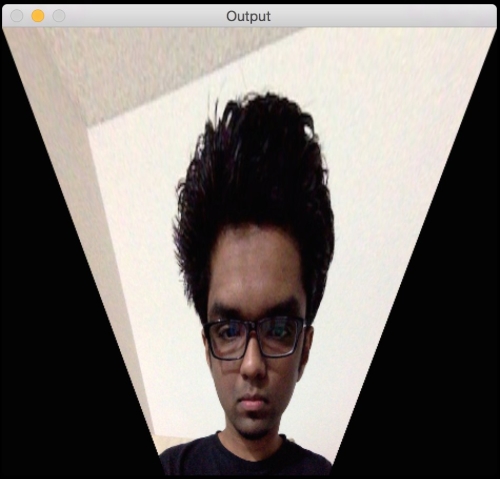
If you run the preceding code, you will see a funny looking output like the following screenshot:

Projective transformations

What just happened?

We can choose four control points in the source image and map them to the destination image. Parallel lines will not remain parallel lines after the transformation. We use a function called getPerspectiveTransform to get the transformation matrix.

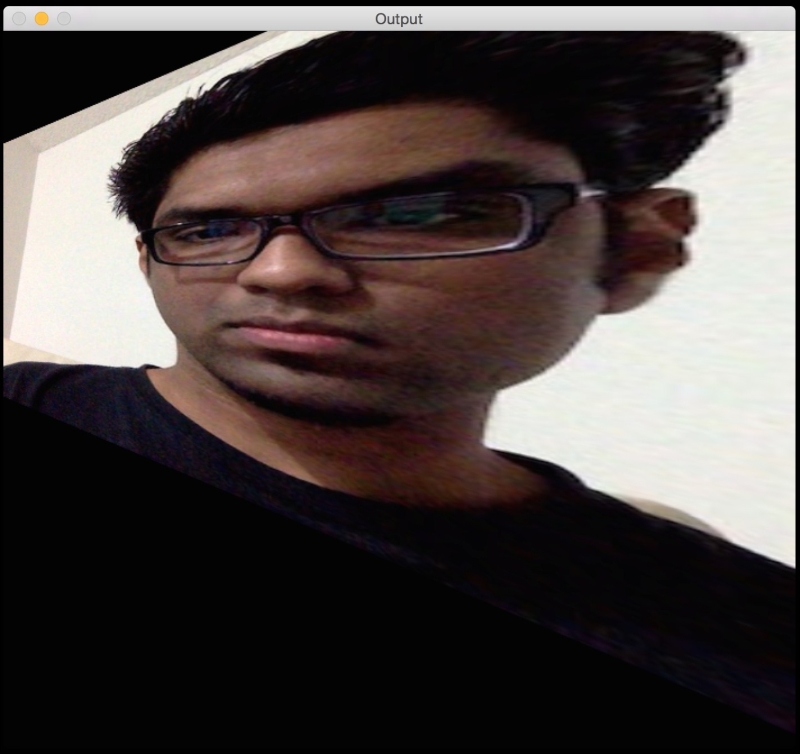
Let's apply a couple of fun effects using projective transformation and see what they look like. All we need to do is change the control points to get different effects.

Here's an example:

What just happened?

The control points are as shown next:

src_points = np.float32([[0,0], [0,rows-1], [cols/2,0], [cols/2,rows-1]])
dst_points = np.float32([[0,100], [0,rows-101], [cols/2,0], [cols/2,rows-1]])

As an exercise, you should map the above points on a plane and see how the points are mapped (just like we did earlier, while discussing Affine Transformations). You will get a good understanding about the mapping system, and you can create your own control points.

CONTINUE READING
83
Tech Concepts
36
Programming languages
73
Tech Tools
Icon Unlimited access to the largest independent learning library in tech of over 8,000 expert-authored tech books and videos.
Icon Innovative learning tools, including AI book assistants, code context explainers, and text-to-speech.
Icon 50+ new titles added per month and exclusive early access to books as they are being written.
OpenCV with Python By Example
notes
bookmark Notes and Bookmarks search Search in title playlist Add to playlist download Download options font-size Font size

Change the font size

margin-width Margin width

Change margin width

day-mode Day/Sepia/Night Modes

Change background colour

Close icon Search
Country selected

Close icon Your notes and bookmarks

Confirmation

Modal Close icon
claim successful

Buy this book with your credits?

Modal Close icon
Are you sure you want to buy this book with one of your credits?
Close
YES, BUY

Submit Your Feedback

Modal Close icon
Modal Close icon
Modal Close icon