Sign In Start Free Trial
Account

Add to playlist

Create a Playlist

Modal Close icon
You need to login to use this feature.
  • Book Overview & Buying Splunk Developer?s Guide
  • Table Of Contents Toc
Splunk Developer?s Guide

Splunk Developer?s Guide

By : Smith
4 (6)
close
close
Splunk Developer?s Guide

Splunk Developer?s Guide

4 (6)
By: Smith

Overview of this book

If you are a Splunk user and want to enter the wonderful world of Splunk application development, then this book is for you. Some experience with Splunk, writing searches, and designing basic dashboards is expected.
Table of Contents (10 chapters)
close
close

App installation

As a Splunk developer, you should be aware of the three methods to install apps. There are advantages and disadvantages to each method, but no required method. It is mostly personal preference as to which method is used by the end user, but, typically, newer Splunk users will use the web interface, while advanced users will use the command line. Let's review those methods, just to keep them fresh in your mind.

Splunk Web

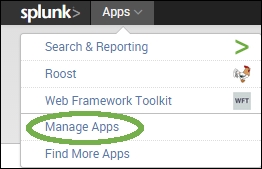
Installing apps via Splunk Web is simple. Once you have downloaded the app from its source, you navigate to the Manage Apps section of Splunk. You will find this at the top-left of Splunk Web, as seen in the following screenshot:

Splunk Web

Once you have clicked on Manage Apps, you will see a button available to install from a file. You can also browse the Splunk app store, using the first button:

Splunk Web

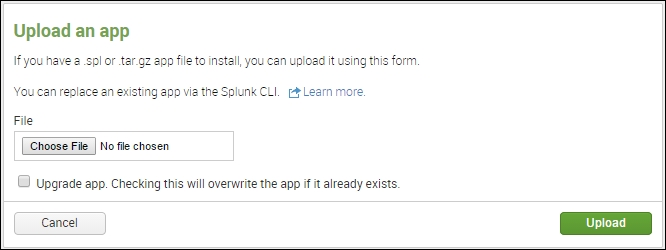
This brings you to a form that you can use to actually install the App. Simply click on the Browse button, select the file you downloaded, check the Update button if this App has already been installed, and then click on Upload. That's it! Splunk takes the App, installs it, and prompts you to restart if needed.

Splunk Web

The Splunk command line

CLI holds a special place in many *nix admin's hearts. It is entirely possible to install Apps via the command line alone. Doing so requires having the following:

  • Access to the physical (or virtual) server
  • Enough permissions to perform CLI commands with Splunk

All commands are going to be executed from $SPLUNK_HOME, which normally defaults to /opt/splunk. Follow these steps to install an App via CLI:

  1. Copy the App file (either a *.tgz or *.spl file) to the filesystem.
  2. Run ./bin/splunk install app <path_to_file>.
  3. Splunk will install the App. You may be prompted to restart, depending on the contents of the App. Index-time configurations require a restart, whereas search-time configurations do not.

Tip

Downloading the example code

You can download the example code files from your account at http://www.packtpub.com for all the Packt Publishing books you have purchased. If you purchased this book elsewhere, you can visit http://www.packtpub.com/support and register to have the files e-mailed directly to you.

Unzipping via the command line

The final methodology is to perform an unzip/untar. If the App was constructed properly, the only steps you need to perform are:

  1. Copy the file to $SPLUNK_HOME/etc/apps.
  2. Change the file extension from .spl to .zip.
  3. Use your favorite utility and unzip the file into the folder.

Note

Caution: This will overwrite any other settings you have configured, including local configurations (if present in the zip). We will cover directory structure in the next chapter.

CONTINUE READING
83
Tech Concepts
36
Programming languages
73
Tech Tools
Icon Unlimited access to the largest independent learning library in tech of over 8,000 expert-authored tech books and videos.
Icon Innovative learning tools, including AI book assistants, code context explainers, and text-to-speech.
Icon 50+ new titles added per month and exclusive early access to books as they are being written.
Splunk Developer?s Guide
notes
bookmark Notes and Bookmarks search Search in title playlist Add to playlist font-size Font size

Change the font size

margin-width Margin width

Change margin width

day-mode Day/Sepia/Night Modes

Change background colour

Close icon Search
Country selected

Close icon Your notes and bookmarks

Confirmation

Modal Close icon
claim successful

Buy this book with your credits?

Modal Close icon
Are you sure you want to buy this book with one of your credits?
Close
YES, BUY

Submit Your Feedback

Modal Close icon
Modal Close icon
Modal Close icon