Sign In Start Free Trial
Account

Add to playlist

Create a Playlist

Modal Close icon
You need to login to use this feature.
  • Book Overview & Buying Learning Couchbase
  • Table Of Contents Toc
Learning Couchbase

Learning Couchbase

By : Henry Potsangbam
close
close
Learning Couchbase

Learning Couchbase

By: Henry Potsangbam

Overview of this book

This book achieves its goal by taking up an end-to-end development structure, right from understanding NOSQL document design to implementing full fledged eCommerce application design using Couchbase as a backend. Starting with the architecture of Couchbase to get you up and running, this book quickly takes you through designing a NoSQL document and implementing highly scalable applications using Java API. You will then be introduced to document design and get to know the various ways to administer Couchbase. Followed by this, learn to store documents using bucket. Moving on, you will then learn to store, retrieve and delete documents using smart client base on Java API. You will then retrieve documents using SQL like syntax call N1QL. Next, you will learn how to write map reduce base views. Finally, you will configure XDCR for disaster recovery and implement an eCommerce application using Couchbase.
Table of Contents (13 chapters)
close
close
11
11. Case Study – An E-Commerce Application
12
Index

Concepts of Couchbase

Let's take a look at some of the concepts of Couchbase next in this section.

Buckets

In RDBMS, we usually encapsulate all relevant data for a particular application in a database namespace. Say, for example, we are developing an e-commerce application. We usually create a database name, e-commerce, which will be used as the logical namespace to store records in a table, such as customer or shopping cart details. It's called a bucket in a Couchbase terminology. So, whenever you want to store any document in a Couchbase cluster, you will be creating a bucket as a logical namespace as a first step. A bucket is an independent virtual container that groups documents logically in a Couchbase cluster, which is equivalent to a database namespace in RDBMS. It can be accessed by various clients in an application. You can also configure features such as security, replication, and so on per bucket. We usually create one database and consolidate all related tables in that namespace in the RDBMS development. Likewise, in Couchbase too, you will usually create one bucket per application and encapsulate all the documents in it.

Views

Views enable indexing and querying by looking inside JSON documents for a key, for ranges of keys, or to aggregate data.

Views are created using incremental MapReduce, which powers indexing. We will discuss this in detail in Chapter 6, Retrieving Documents without Keys Using Views. You can build complex views for your data using the map reduce feature. Views enable us to define materialized views on JSON documents and then query across the dataset.

Note

A materialized view is a database object that contains the result of MapReduce.

Using views, you can define primary, simple secondary (the most common use case), complex secondary, tertiary, and composite indexes, as well as aggregations (reduction). It is developed using MapReduce technology. MapReduce functions are written in JavaScript. You will understand more about MapReduce and views in detail in Chapter 6, Retrieving Documents without Keys Using Views.

Cross Data Center Replication

Cross Data Center Replication (XDCR) is the mechanism provided by Couchbase to replicate documents from one cluster to another. Most of the time, data will be replicated across clusters that are geographically spread out. Usually, when you want to replicate data in a separate data center for disaster recovery or to provide performance by enabling data locality for application, we configure XDCR on a per bucket (per database) basis. When you configure replication across two clusters—say Cluster A is located in Imphal (India) and Cluster B is in Mumbai (India), which are 2,500 kms away from each other—you can specify to replicate only from Cluster A to Cluster B, unidirectional or in both directions, that is, bidirectional. Thus, you are enabling clients to read/write from both the clusters when you enable bidirectional active replication across the clusters. Lastly, you need to remember that this is different from intracluster replication, which occurs within a cluster.

Note

In case of intracluster replication, documents are replicated as a replica for a failover in the other nodes of the same cluster. More details about XDCR will be discussed in Chapter 9, Data Replication and Compaction.

Installation on Windows and Linux environments

Enough of concepts! Let's install Couchbase so that we can get some hands-on experience. We will install in a Windows environment first. You can download the software from www.couchbase.com.

You can download the enterprise or community edition. We will use the Couchbase 64-bit enterprise edition.

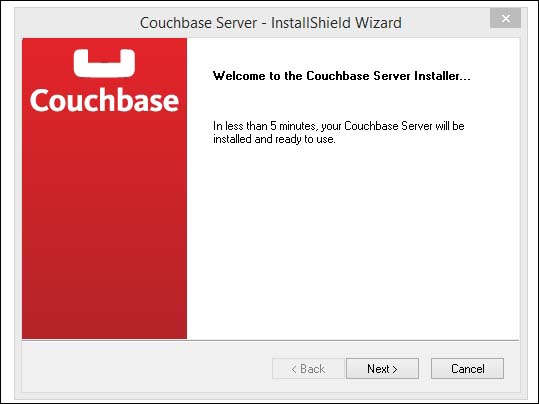
To start the installation wizard, double-click on couchbase-server-enterprise_x86_64_3.0.0.setup.exe. Then, you will see the following window:

Installation on Windows and Linux environments

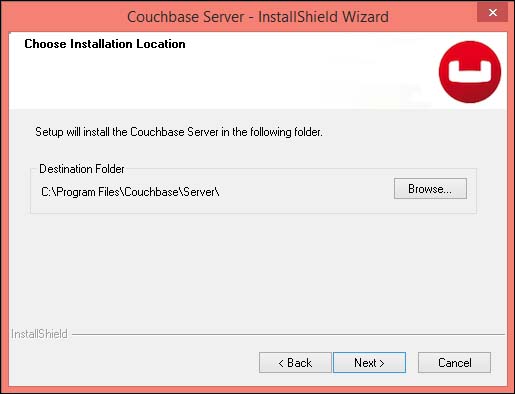
Click on Next. The next screen will allow you to select the folder where you want to install Couchbase. In my case, I chose the default location. You can change the directory location if you want; click on the Browse button for that, as shown here:

Installation on Windows and Linux environments

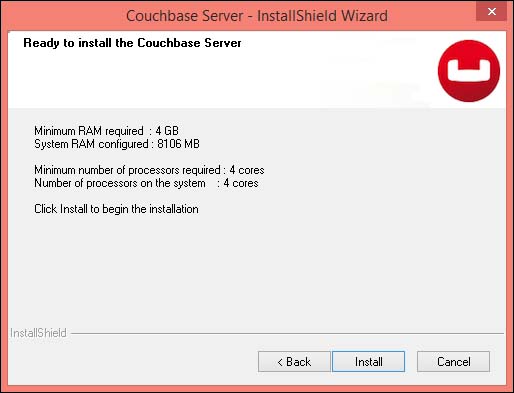
After selecting the installation folder, you can click on Install, as shown in the following screenshot:

Installation on Windows and Linux environments

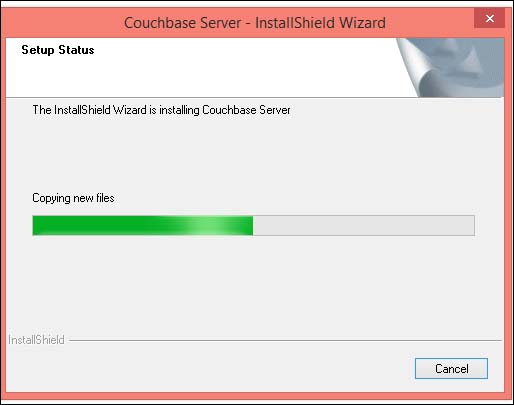
After this, the Couchbase will be installed on your system. You can see the progress of installation in the following screenshot:

Installation on Windows and Linux environments

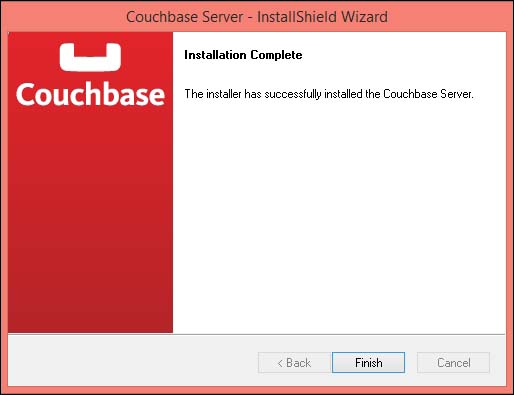
It will take some time to install. After a few minutes, you will see the following success screen. Congratulations!!

Installation on Windows and Linux environments

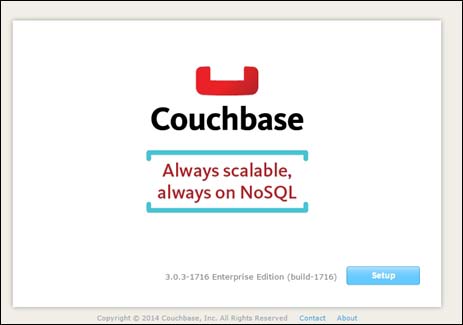
You need to change some settings before you can use Couchbase. You can access the admin console with http://localhost:8091/index.html. The default port is 8091. You can change this if required.

Installation on Windows and Linux environments

The Bucket set up

Click on Setup and you will be able to configure Couchbase for your environment:

Installation on Windows and Linux environments

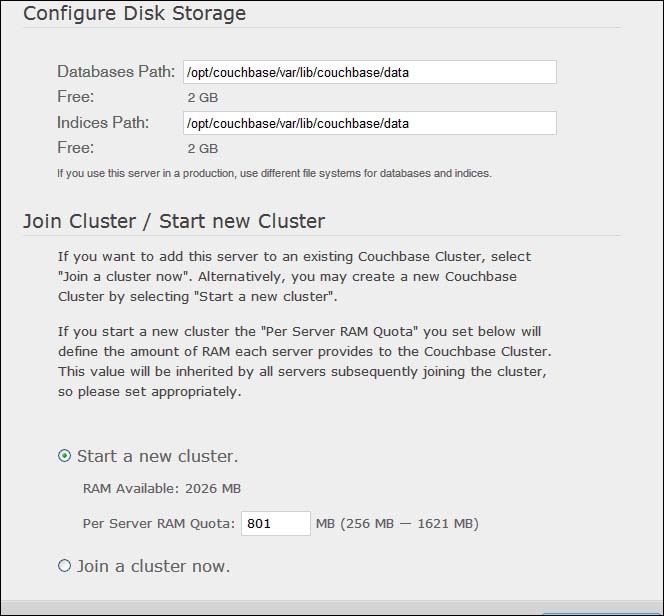
Server configuration

You can select the location of the databases and indexes with this option. Select the options shown in the preceding screenshot. Since it's the first node we are installing and there is no existing cluster, select Start a new cluster and specify 801 MB RAM, which needs to be allocated to the Couchbase cluster by each node. Then, click on Next:

Installation on Windows and Linux environments

Sample bucket

Select both the samples provided along with the Couchbase software. After that, click on Next. On the subsequent page, create a default bucket with the following options:

  • RAM: 601 MB
  • Replicas: 1
Installation on Windows and Linux environments

Default bucket

We will explain all these options of bucket settings when we discuss buckets in Chapter 3, Storing Documents in Couchbase Using Buckets. Keep clicking on the Next button until you get the following screen:

Installation on Windows and Linux environments

Admin credentials

Enter the password, which is root123. It will be used to connect to the Couchbase admin console. Click on Next to finish.

Your Couchbase Server is now running and ready to use!

Couchbase installation on Red Hat, CentOS, and others

You can use the rpm command to install Couchbase on Red Hat or CentOS, as follows. Replace the version with the version number of the package downloaded:

# rpm -ivhcouchbase-server-{version}.rpm

For Ubuntu and Debian, use the following:

#dpkg -i couchbase-server{version007D.deb

After the installation is complete, Couchbase starts automatically. You can perform the initial setup by going to http://localhost:8091.

Startup and shutdown

Couchbase gives you the ability to start up and shut down your cluster. Let's take a look at how to achieve this on Linux and Windows.

On Linux

Downloading the example code

You can download the example code files for all Packt books you have purchased from your account at http://www.packtpub.com. If you purchased this book elsewhere, you can visit http://www.packtpub.com/support and register to have the files e-mailed directly to you.

You can start and stop a Couchbase cluster using the following commands:

#/etc/init.d/couchbase-server start
#/etc/init.d/couchbase-server stop

It assumes that you are executing the preceding commands with the root credentials. For some OS you need to use the sudo command.

On Windows

You can start and stop a cluster using the scripts provided in the following installation folders:

  • C:\Program Files\Couchbase\Server\bin\service_start.bat
  • C:\Program Files\Couchbase\Server\bin\service_stop.bat

Understanding log and configuration files

Couchbase Server creates a number of different log files, depending on the component of the system that produced the error, the level and severity of the problem being reported. All these logs are created in a folder. Whenever there is any issue, you can go to the following paths and check the respective logs. Their specific paths are:

  • In Windows:

    C:\Program Files\Couchbase\Server\var\lib\couchbase\logs

  • In Linux:

    /opt/couchbase/var/lib/couchbase/logs

Some of the logs that need to be looked into when there is an issue are discussed next.

debug

You can find debug-level error messages related to the core server management subsystem. This log does not contain information included in the couchdb, xdcr, and stats logs.

info

You can observe information-level error messages related to the core server management subsystem. This log does not contain information included in the couchdb, xdcr, and stats logs.

error

Any error-level messages for all subsystems of Couchbase excluding xdcr related errors, will be logged in this file.

mapreduce_errors

Errors pertaining to JavaScript and other view-processing errors are reported in the mapreduce_errors file.

reports.log

It logs only the progress report and crash reports for the Erlang process (the language in which the cluster management is being developed), which is a lightweight process that provides built-in support for concurrency, an important requirement for distributed systems.

Mobile development with Couchbase Lite

Couchbase Lite is an embedded JSON database that can work as a standalone server, in a P2P network, or as a remote endpoint for Couchbase Server. It provides native APIs for the iOS and Android platforms. It supports replication with compatible database servers. It also supports low-latency and offline access to data.

The sync server enables Couchbase Server 2.0 and later to act as a replication endpoint for Couchbase Lite. The Sync Gateway runs an HTTP listener process that provides a passive replication endpoint and uses a Couchbase Server bucket as persistent storage for all database documents.

Tip

Downloading the example code

You can download the example code files for all Packt books you have purchased from your account at http://www.packtpub.com. If you purchased this book elsewhere, you can visit http://www.packtpub.com/support and register to have the files e-mailed directly to you.

CONTINUE READING
83
Tech Concepts
36
Programming languages
73
Tech Tools
Icon Unlimited access to the largest independent learning library in tech of over 8,000 expert-authored tech books and videos.
Icon Innovative learning tools, including AI book assistants, code context explainers, and text-to-speech.
Icon 50+ new titles added per month and exclusive early access to books as they are being written.
Learning Couchbase
notes
bookmark Notes and Bookmarks search Search in title playlist Add to playlist font-size Font size

Change the font size

margin-width Margin width

Change margin width

day-mode Day/Sepia/Night Modes

Change background colour

Close icon Search
Country selected

Close icon Your notes and bookmarks

Confirmation

Modal Close icon
claim successful

Buy this book with your credits?

Modal Close icon
Are you sure you want to buy this book with one of your credits?
Close
YES, BUY

Submit Your Feedback

Modal Close icon
Modal Close icon
Modal Close icon