Sign In Start Free Trial
Account

Add to playlist

Create a Playlist

Modal Close icon
You need to login to use this feature.
  • Book Overview & Buying Socket.IO Cookbook
  • Table Of Contents Toc
Socket.IO Cookbook

Socket.IO Cookbook

By : Tyson Cadenhead
3.3 (6)
close
close
Socket.IO Cookbook

Socket.IO Cookbook

3.3 (6)
By: Tyson Cadenhead

Overview of this book

Socket.IO is a JavaScript library that provides you with the ability to implement real-time analytics, binary streaming, instant messaging, and document collaboration. It has two parts: a client-side library that runs in the browser, and a server-side library for node.js. Socket.IO is event-driven and primarily uses the WebSocket protocol that allows us to emit data bi-directionally from the server and the client. Socket.IO This book is a complete resource, covering topics from webSocket security to scaling the server-side of a Socket.IO application and everything in between. This book will provide real-world examples of how secure bi-directional, full-duplex connections that can be created using Socket.IO for different environments. It will also explain how the connection vulnerabilities can be resolved for large numbers of users and huge amounts of data/messages. By the end of the book, you will be a competent Socket.IO developer. With the help of the examples and real-world solutions,you will learn to create fast, scalable, and dynamic real-time apps by creating efficient messaging systems between the server side and the client side using Socket.IO.
Table of Contents (10 chapters)
close
close
9
Index

Debugging on the client

In the earlier versions of Socket.IO, debugging was extremely simple. This was because verbose logging was pushed to the developer console by default. Although this feature was a great way to dig into issues when they occurred, it could also get in the way by logging too much when no debugging was needed.

Now, Socket.IO gives us the ability to toggle certain parts of our logging on and off as needed. In this recipe, we will enable client-side debugging to have a better view of what is happening in our Socket.IO communication.

Getting ready

Starting with version 1.0, Socket.IO doesn't show any logging by default. However, it can easily be turned on. Behind the scenes, it will use an NPM module called debug, which allows logging to navigate to various scopes that can be turned on or off as needed.

How to do it…

To enable debugging on the client side, follow these steps:

  1. On the client side, log settings are persisted through HTML5 localStorage, so you can turn logging on by setting the value of localStorage.debug.
  2. To see all the logging messages, just set the value of debug to an asterisk, as shown in the following code:
    localStorage.debug = '*';
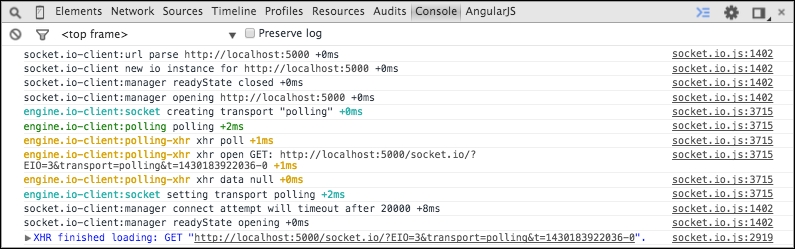
  3. Now that robust logging is turned on, you can open your developer tools and see a rich array of messages that details what is happening under the hood:
    How to do it…

How it works…

The localStorage object in the browser is an object with key/value pairs that is maintained when you refresh the page or leave it entirely. It is useful for persisting data on the client side in modern browsers.

Socket.IO uses the debug NPM module. This views the localStorage key to determine the logging level to be displayed in the browser. The fact that the debugging level is set in localStorage can be very useful because you can set a debugging type anywhere even in production, and it will only log on to your machine. Also, you will be able to refresh the page and see the Socket.IO logging from the initial page load, which can be really handy for debugging events that occur earlier on the page life cycle.

There's more…

Not only can you set the logging to show everything, you can also listen for only certain log types by setting them up in localStorage. For example, if you are only interested in XHR requests, you can ask to only see messages in the engine.io-client:polling-xhr namespace with the following code:

localStorage.debug = 'engine.io-client:polling-xhr';

You can also set multiple log types by separating them with a comma, as shown in the following code:

localStorage.debug = 'engine.io-client:polling, engine.io-client:socket';

See also

The following recipe, Debugging on the server.

CONTINUE READING
83
Tech Concepts
36
Programming languages
73
Tech Tools
Icon Unlimited access to the largest independent learning library in tech of over 8,000 expert-authored tech books and videos.
Icon Innovative learning tools, including AI book assistants, code context explainers, and text-to-speech.
Icon 50+ new titles added per month and exclusive early access to books as they are being written.
Socket.IO Cookbook
notes
bookmark Notes and Bookmarks search Search in title playlist Add to playlist font-size Font size

Change the font size

margin-width Margin width

Change margin width

day-mode Day/Sepia/Night Modes

Change background colour

Close icon Search
Country selected

Close icon Your notes and bookmarks

Confirmation

Modal Close icon
claim successful

Buy this book with your credits?

Modal Close icon
Are you sure you want to buy this book with one of your credits?
Close
YES, BUY

Submit Your Feedback

Modal Close icon
Modal Close icon
Modal Close icon