Sign In Start Free Trial
Account

Add to playlist

Create a Playlist

Modal Close icon
You need to login to use this feature.
  • Book Overview & Buying Splunk Developer's Guide
  • Table Of Contents Toc
Splunk Developer's Guide

Splunk Developer's Guide - Second Edition

By : Marco Scala, Kyle Smith
3.6 (5)
close
close
Splunk Developer's Guide

Splunk Developer's Guide

3.6 (5)
By: Marco Scala, Kyle Smith

Overview of this book

Splunk provides a platform that allows you to search data stored on a machine, analyze it, and visualize the analyzed data to make informed decisions. The adoption of Splunk in enterprises is huge, and it has a wide range of customers right from Adobe to Dominos. Using the Splunk platform as a user is one thing, but customizing this platform and creating applications specific to your needs takes more than basic knowledge of the platform. This book will dive into developing Splunk applications that cater to your needs of making sense of data and will let you visualize this data with the help of stunning dashboards. This book includes everything on developing a full-fledged Splunk application?right from designing to implementing to publishing. We will design the fundamentals to build a Splunk application and then move on to creating one. During the course of the book, we will cover application data, objects, permissions, and more. After this, we will show you how to enhance the application, including branding, workflows, and enriched data. Views, dashboards, and web frameworks are also covered. This book will showcase everything new in the latest version of Splunk?including the latest data models, alert actions, XML forms, various dashboard enhancements, and visualization options (with D3). Finally, we take a look at the latest Splunk cloud applications, advanced integrations, and development as per the latest release.
Table of Contents (10 chapters)
close
close
9
Index

Installing Apps

As a Splunk developer, you should be aware of the three methods to install Apps. There are advantages and disadvantages to each method, but no required method. It is mostly personal preference as to which method is used by the end user, but, typically, newer Splunk users will use the Web interface, while advanced users will use the command line. Let's review those methods, just to keep them fresh in your mind.

Splunk Web

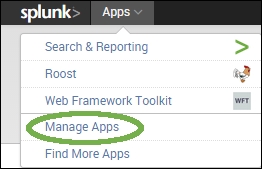
Installing Apps via Splunk Web is simple. Once you have downloaded the App from its source, you navigate to the Manage Apps section of Splunk. You will find this at the top-left of Splunk Web, as shown in the following screenshot:

Splunk Web

Once you have clicked on Manage Apps, you will see a button to install the app from a file. You can also browse the Splunk App store, using the first button:

Splunk Web

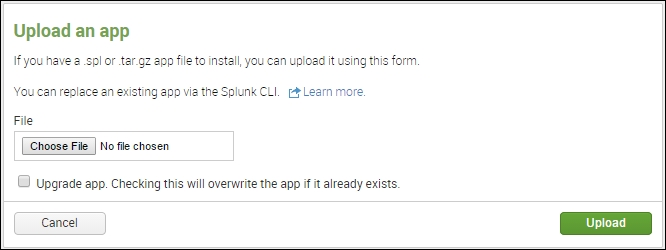
This brings you to a form that you can use to actually install the App. Simply click on the Browse button, select the file you downloaded, check the Upgrade button if this App has already been installed, and then click on Upload. That's it! Splunk takes the App, installs it, and prompts to restart if needed:

Splunk Web

The Splunk command line

CLI holds a special place in many *nix admins' hearts. It is entirely possible to install Apps via the command line alone. Doing so requires having the following: access to the physical (or virtual) server and enough permissions to perform CLI commands with Splunk. All commands are going to be executed from $SPLUNK_HOME, which normally defaults to /opt/splunk. Follow these steps to install an App via CLI:

  1. Copy the App file (either a *.tgz or *.spl file) to the filesystem.
  2. Run the ./bin/splunk install app <path_to_file> command.

Splunk will install the App. You may be prompted to restart, depending on the contents of the App. Index-time configurations require a restart, whereas search-time configurations do not.

Unzipping using the command line

The final methodology is to perform an unzip/untar. If the App was constructed properly, the only steps you need to perform are as follows:

  1. Copy the file to $SPLUNK_HOME/etc/apps.
  2. Change the file extension from .spl to .zip.
  3. Use your favorite utility and unzip the file into the folder.

    Note

    Caution! This will overwrite any other settings you have configured, including local configurations (if present in the zip file). We will cover directory structure in the next chapter.

Tip

Downloading the example code

You can download the example code files from your account at http://www.packtpub.com for all the Packt Publishing books you have purchased. If you purchased this book elsewhere, you can visit http://www.packtpub.com/support and register to have the files e-mailed directly to you.

CONTINUE READING
83
Tech Concepts
36
Programming languages
73
Tech Tools
Icon Unlimited access to the largest independent learning library in tech of over 8,000 expert-authored tech books and videos.
Icon Innovative learning tools, including AI book assistants, code context explainers, and text-to-speech.
Icon 50+ new titles added per month and exclusive early access to books as they are being written.
Splunk Developer's Guide
notes
bookmark Notes and Bookmarks search Search in title playlist Add to playlist font-size Font size

Change the font size

margin-width Margin width

Change margin width

day-mode Day/Sepia/Night Modes

Change background colour

Close icon Search
Country selected

Close icon Your notes and bookmarks

Confirmation

Modal Close icon
claim successful

Buy this book with your credits?

Modal Close icon
Are you sure you want to buy this book with one of your credits?
Close
YES, BUY

Submit Your Feedback

Modal Close icon
Modal Close icon
Modal Close icon