Sign In Start Free Trial
Account

Add to playlist

Create a Playlist

Modal Close icon
You need to login to use this feature.
  • Book Overview & Buying Mastering Data Visualization with Microsoft Visio Professional 2016
  • Table Of Contents Toc
Mastering Data Visualization with Microsoft Visio Professional 2016

Mastering Data Visualization with Microsoft Visio Professional 2016

By : David Parker
4.2 (6)
close
close
Mastering Data Visualization with Microsoft Visio Professional 2016

Mastering Data Visualization with Microsoft Visio Professional 2016

4.2 (6)
By: David Parker

Overview of this book

Microsoft Visio Professional is a data visualization application that is used by many different market sectors and many different departments to represent information visually, from network infrastructure to organization charts, from process diagrams to office layouts. Starting off with a brief introduction to Visio Professional 2016 and then moving on to data storage, linking data to shapes, and working with SQL Server to create a solid foundation. Then we’ll cover topics such as refreshing data, working with geographical data, working with various graphics, and diagrams, and more. Finally, you’ll find out how to deploy custom stencils, templates, and code.
Table of Contents (13 chapters)
close
close
12
Index

Understanding the Graphic Item types


A Data Graphics is a collection of graphic items with specific configurations. The graphic items are each one of four types, Text Callout, Icon Set, Data Bar, or Color By Value. There can be multiple instances of the first three types simultaneously, but there can be only one active Color By Value.

Using Text Callouts

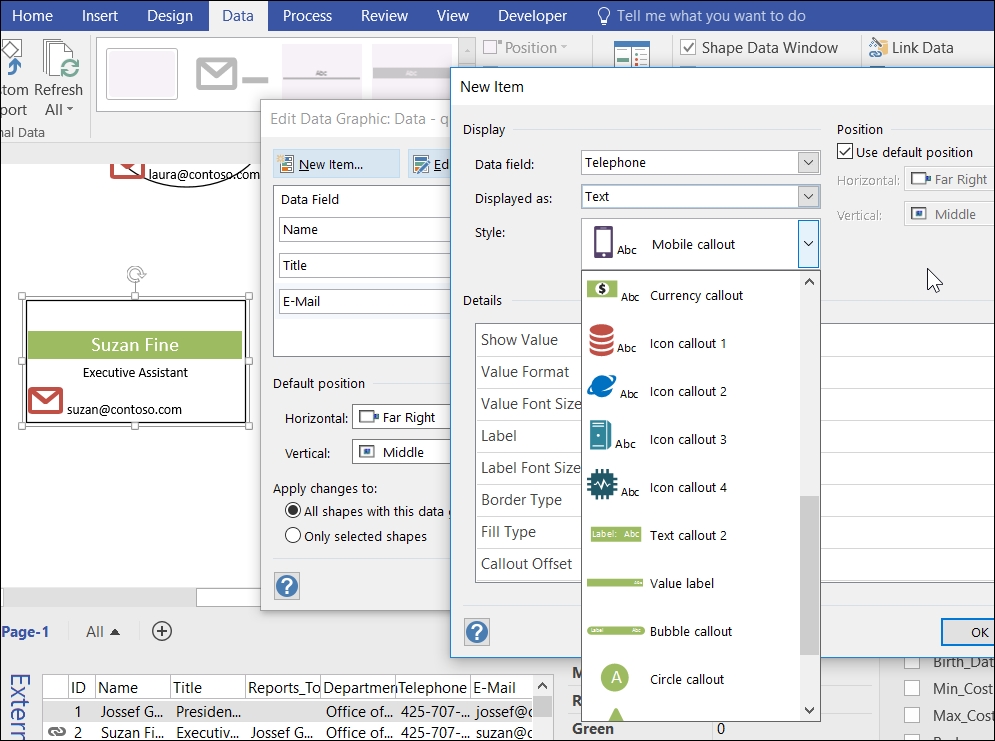
Visio 2016 introduced some new Text Callouts that include an icon along with the text. This has caused a new setting to be added called Show Value, which gives the option to make the text value invisible. There are a number of these new styles available, as seen in the following screenshot:

There are a number of configuration settings available for Text Callouts; they are listed in the following table:

Setting

Comment

Show Value

Select from...

CONTINUE READING
83
Tech Concepts
36
Programming languages
73
Tech Tools
Icon Unlimited access to the largest independent learning library in tech of over 8,000 expert-authored tech books and videos.
Icon Innovative learning tools, including AI book assistants, code context explainers, and text-to-speech.
Icon 50+ new titles added per month and exclusive early access to books as they are being written.
Mastering Data Visualization with Microsoft Visio Professional 2016
notes
bookmark Notes and Bookmarks search Search in title playlist Add to playlist download Download options font-size Font size

Change the font size

margin-width Margin width

Change margin width

day-mode Day/Sepia/Night Modes

Change background colour

Close icon Search
Country selected

Close icon Your notes and bookmarks

Confirmation

Modal Close icon
claim successful

Buy this book with your credits?

Modal Close icon
Are you sure you want to buy this book with one of your credits?
Close
YES, BUY

Submit Your Feedback

Modal Close icon
Modal Close icon
Modal Close icon