Sign In Start Free Trial
Account

Add to playlist

Create a Playlist

Modal Close icon
You need to login to use this feature.
  • Book Overview & Buying Computer Vision for the Web
  • Table Of Contents Toc
Computer Vision for the Web

Computer Vision for the Web

By : Akhmadeev
3.3 (4)
close
close
Computer Vision for the Web

Computer Vision for the Web

3.3 (4)
By: Akhmadeev

Overview of this book

This book will give you an insight into controlling your applications with gestures and head motion and readying them for the web. Packed with real-world tasks, it begins with a walkthrough of the basic concepts of Computer Vision that the JavaScript world offers us, and you’ll implement various powerful algorithms in your own online application. Then, we move on to a comprehensive analysis of JavaScript functions and their applications. Furthermore, the book will show you how to implement filters and image segmentation, and use tracking.js and jsfeat libraries to convert your browser into Photoshop. Subjects such as object and custom detection, feature extraction, and object matching are covered to help you find an object in a photo. You will see how a complex object such as a face can be recognized by a browser as you move toward the end of the book. Finally, you will focus on algorithms to create a human interface. By the end of this book, you will be familiarized with the application of complex Computer Vision algorithms to develop your own applications, without spending much time learning sophisticated theory.
Table of Contents (8 chapters)
close
close

Advanced image processing

We talked about filters a lot, but they usually require only some sort of a matrix kernel and that is it. If you think that there should be more cool stuff in image filtering, you are totally right! First, we will see how to apply edge detection and how it works. In the final part, we will review the histogram equalization algorithm, which you probably use a lot if you have Photoshop.

The Canny edge detector

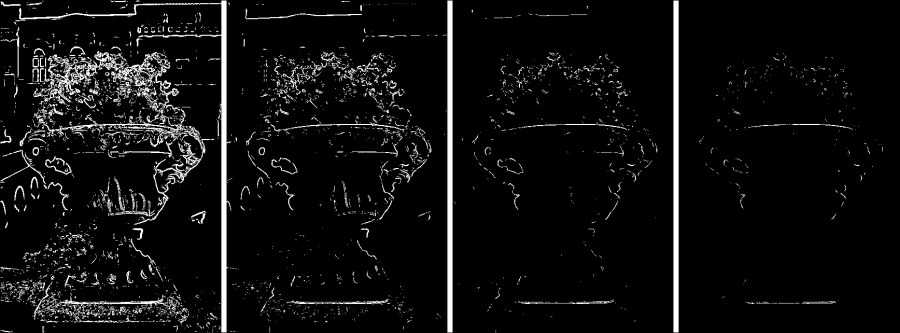
Let's be curious; what if we threshold an image after the Sobel filter? Thresholding is done by iterating over all pixels of a grayscale image and checking whether the value exceeds the threshold value:

for (var i = 0; i < arr.length; i++)
    arr[i] = arr[i] > threshold ? 255 : 0;

This is what the threshold looks like. Just set the value to 255 if it is higher than the threshold and to 0 when it is not.

Here are several examples of different thresholds, each image having a higher threshold value than the previous:

The Canny edge detector

See? The higher the threshold we set...

CONTINUE READING
83
Tech Concepts
36
Programming languages
73
Tech Tools
Icon Unlimited access to the largest independent learning library in tech of over 8,000 expert-authored tech books and videos.
Icon Innovative learning tools, including AI book assistants, code context explainers, and text-to-speech.
Icon 50+ new titles added per month and exclusive early access to books as they are being written.
Computer Vision for the Web
notes
bookmark Notes and Bookmarks search Search in title playlist Add to playlist font-size Font size

Change the font size

margin-width Margin width

Change margin width

day-mode Day/Sepia/Night Modes

Change background colour

Close icon Search
Country selected

Close icon Your notes and bookmarks

Confirmation

Modal Close icon
claim successful

Buy this book with your credits?

Modal Close icon
Are you sure you want to buy this book with one of your credits?
Close
YES, BUY

Submit Your Feedback

Modal Close icon
Modal Close icon
Modal Close icon