Sign In Start Free Trial
Account

Add to playlist

Create a Playlist

Modal Close icon
You need to login to use this feature.
  • Book Overview & Buying R Data Mining
  • Table Of Contents Toc
R Data Mining

R Data Mining

By : Andrea Cirillo
5 (2)
close
close
R Data Mining

R Data Mining

5 (2)
By: Andrea Cirillo

Overview of this book

R is widely used to leverage data mining techniques across many different industries, including finance, medicine, scientific research, and more. This book will empower you to produce and present impressive analyses from data, by selecting and implementing the appropriate data mining techniques in R. It will let you gain these powerful skills while immersing in a one of a kind data mining crime case, where you will be requested to help resolving a real fraud case affecting a commercial company, by the mean of both basic and advanced data mining techniques. While moving along the plot of the story you will effectively learn and practice on real data the various R packages commonly employed for this kind of tasks. You will also get the chance of apply some of the most popular and effective data mining models and algos, from the basic multiple linear regression to the most advanced Support Vector Machines. Unlike other data mining learning instruments, this book will effectively expose you the theory behind these models, their relevant assumptions and when they can be applied to the data you are facing. By the end of the book you will hold a new and powerful toolbox of instruments, exactly knowing when and how to employ each of them to solve your data mining problems and get the most out of your data. Finally, to let you maximize the exposure to the concepts described and the learning process, the book comes packed with a reproducible bundle of commented R scripts and a practical set of data mining models cheat sheets.
Table of Contents (16 chapters)
close
close
14
Epilogue

Installing R and writing R code

Now that you know why it is worth learning R as a language for data analysis, let's have a look at how to get up and running with R coding. First of all, let's have a bit of clarity—installing R is different from installing an integrated platform on which to write and run R code. Here, you will learn both of these and the differences between them. 

Downloading R

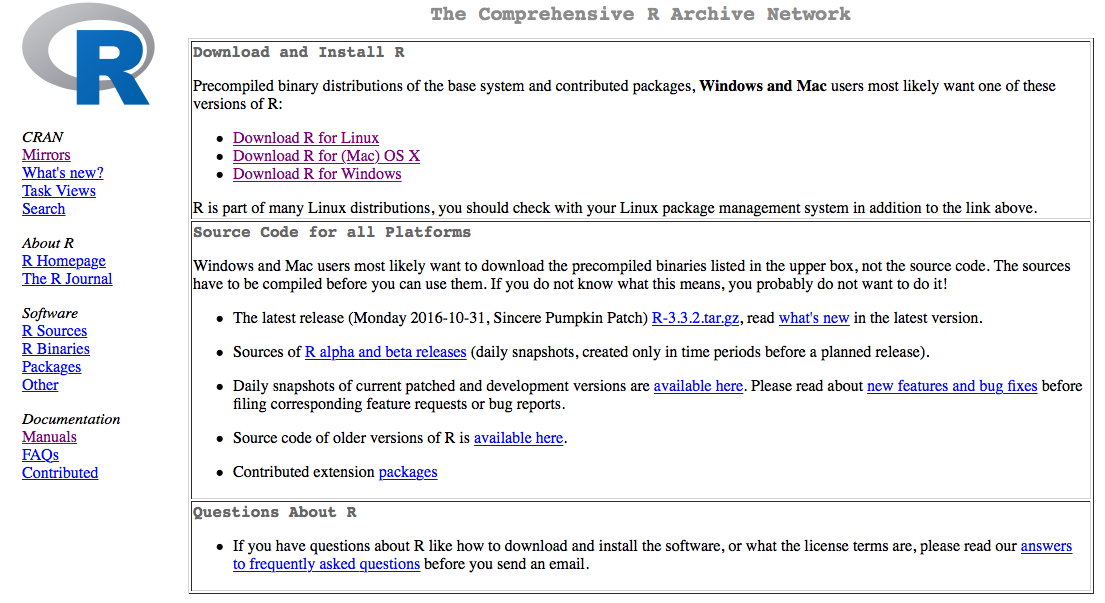
Installing R means installing the R language interpreter on your computer. This will teach your computer how to execute R commands and R scripts, marked with the .R file extension. The most up-to-date release of the R language is hosted on the official R project server, reachable at https://cran.r-project.org.

Once you have surfed the website, you will have to locate the proper download link, that is, the link to the R version appropriate for your platform. You will have these three choices:

R installation for Windows and macOS

 For macOS and Windows, you will follow a similar workflow:

  1. Download the files bundle you will be pointed to from the platform-related page.
  2. Within the bundle, locate the appropriate installer:
    • The one for Windows will be named something like R-3.3.2-win.exe
    • The one for macOS will be similar to R-3.3.2.pkg
  3. Execute that installer and wait for the installation process to complete:

Once you are done with this procedure, R will be installed on your platform and you will be ready to employ it. If you are a Linux user, things will look a little different.

R installation for Linux OS

The most convenient choice, if you are a Linux user, is to install the R base version directly from your command line. This is actually a straightforward procedure that only requires you to run the following commands on your Terminal:

sudo apt-get update
sudo apt-get install r-base

This will likely result in the Terminal asking you for your machine administrator password, which is strictly required to perform commands as a superuser (that is what sudo stands for).

Main components of a base R installation

You may be wondering what you get with the installation you just performed, and that is what we are going to look at here. First of all, the base R version comes with a proper interpreter of the most updated version of the R software. This means, if you recall what we learned in the What is R? section, that after performing your installation, the computer will be able to read R code, parse it, and execute instructions composed of parsed code. To get a feel for this, try the following code on your OS command line, choosing the appropriate one:

  • On Windows OS (on PowerShell):
echo "print('hello world')" >> new_script.R
Rscript.exe new_script.R
  • On macOS or Linux OS:
R
print('hello world')

Both of these should result in the evergreen 'hello world' output.

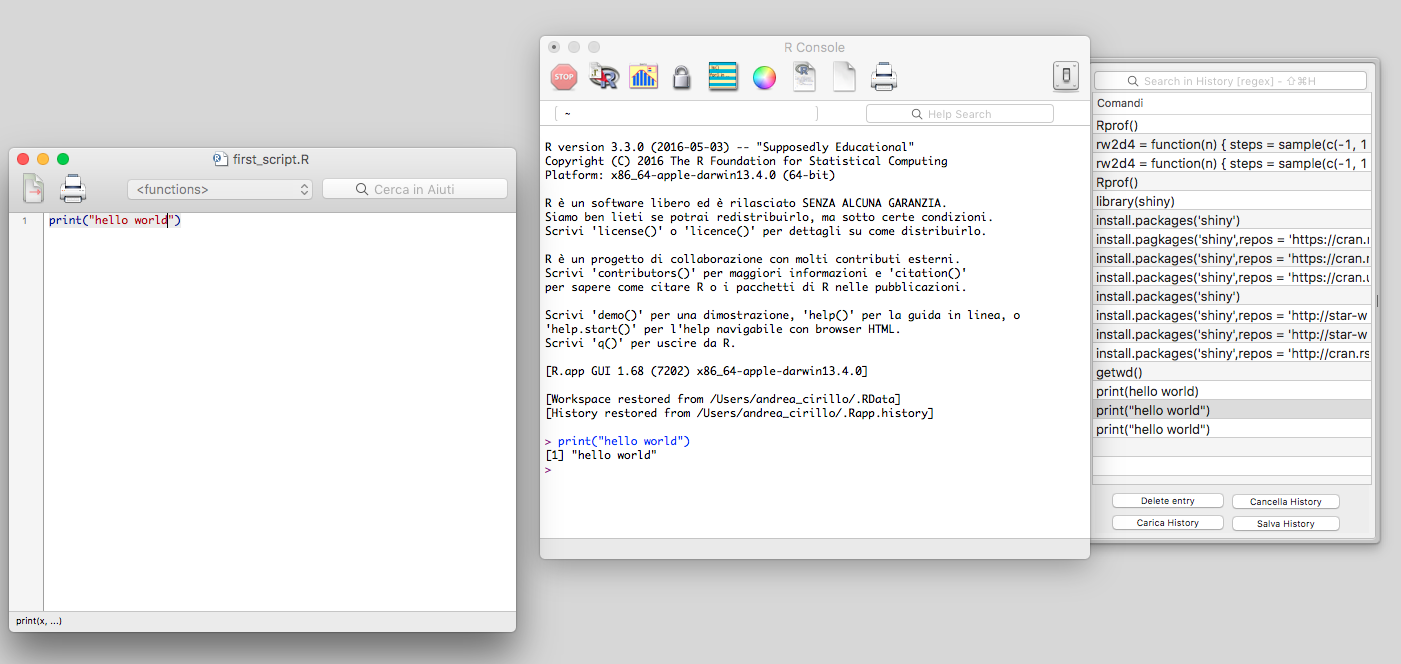
Apart from the interpreter, the R language base version also comes packed with a very basic platform for the development and execution of R code, which is mainly composed of:

  • An R console to execute R code and observe the results of the execution
  • An R script text editor to write down the R code and subsequently save it as standalone scripts (the ones with the .R file extension)
  • Additional utilities, such as functions to import data, install additional packages, and navigate your console history:

This was the way R code was produced and consumed by the vast majority of the R community for a long time. Nowadays, even though it runs perfectly and is regularly updated, this platform tends to appear one step behind the available alternatives we are going to explore in the next section.

CONTINUE READING
83
Tech Concepts
36
Programming languages
73
Tech Tools
Icon Unlimited access to the largest independent learning library in tech of over 8,000 expert-authored tech books and videos.
Icon Innovative learning tools, including AI book assistants, code context explainers, and text-to-speech.
Icon 50+ new titles added per month and exclusive early access to books as they are being written.
R Data Mining
notes
bookmark Notes and Bookmarks search Search in title playlist Add to playlist download Download options font-size Font size

Change the font size

margin-width Margin width

Change margin width

day-mode Day/Sepia/Night Modes

Change background colour

Close icon Search
Country selected

Close icon Your notes and bookmarks

Confirmation

Modal Close icon
claim successful

Buy this book with your credits?

Modal Close icon
Are you sure you want to buy this book with one of your credits?
Close
YES, BUY

Submit Your Feedback

Modal Close icon
Modal Close icon
Modal Close icon