
Sign In Start Free Trial
Account

Add to playlist

Create a Playlist

Modal Close icon
You need to login to use this feature.
  • Book Overview & Buying Frank Kane's Taming Big Data with Apache Spark and Python
  • Table Of Contents Toc
Frank Kane's Taming Big Data with Apache Spark and Python

Frank Kane's Taming Big Data with Apache Spark and Python

By : Frank Kane
3.8 (11)
close
close
Frank Kane's Taming Big Data with Apache Spark and Python

Frank Kane's Taming Big Data with Apache Spark and Python

3.8 (11)
By: Frank Kane

Overview of this book

Frank Kane’s Taming Big Data with Apache Spark and Python is your companion to learning Apache Spark in a hands-on manner. Frank will start you off by teaching you how to set up Spark on a single system or on a cluster, and you’ll soon move on to analyzing large data sets using Spark RDD, and developing and running effective Spark jobs quickly using Python. Apache Spark has emerged as the next big thing in the Big Data domain – quickly rising from an ascending technology to an established superstar in just a matter of years. Spark allows you to quickly extract actionable insights from large amounts of data, on a real-time basis, making it an essential tool in many modern businesses. Frank has packed this book with over 15 interactive, fun-filled examples relevant to the real world, and he will empower you to understand the Spark ecosystem and implement production-grade real-time Spark projects with ease.
Table of Contents (8 chapters)
close
close
7
Where to Go From Here? – Learning More About Spark and Data Science

Preface

We will do some really quick housekeeping here, just so you know where to put all the stuff for this book. First, I want you to go to your hard drive, create a new folder called SparkCourse, and put it in a place where you're going to remember it is:
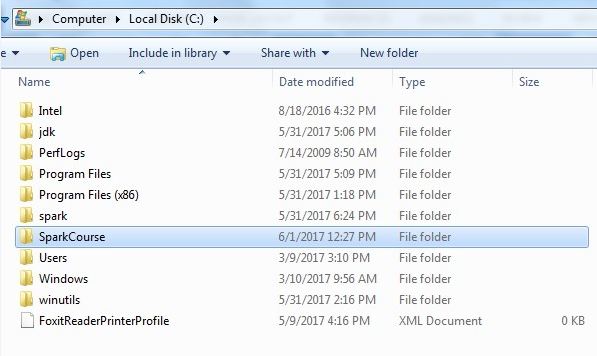
For me, I put that in my C drive in a folder called SparkCourse. This is where you're going to put everything for this book. As you go through the individual sections of this book, you'll see that there are resources provided for each one. There can be different kinds of resources, files, and downloads. When you download them, make sure you put them in this folder that you have created. This is the ultimate destination of everything you're going to download for this book, as you can see in my SparkCourse folder, shown in the following screenshot; you'll just accumulate all this stuff over time as you work your way through it:
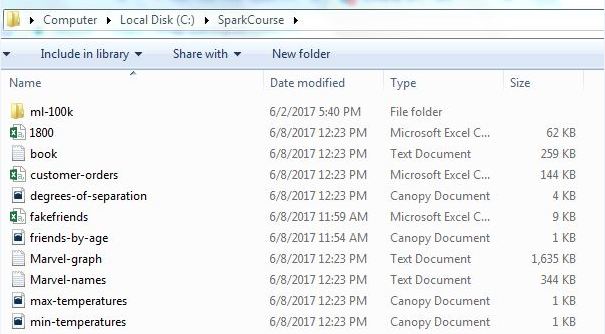

So, remember where you put it all, you might need to refer to these files by their path, in this case, C:\SparkCourse. Just make sure you download them to a consistent place and you should be good to go. Also, be cognizant of the differences in file paths between operating systems. If you're on Mac or Linux, you're not going to have a C drive; you'll just have a slash and the full path name. Capitalization might be important, while it's not in Windows. Using forward slashes instead of backslashes in paths is another difference between other operating systems and Windows. So if you are using something other than Windows, just remember these differences, don't let them trip you up. If you see a path to a file and a script, make sure you adjust it accordingly to make sense of where you put these files and what your operating system is.

CONTINUE READING
83
Tech Concepts
36
Programming languages
73
Tech Tools
Icon Unlimited access to the largest independent learning library in tech of over 8,000 expert-authored tech books and videos.
Icon Innovative learning tools, including AI book assistants, code context explainers, and text-to-speech.
Icon 50+ new titles added per month and exclusive early access to books as they are being written.
Frank Kane's Taming Big Data with Apache Spark and Python
notes
bookmark Notes and Bookmarks search Search in title playlist Add to playlist download Download options font-size Font size

Change the font size

margin-width Margin width

Change margin width

day-mode Day/Sepia/Night Modes

Change background colour

Close icon Search
Country selected

Close icon Your notes and bookmarks

Confirmation

Modal Close icon
claim successful

Buy this book with your credits?

Modal Close icon
Are you sure you want to buy this book with one of your credits?
Close
YES, BUY

Submit Your Feedback

Modal Close icon
Modal Close icon
Modal Close icon