-
Book Overview & Buying
-
Table Of Contents
Machine Learning with Amazon SageMaker Cookbook
By :
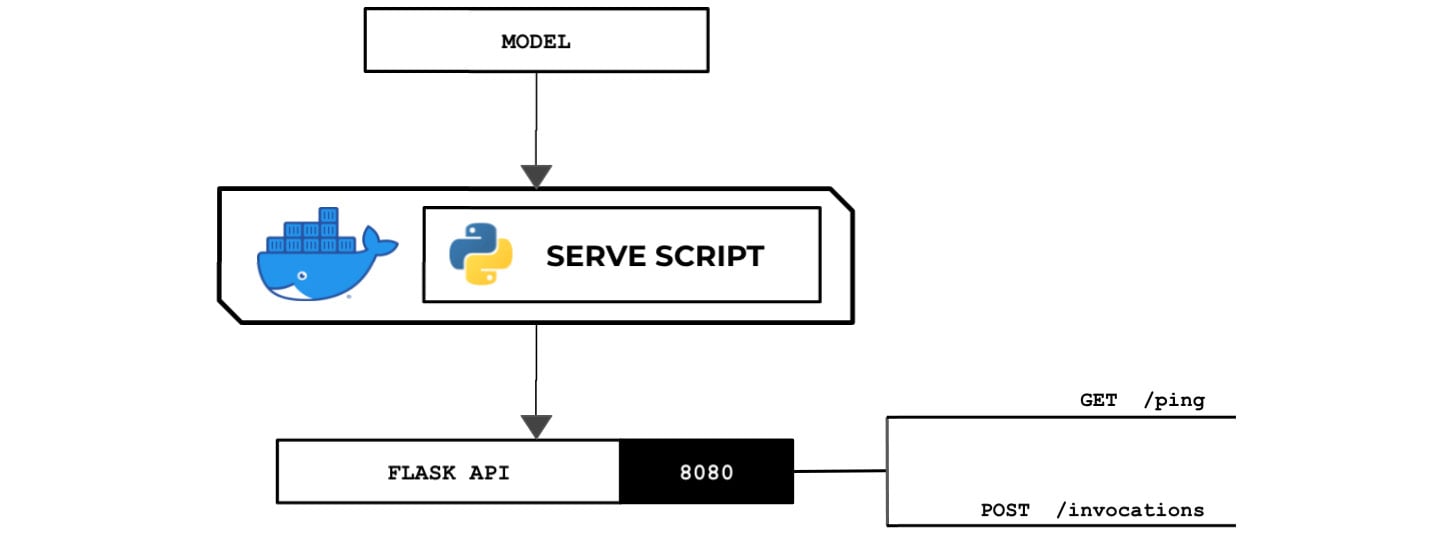
In this recipe, we will create a sample serve script using Python that loads the model and sets up a Flask server for returning predictions. This will provide us with a template to work with and test the end-to-end training and deployment process before adding more complexity to the serve script. The following diagram shows the expected behavior of the Python serve script that we will prepare in this recipe. The Python serve script loads the model file from the /opt/ml/model directory and runs a Flask web server on port 8080:
Figure 2.49 – The Python serve script loads and deserializes the model and runs a Flask API server that acts as the inference endpoint
The web server is expected to have the /ping and /invocations endpoints. This standalone Python script will run inside a custom container that allows the Python train and serve scripts to run.
Make sure you have completed the Preparing and testing the train script in Python recipe.
We will start by preparing the serve script:
ml-python directory, double-click the serve file to open it inside the Editor pane:
Figure 2.50 – Locating the empty serve script inside the ml-python directory
Here, we can see three files under the ml-python directory. Remember that in the Setting up the Python and R experimentation environments recipe, we prepared an empty serve script:

Figure 2.51 – Empty serve file
In the next couple of steps, we will add the lines of code for the serve script.
serve script to import and initialize the prerequisites:#!/usr/bin/env python3 import numpy as np from flask import Flask from flask import Response from flask import request from joblib import dump, load
get_path() function:app = Flask(__name__)
PATHS = {
'hyperparameters': 'input/config/hyperparameters.json',
'input': 'input/config/inputdataconfig.json',
'data': 'input/data/',
'model': 'model/'
}
def get_path(key):
return '/opt/ml/' + PATHS[key]load_model() function by adding the following lines of code to the serve script:def load_model():
model = None
filename = get_path('model') + 'model'
print(filename)
model = load(filename)
return modelNote that the filename of the model here is model as we specified this model artifact filename when we saved the model using the dump() function in the Preparing and testing the train script in Python recipe.
Important note
Note that it is important to choose the right approach when saving and loading machine learning models. In some cases, machine learning models from untrusted sources may contain malicious instructions that cause security issues such as arbitrary code execution! For more information on this topic, feel free to check out https://joblib.readthedocs.io/en/latest/persistence.html.
/invocations route:@app.route("/invocations", methods=["POST"])
def predict():
model = load_model()
post_body = request.get_data().decode("utf-8")
payload_value = float(post_body)
X_test = np.array(
[payload_value]
).reshape(-1, 1)
y_test = model.predict(X_test)
return Response(
response=str(y_test[0]),
status=200
)This function has five parts: loading the trained model using the load_model() function, reading the POST request data using the request.get_data() function and storing it inside the post_body variable, transforming the prediction payload into the appropriate structure and type using the float(), np.array(), and reshape() functions, making a prediction using the predict() function, and returning the prediction value inside a Response object.
Important note
Note that the implementation of the predict() function in the preceding code block can only handle predictions involving single payload values. At the same time, it can't handle different types of input similar to how built-in algorithms handle CSV, JSON, and other types of request formats. If you need to provide support for this, additional lines of code need to be added to the implementation of the predict() function.
/ping route and handler by adding the following lines of code to the serve script:@app.route("/ping")
def ping():
return Response(response="OK", status=200)app.run() method and bind the web server to port 8080:app.run(host="0.0.0.0", port=8080)
Tip
You can access a working copy of the serve script file in this book's GitHub repository: https://github.com/PacktPublishing/Machine-Learning-with-Amazon-SageMaker-Cookbook/blob/master/Chapter02/ml-python/serve.

Figure 2.52 – New Terminal
Here, we can see a Terminal tab already open. If you need to create a new one, simply click the plus (+) sign and then click New Terminal. We will run the next few commands in this Terminal tab.
Flask framework using pip. We will use Flask for our inference API endpoint:pip3 install flask
ml-python directory:cd /home/ubuntu/environment/opt/ml-python
serve script executable using chmod:chmod +x serve
serve script using the following command:./serve
This should start the Flask app, as shown here:

Figure 2.53 – Running the serve script
Here, we can see that our serve script has successfully run a flask API web server on port 8080.
Finally, we will trigger this running web server.

Figure 2.54 – New Terminal
As we can see, we are creating a new Terminal tab as the first tab is already running the serve script.
ping endpoint URL using the curl command:SERVE_IP=localhost curl http://$SERVE_IP:8080/ping
Running the previous line of code should yield an OK message from the /ping endpoint.
curl command:curl -d "1" -X POST http://$SERVE_IP:8080/invocations
We should get a value similar or close to 881.3428400857507 after invoking the invocations endpoint.
Now, let's see how this works!
In this recipe, we prepared the serve script in Python. The serve script makes use of the Flask framework to generate an API that allows GET requests for the /ping route and POST requests for the /invocations route.
The serve script is expected to load the model file(s) from the /opt/ml/model directory and run a backend API server inside the custom container. It should provide a /ping route and an /invocations route. With these in mind, our bare minimum Flask application template may look like this:
from flask import Flask
app = Flask(__name__)
@app.route("/ping")
def ping():
return <RETURN VALUE>
@app.route("/invocations", methods=["POST"])
def predict():
return <RETURN VALUE>
The app.route() decorator maps a specified URL to a function. In this template code, whenever the /ping URL is accessed, the ping() function is executed. Similarly, whenever the /invocations URL is accessed with a POST request, the predict() function is executed.
Note
Take note that we are free to use any other web framework (for example, the Pyramid Web Framework) for this recipe. So long as the custom container image has the required libraries for the script that's been installed, then we can import and use these libraries in our script files.