Sign In Start Free Trial
Account

Add to playlist

Create a Playlist

Modal Close icon
You need to login to use this feature.
  • Book Overview & Buying Amazon Redshift Cookbook
  • Table Of Contents Toc
Amazon Redshift Cookbook

Amazon Redshift Cookbook

By : Shruti Worlikar, Thiyagarajan Arumugam, Harshida Patel
4.8 (9)
close
close
Amazon Redshift Cookbook

Amazon Redshift Cookbook

4.8 (9)
By: Shruti Worlikar, Thiyagarajan Arumugam, Harshida Patel

Overview of this book

Amazon Redshift is a fully managed, petabyte-scale AWS cloud data warehousing service. It enables you to build new data warehouse workloads on AWS and migrate on-premises traditional data warehousing platforms to Redshift. This book on Amazon Redshift starts by focusing on Redshift architecture, showing you how to perform database administration tasks on Redshift. You'll then learn how to optimize your data warehouse to quickly execute complex analytic queries against very large datasets. Because of the massive amount of data involved in data warehousing, designing your database for analytical processing lets you take full advantage of Redshift's columnar architecture and managed services. As you advance, you’ll discover how to deploy fully automated and highly scalable extract, transform, and load (ETL) processes, which help minimize the operational efforts that you have to invest in managing regular ETL pipelines and ensure the timely and accurate refreshing of your data warehouse. Finally, you'll gain a clear understanding of Redshift use cases, data ingestion, data management, security, and scaling so that you can build a scalable data warehouse platform. By the end of this Redshift book, you'll be able to implement a Redshift-based data analytics solution and have understood the best practice solutions to commonly faced problems.
Table of Contents (13 chapters)
close
close

Creating an Amazon Redshift provisioned cluster using the AWS Console

The AWS Management Console allows you to interactively create an Amazon Redshift provisioned cluster via a browser-based user interface. It also recommends the right cluster configuration based on the size of your workload. Once the cluster has been created, you can use the Console to monitor the health of the cluster and diagnose query performance issues from a unified dashboard.

Getting ready

To complete this recipe, you will need:

  • An existing or new AWS account. If new AWS accounts need to be created, go to https://portal.aws.amazon.com/billing/signup, enter information, and follow the steps on the site.
  • An IAM user with access to Amazon Redshift.

How to do it…

The following steps will enable you to create a cluster with minimal parameters:

  1. Navigate to the AWS Management Console, select Amazon Redshift, https://console.aws.amazon.com/redshiftv2/, and browse to Provisioned clusters dashboard.
  2. Choose the AWS Region (eu-west-1) or the corresponding region in the top right of the screen.
  3. On the Amazon Redshift dashboard, select CLUSTERS, then click Create cluster.
  4. In the Cluster configuration section, type any meaningful Cluster identifier like myredshiftcluster.
  5. Choose either Production or Free trial depending on what you plan to use this cluster.
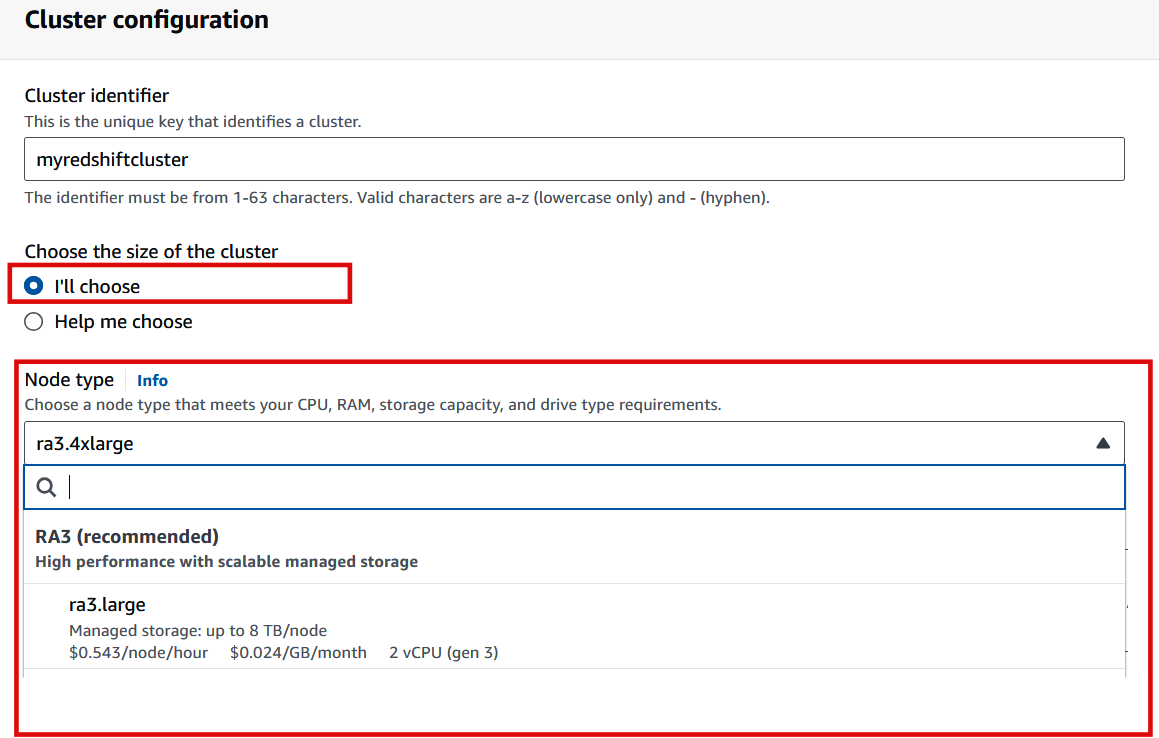
  6. If you need help determining the right size for your compute cluster, select the Help me choose option. Alternatively, if you know the required size of your cluster (that is, the node type and number of nodes), select I’ll choose. For example, you can choose Node type: ra3.xlplus with Nodes: 2.
Figure 1.4 – Create Amazon Redshift provisioned cluster

Figure 1.4 – Create Amazon Redshift provisioned cluster

  1. In the Database configuration section, specify values for Database name (optional), Database port (optional), Master user name, and Master user password. For example:
  2. Optionally, you can configure the Cluster permissions and Additional configurations section when you want to pick specific network and security configurations. The console defaults to the preset configuration otherwise.
  3. Choose Create cluster.
  4. The cluster creation takes a few minutes to complete. Navigate to the cluster, select Query data, and click on Query in Query Editor v2 to connect to the cluster.
Visually different images
CONTINUE READING
83
Tech Concepts
36
Programming languages
73
Tech Tools
Icon Unlimited access to the largest independent learning library in tech of over 8,000 expert-authored tech books and videos.
Icon Innovative learning tools, including AI book assistants, code context explainers, and text-to-speech.
Icon 50+ new titles added per month and exclusive early access to books as they are being written.
Amazon Redshift Cookbook
notes
bookmark Notes and Bookmarks search Search in title playlist Add to playlist download Download options font-size Font size

Change the font size

margin-width Margin width

Change margin width

day-mode Day/Sepia/Night Modes

Change background colour

Close icon Search
Country selected

Close icon Your notes and bookmarks

Confirmation

Modal Close icon
claim successful

Buy this book with your credits?

Modal Close icon
Are you sure you want to buy this book with one of your credits?
Close
YES, BUY

Submit Your Feedback

Modal Close icon
Modal Close icon
Modal Close icon