Amazon SageMaker supports several types of managed hosting infrastructure:
- A persistent synchronous HTTPS endpoint for real-time inference
- An asynchronous endpoint for near-real-time inference
- A transient Batch Transform job that performs inference across the entire dataset
In the next section, we will discuss use cases regarding when to use what type of hosting infrastructure, and we’ll review real-time inference endpoints in detail.
Real-time inference endpoints
Real-time endpoints are built for use cases where you need to get inference results as soon as possible. SageMaker’s real-time endpoint is an HTTPS endpoint: model inputs are provided by the client via a POST request payload, and inference results are returned in the response body. The communication is synchronous.
There are many scenarios when real-time endpoints are applicable, such as the following:
- To provide movie recommendations when the user opens a streaming application, based on the user’s watch history, individual ratings, and what’s trending now
- To detect objects in a real-time video stream
- To generate a suggested next word as the user inputs text
SageMaker real-time endpoints provide customers with a range of capabilities to design and manage their inference workloads:
- Create a fully managed compute infrastructure with horizontal scaling (meaning that a single endpoint can use multiple compute instances to serve high traffic load without performance degradation)
- There is a wide spectrum of EC2 compute instance types to choose from based on model requirements including AWS’ custom chip Inferentia and SageMaker Elastic Inference
- Pre-built inference containers for popular DL frameworks
- Multi-model and multi-container endpoints
- Model production variants for A/B testing
- Multi-model inference pipelines
- Model monitoring for performance, accuracy, and bias
- SageMaker Neo and SageMaker Edge Manager to optimize and manage inference at edge devices
Since this is a managed capability, Amazon SageMaker is responsible for the following aspects of managing users’ real-time endpoints:
- Provisioning and scaling the underlying compute infrastructure based on customer-defined scaling policies
- Traffic shaping between model versions and containers in cases where multiple models are deployed on a single SageMaker endpoint.
- Streaming logs and metrics at the level of the compute instance and model.
Creating and using your SageMaker endpoint
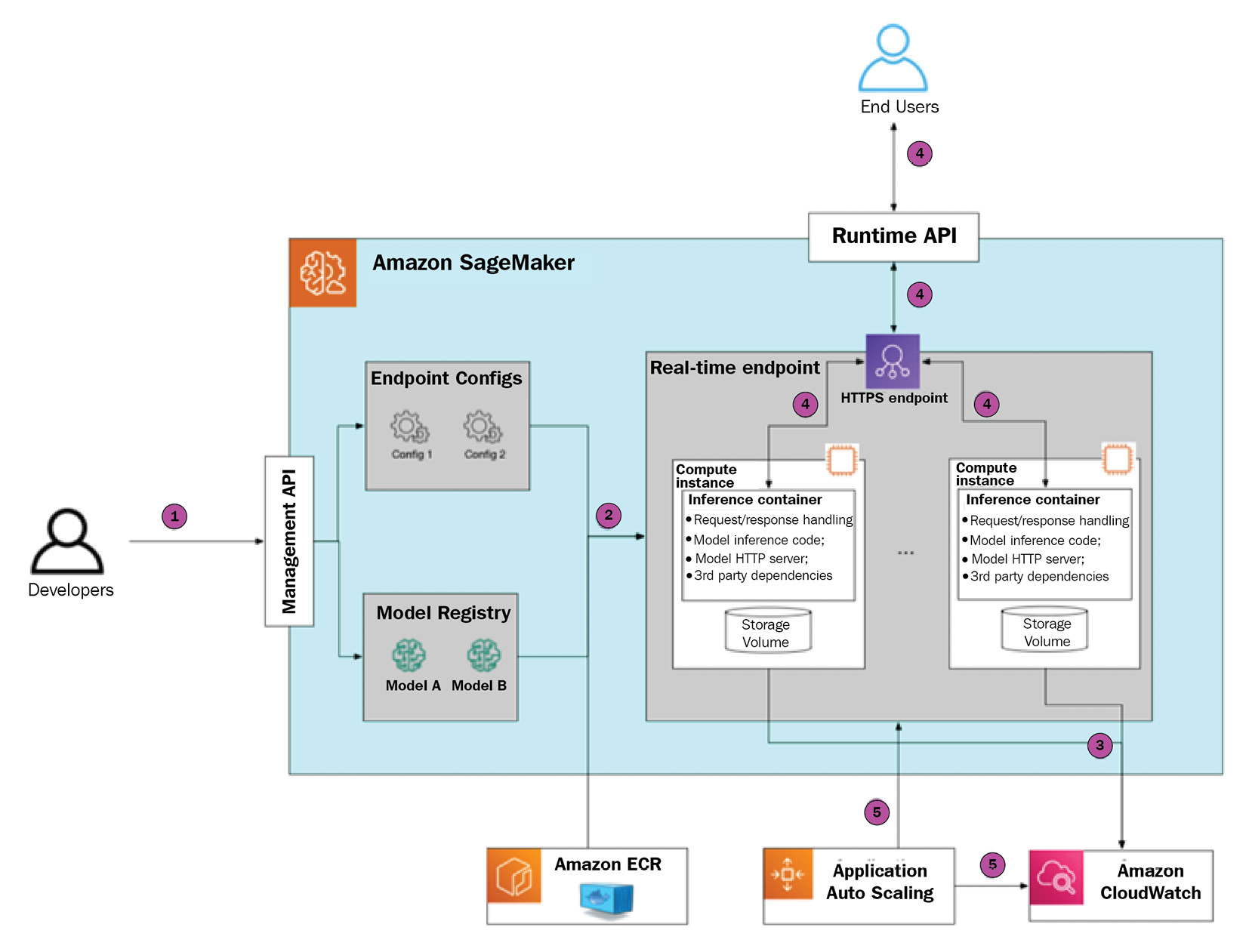
Let’s walk through the process of configuring, provisioning, and using your first SageMaker real-time endpoint. This will help to build your understanding of its internal workings and the available configuration options. The following diagram provides a visual guide:
Figure 1.3 – SageMaker inference endpoint deployment and usage
Step 1 – initiating endpoint creation
There are several ways to initiate SageMaker endpoint creation: the SageMaker Python SDK, the boto3 SDK, the AWS CLI, or via a CloudFormation template. As part of the request, there are several parameters that you need to provide, as follows:
- Model definition in SageMaker Model Registry, which will be used at inference time. The model definition includes references to serialized model artifacts in S3 and a reference to the inference container (or several containers in the case of a multi-container endpoint) in Amazon ECR.
- Endpoint configuration, which defines the number and type of compute instances, and (optional) a combination of several models (in the case of a multi-model endpoint) or several model production variants (in the case of A/B testing).
Step 2 – configuring the SageMaker endpoint for image classification
The following Python code sample shows how to create and deploy an endpoint using the previously trained image classification model:
- Begin with your initial imports, IAM role, and SageMaker session instantiation:
import sagemaker
from sagemaker import get_execution_role
role = get_execution_role()
sess = sagemaker.Session()
- Retrieve the inference container URI for the image classification algorithm:
image_uri = sagemaker.image_uris.retrieve('image-classification', sess.boto_region_name)
- Define where the model artifacts (such as trained weights) are stored in S3:
model_data = f"s3://{sess.default_bucket}/model_location"
- Create a SageMaker
Model object that encapsulates the model configuration:model = Model(
image_uri=image_uri,
model_data=model_data,
name="image-classification-endpoint",
sagemaker_session=sess,
role=role
)
- Define the endpoint configuration parameters:
endpoint_name = "image-classification-endpoint"
instance_type = "ml.g4dn.xlarge"
instance_count = 1
- The
.predict() method submits a request to SageMaker to create an endpoint with a specific model deployed:predictor = model.deploy(
instance_type=instance_type,
initial_instance_count=instance_count,
endpoint_name=endpoint_name,
)
With that done, SageMaker gets to work.
Step 3 – SageMaker provisions the endpoint
Once your provision request is submitted, SageMaker performs the following actions:
- It will allocate several instances according to the endpoint configuration
- It will deploy an inference container
- It will download the model artifacts
It takes several minutes to complete endpoint provisioning from start to finish. The provisioning time depends on the number of parameters, such as instance type, size of the inference container, and the size of the model artifacts that need to be uploaded to the inference instance(s).
Please note that SageMaker doesn’t expose inference instances directly. Instead, it uses a fronting load balancer, which then distributes the traffic between provisioned instances. As SageMaker is a managed service, you will never interact with inference instances directly, only via the SageMaker API.
Step 4 – SageMaker starts the model server
Once the endpoint has been fully provisioned, SageMaker starts the inference container by running the following command, which executes the ENTRYPOINT command in the container:
docker run image serve
This script does the following:
- Starts the model server, which exposes the HTTP endpoint
- Makes the model server load the model artifacts in memory
- At inference time, it makes the model server execute the inference script, which defines how to preprocess data
In the case of SageMaker-managed Docker images, the model server and startup logic are already implemented by AWS. If you choose to BYO serving container, then this needs to be implemented separately.
SageMaker captures the stdout/stderr streams and automatically streams them to CloudWatch logs. It also streams instances metrics such as the number of invocations total and per instance, invocation errors, and latency measures.
Step 5 – the SageMaker endpoint serves traffic
Once the model server is up and running, end users can send a POST request to the SageMaker endpoint. The endpoint authorizes the request based on the authorization headers (these headers are automatically generated when using the SageMaker Python SDK or the AWS CLI based on the IAM profile). If authorization is successful, then the payload is sent to the inference instance.
The running model server handles the request by executing the inference script and returns the response payload, which is then delivered to the end user.
Step 6 – SageMaker scales the inference endpoint in or out
You may choose to define an auto-scaling policy to scale endpoint instances in and out. In this case, SageMaker will add or remove compute nodes behind the endpoint to match demand more efficiently. Please note that SageMaker only supports horizontal scaling, such as adding or removing compute nodes, and not changing instance type.
SageMaker supports several types of scaling events:
- Manual, where the user updates the endpoint configuration via an API call
- A target tracking policy, where SageMaker scales in or out based on the value of the user-defined metric (for example, the number of invocations or resource utilization)
- A step scaling policy, which provides the user with more granular control over how to adjust the number of instances based on how much threshold is breached
- A scheduled scaling policy, which allows you to scale the SageMaker endpoint based on a particular schedule (for example, scale in during the weekend, where there’s low traffic, and scale out during the weekday, where there’s peak traffic)
Advanced model deployment patterns
We just reviewed the anatomy of a simple, single-model real-time endpoint. However, in many real-life scenarios where there are tens or hundreds of models that need to be available at any given point in time, this approach will lead to large numbers of underutilized or unevenly utilized inference nodes.
This is a generally undesirable situation as it will lead to high compute costs without any end user value. To address this problem, Amazon SageMaker provides a few advanced deployment options that allow you to combine several models within the same real-time endpoint and, hence, utilize resources more efficiently.
Multi-container endpoint
When deploying a multi-container endpoint, you may specify up to 15 different containers within the same endpoint. Each inference container has model artifacts and its own runtime environment. This allows you to deploy models built in various frameworks and runtime environments within a single SageMaker endpoint.
At creation time, you define a unique container hostname. Each container can then be invoked independently. During endpoint invocation, you are required to provide this container hostname as one of the request headers. SageMaker will automatically route the inference request to a correct container based on this header.
This feature comes in handy when there are several models with relatively low traffic and different runtime environments (for example, Pytorch and TensorFlow).
Inference pipeline
Like a multi-container endpoint, the inference pipeline allows you to combine different models and container runtimes within a single SageMaker endpoint. However, the containers are called sequentially. This feature is geared toward scenarios where an inference request requires pre and/or post-processing with different runtime requirements; for example:
- The pre-processing phase is done using the scikit-learn library
- Inference is done using a DL framework
- Post-processing is done using a custom runtime environment, such as Java or C++
By encapsulating different phases of the inference pipeline in separate containers, changes in one container won’t impact adversely other containers, such as updating the dependency version. Since containers within inference pipelines are located on the same compute node, this guarantees low latency during request handoff between containers.
Multi-model endpoint
Multi-model endpoints allow you to deploy hundreds of models within a single endpoint. Unlike multi-container endpoints and inference pipelines, a multi-model endpoint has a single runtime environment. SageMaker automatically loads model artifacts into memory and handles inference requests. When a model is no longer needed, SageMaker unloads it from memory to free up resources. This leads to some additional latency when invoking the model for the first time after a while. Model artifacts are stored on Amazon S3 and loaded by SageMaker automatically.
At the core of the multi-model endpoint is the AWS-developed open source Multi-Model Server, which provides model management capabilities (loading, unloading, and resource allocation) and an HTTP frontend to receive inference requests, execute inference code for a given model, and return the resulting payload.
Multi-model endpoints are optimal when there’s a large number of homogeneous models and end users can tolerate warmup latency.
SageMaker asynchronous endpoints
So far, we have discussed SageMaker real-time endpoints, which work synchronously: users invoke the endpoint by sending a POST request, wait for the endpoint to run inference code, and then return the inference results in the response payload. The inference code is expected to complete within 60 seconds; otherwise, the SageMaker endpoint will return a timeout response.
In certain scenarios, however, this synchronous communication pattern can be problematic:
- Large models can take a considerable time to perform inference
- Large payload sizes (for instance, high-resolution imagery)
For such scenarios, SageMaker provides Asynchronous Endpoints, which allow you to queue inference requests and process them asynchronously, avoiding potential timeouts. Asynchronous endpoints also allow for a considerably larger payload size of up to 1 GB, whereas SageMaker real-time endpoints have a limit of 5 MB. Asynchronous endpoints can be scaled to 0 instances when the inference queue is empty to provide additional cost savings. This is specifically useful for scenarios with sporadic inference traffic patterns.
The main tradeoff of asynchronous endpoints is that the inference results are delivered in near real-time and may not be suited for scenarios where consistent latency is expected:
Figure 1.4 – SageMaker asynchronous endpoint
SageMaker Batch Transform
SageMaker Batch Transform allows you to get predictions for a batch of inference inputs. This can be useful for scenarios where there is a recurrent business process and there are no strict latency requirements. An example is a nightly job that calculates risks for load applications.
SageMaker Batch Transform is beneficial for the following use cases:
- Customers only pay for resources that are consumed during job execution
- Batch Transform jobs can scale to GBs and tens of compute nodes
When scheduling a Batch Transform job, you define the cluster configuration (type and number of compute nodes), model artifacts, inference container, the input S3 location for the inference dataset, and the output S3 location for the generated predictions. Please note that customers can use the same container for SageMaker real-time endpoints and the Batch Transform job. This allows developers to use the same models/containers for online predictions (as real-time endpoints) and offline (as Batch Transform jobs):
Figure 1.5 – SageMaker Batch Transform job
With that, you understand how to train a simple DL model using a SageMaker training job and then create a real-time endpoint to perform inference. Before we proceed further, we need to learn about several foundational AWS services that are used by Amazon SageMaker that you will see throughout this book.





 Free Chapter