-
Book Overview & Buying
-
Table Of Contents
TensorFlow 2 Reinforcement Learning Cookbook
By :
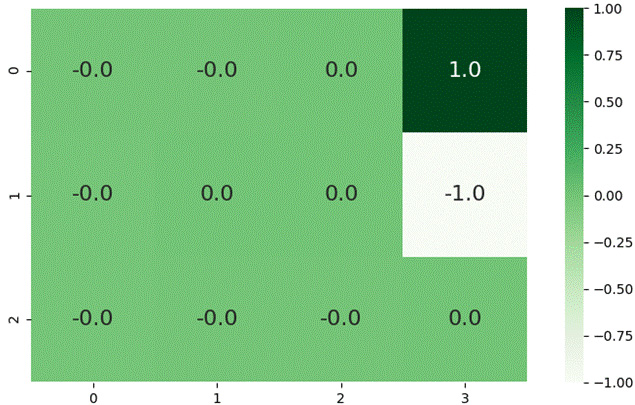
This recipe will walk you through how to implement the temporal difference (TD) learning algorithm. TD algorithms allow us to incrementally learn from incomplete episodes of agent experiences, which means they can be used for problems that require online learning capabilities. TD algorithms are useful in model-free RL settings as they do not depend on a model of the MDP transitions or rewards. To visually understand the learning progression of the TD algorithm, this recipe will also show you how to implement the GridworldV2 learning environment, which looks as follows when rendered:
Figure 2.6 – The GridworldV2 learning environment 2D rendering with state values and grid cell coordinates
To complete this recipe, you will need to activate the tf2rl-cookbook Python/conda virtual environment and run pip install numpy gym. If the following import statements run without issues, you are ready to get started:
import gym import matplotlib.pyplot as plt import numpy as np
Now, we can begin.
This recipe will contain two components that we will put together at the end. The first component is the GridworldV2 implementation, while the second component is the TD learning algorithm's implementation. Let's get started:
GridworldV2Eng class:class GridworldV2Env(gym.Env):
def __init__(self, step_cost=-0.2, max_ep_length=500,
explore_start=False):
self.index_to_coordinate_map = {
"0": [0, 0],
"1": [0, 1],
"2": [0, 2],
"3": [0, 3],
"4": [1, 0],
"5": [1, 1],
"6": [1, 2],
"7": [1, 3],
"8": [2, 0],
"9": [2, 1],
"10": [2, 2],
"11": [2, 3],
}
self.coordinate_to_index_map = {
str(val): int(key) for key, val in self.index_to_coordinate_map.items()
}__init__ method and define the necessary values that define the size of the Gridworld, the goal location, the wall location, and the location of the bomb, among other things:self.map = np.zeros((3, 4))
self.observation_space = gym.spaces.Discrete(1)
self.distinct_states = [str(i) for i in \
range(12)]
self.goal_coordinate = [0, 3]
self.bomb_coordinate = [1, 3]
self.wall_coordinate = [1, 1]
self.goal_state = self.coordinate_to_index_map[
str(self.goal_coordinate)] # 3
self.bomb_state = self.coordinate_to_index_map[
str(self.bomb_coordinate)] # 7
self.map[self.goal_coordinate[0]]\
[self.goal_coordinate[1]] = 1
self.map[self.bomb_coordinate[0]]\
[self.bomb_coordinate[1]] = -1
self.map[self.wall_coordinate[0]]\
[self.wall_coordinate[1]] = 2
self.exploring_starts = explore_start
self.state = 8
self.done = False
self.max_ep_length = max_ep_length
self.steps = 0
self.step_cost = step_cost
self.action_space = gym.spaces.Discrete(4)
self.action_map = {"UP": 0, "RIGHT": 1,
"DOWN": 2, "LEFT": 3}
self.possible_actions = \
list(self.action_map.values())reset() method, which will be called at the start of every episode, including the first one:def reset(self): self.done = False self.steps = 0 self.map = np.zeros((3, 4)) self.map[self.goal_coordinate[0]]\ [self.goal_coordinate[1]] = 1 self.map[self.bomb_coordinate[0]]\ [self.bomb_coordinate[1]] = -1 self.map[self.wall_coordinate[0]]\ [self.wall_coordinate[1]] = 2 if self.exploring_starts: self.state = np.random.choice([0, 1, 2, 4, 6, 8, 9, 10, 11]) else: self.state = 8 return self.state
get_next_state method so that we can conveniently obtain the next state:def get_next_state(self, current_position, action): next_state = self.index_to_coordinate_map[ str(current_position)].copy() if action == 0 and next_state[0] != 0 and \ next_state != [2, 1]: # Move up next_state[0] -= 1 elif action == 1 and next_state[1] != 3 and \ next_state != [1, 0]: # Move right next_state[1] += 1 elif action == 2 and next_state[0] != 2 and \ next_state != [0, 1]: # Move down next_state[0] += 1 elif action == 3 and next_state[1] != 0 and \ next_state != [1, 2]: # Move left next_state[1] -= 1 else: pass return self.coordinate_to_index_map[str( next_state)]
step method of the GridworldV2 environment:def step(self, action):
assert action in self.possible_actions, \
f"Invalid action:{action}"
current_position = self.state
next_state = self.get_next_state(
current_position, action)
self.steps += 1
if next_state == self.goal_state:
reward = 1
self.done = True
elif next_state == self.bomb_state:
reward = -1
self.done = True
else:
reward = self.step_cost
if self.steps == self.max_ep_length:
self.done = True
self.state = next_state
return next_state, reward, self.donenumpy array and then set the value of the goal location and the bomb state:def temporal_difference_learning(env, max_episodes): grid_state_values = np.zeros((len( env.distinct_states), 1)) grid_state_values[env.goal_state] = 1 grid_state_values[env.bomb_state] = -1
gamma, the learning rate, alpha, and initialize done to False:# v: state-value function v = grid_state_values gamma = 0.99 # Discount factor alpha = 0.01 # learning rate done = False
max_episodes times, resetting the state of the environment to its initial state at the start of every episode:for episode in range(max_episodes): state = env.reset()
while not done: action = env.action_space.sample() # random policy next_state, reward, done = env.step(action) # State-value function updates using TD(0) v[state] += alpha * (reward + gamma * \ v[next_state] - v[state]) state = next_state
visualize_grid_state_values function from value_function_utils:visualize_grid_state_values(grid_state_values.reshape((3, 4)))
temporal_difference_learning function from our main function:if __name__ == "__main__": max_episodes = 4000 env = GridworldV2Env(step_cost=-0.1, max_ep_length=30) temporal_difference_learning(env, max_episodes)
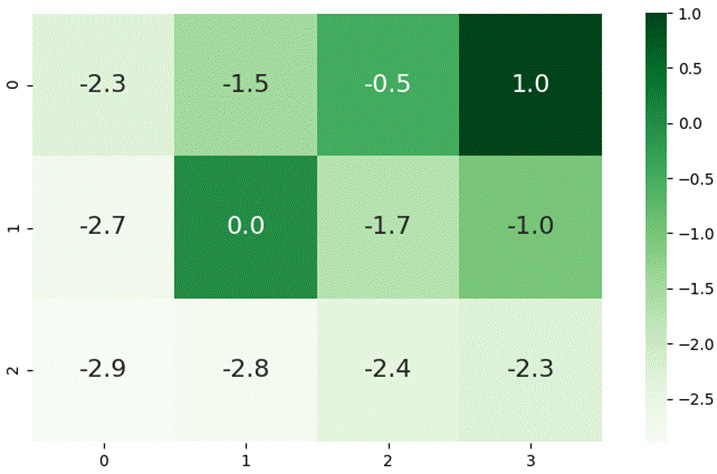
max_episodes. It will then produce a diagram similar to the following:
Figure 2.7 – Rendering of the GridworldV2 environment, with the grid cell coordinates and state values colored according to the scale shown on the right
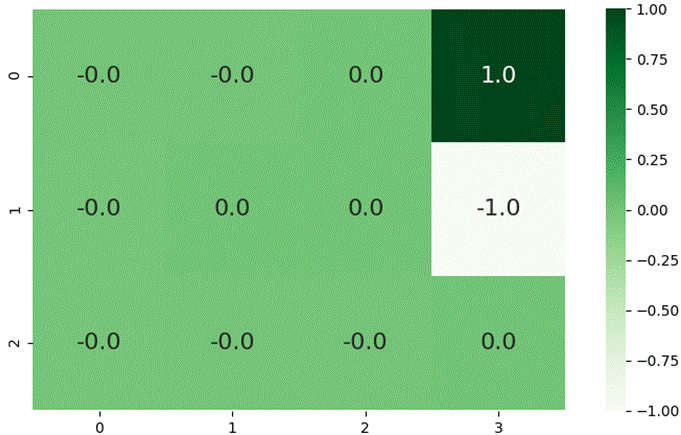
Based on our environment's implementation, you may have noticed that goal_state is located at (0, 3) and that bomb_state is located at (1, 3). This is based on the coordinates, colors, and values of the grid cells:
Figure 2.8 – Rendering of the GridWorldV2 environment with initial state values
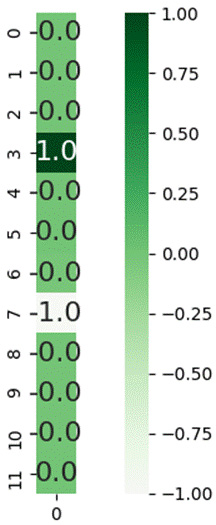
The state is linearized and is represented using a single integer indicating each of the 12 distinct states in the GridWorldV2 environment. The following diagram shows a linearized rendering of the grid states to give you a better understanding of the state encoding:
Figure 2.9 – Linearized representation of the states
Now that we have seen how to implement temporal difference learning, let's move on to building Monte Carlo algorithms.
Change the font size
Change margin width
Change background colour