Sign In Start Free Trial
Account

Add to playlist

Create a Playlist

Modal Close icon
You need to login to use this feature.
  • Book Overview & Buying IBM Cognos 8 Report Studio Cookbook
  • Table Of Contents Toc
IBM Cognos 8 Report Studio Cookbook

IBM Cognos 8 Report Studio Cookbook

By : Abhishek Sanghani
3 (3)
close
close
IBM Cognos 8 Report Studio Cookbook

IBM Cognos 8 Report Studio Cookbook

3 (3)
By: Abhishek Sanghani

Overview of this book

Cognos Report Studio is widely used for creating and managing business reports in medium to large companies. It is simple enough for any business analyst, power user, or developer to pick up and start developing basic reports. However, when it comes to developing more sophisticated, fully functional business reports for wider audiences, report authors will need guidance. This book helps you understand and use all the features provided by Report Studio to generate impressive deliverables. It will take you from being a beginner to a professional report author. It bridges the gap between basic training provided by manuals or trainers and the practical techniques learned over years of practice. This book covers all the basic and advanced features of Report Authoring. It begins by bringing readers on the same platform and introducing the fundamental features useful across any level of reporting. Then it ascends to advanced techniques and tricks to overcome Studio limitations.Develop excellent reports using dimensional data sources by following best practices that development work requires in Report Studio. You will also learn about editing the report outside the Studio by directly editing the XML specifications. Provide richness to the user interface by adding JavaScript and HTML tags. The main focus is on the practical use of various powerful features that Report Studio has to offer to suit your business requirements.
Table of Contents (14 chapters)
close
close
13
Index

Page structure view

This recipe will show you another view/option available in Cognos Report Studio to examine and edit the reports.

Getting ready

We will use the same report used in the last recipe for this.

How to do it...

  1. Open the report in Report Studio and go to the report page.
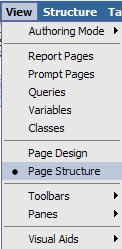
  2. From the menu, choose View | Page Structure.
    How to do it...
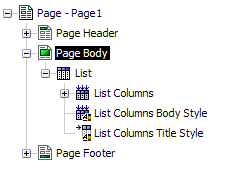
  3. You will see the report page transforms into a tree-type list object.
    How to do it...
  4. Open different nodes and examine the objects.

How it works...

As you know, the report definitions in Cognos Report Studio are nothing but XML files. The report objects, Page, List, Columns, and so on are all stored internally as nested tags.

By switching to Page Structure view, you can actually see how the objects are contained within each other and are inter-related. You can select any object (for example, List Columns Body Style) and manipulate its properties. You can also delete them, copy the objects and paste them in another place, and move them around within the rules governed by Cognos Report Studio...

CONTINUE READING
83
Tech Concepts
36
Programming languages
73
Tech Tools
Icon Unlimited access to the largest independent learning library in tech of over 8,000 expert-authored tech books and videos.
Icon Innovative learning tools, including AI book assistants, code context explainers, and text-to-speech.
Icon 50+ new titles added per month and exclusive early access to books as they are being written.
IBM Cognos 8 Report Studio Cookbook
notes
bookmark Notes and Bookmarks search Search in title playlist Add to playlist font-size Font size

Change the font size

margin-width Margin width

Change margin width

day-mode Day/Sepia/Night Modes

Change background colour

Close icon Search
Country selected

Close icon Your notes and bookmarks

Confirmation

Modal Close icon
claim successful

Buy this book with your credits?

Modal Close icon
Are you sure you want to buy this book with one of your credits?
Close
YES, BUY

Submit Your Feedback

Modal Close icon
Modal Close icon
Modal Close icon