-
Book Overview & Buying
-
Table Of Contents
Oracle PeopleSoft Enterprise Financial Management 9.1 Implementation
By :
Configuring PeopleSoft Financial applications from scratch is certainly no easy task. A typical implementation involving multiple modules typically involves hundreds of configuration activities that need to be performed in a specific sequence. In this chapter so far, we have covered some of the critical configuration activities, but discussing each of them is quite impractical. So the million dollar question is—How do we ensure that we complete all the necessary setup activities in the right order?
Let's not worry…PeopleSoft has just the right tool to help us with exactly this. It is known as the Setup Manager.
Setup Manager lists all the tasks required for implementing a product (module) in the right sequence. In addition, it shows the navigation path to the page where required configuration needs to be done. A direct link is provided so that the user can reach the appropriate page. We'll quickly see how to use it.
Configure the PeopleSoft Billing module using Setup Manager.
Follow the navigation PeopleTools | Setup Manager | Manage Implementation Projects.
Follow this navigation to access Setup Manager:
PeopleTools | Setup Manager | Manage Implementation Projects
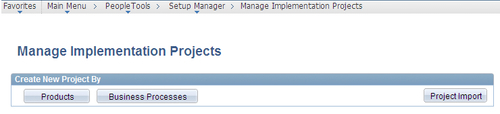
The following screenshot shows the Manage Implementation Projects page:

As you can see, we can create the implementation project either by a product (such as Billing, Accounts Receivable, and so on) or a Business Process (such as Process customer payments, Receive goods, and so on).
For our business requirement, as we need to configure the Billing module, we'll create the implementation project by Product.
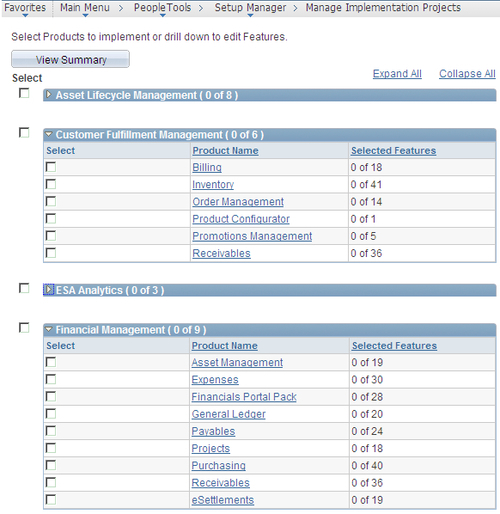
Click the Products button. As shown in the following screenshot, the system opens a page listing all the PeopleSoft modules for which the organization holds a license:

Check the Select checkbox next to the required module and click the View Summary button at the bottom of the page.
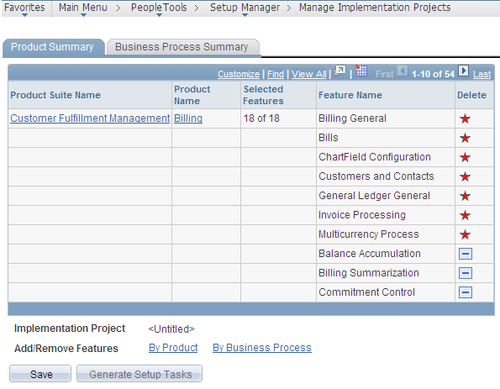
The system opens a new page with two tabs. The following screenshot shows the Product Summary tab:

The page shows all the features offered by PeopleSoft in selected product. As part of the implementation, one of the critical tasks is to determine which of these features are really needed for the implementing organization.
Let's assume that for our hypothetical Billing module implementation, we do not need the Balance Accumulation and Billing Summarization features. Remove these features from the list by clicking the '-' button next to them.
Features marked with a star are mandatory and cannot be removed.
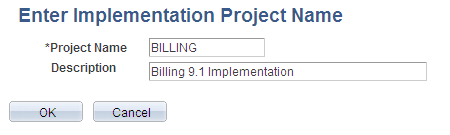
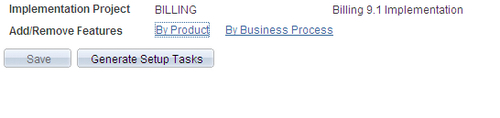
Click Save at the bottom of the page. The system opens a new page, which is shown in the following screenshot:

Enter the Project Name and Description and click OK. As shown in the next screenshot, the system opens a page showing the implementation project with given name:

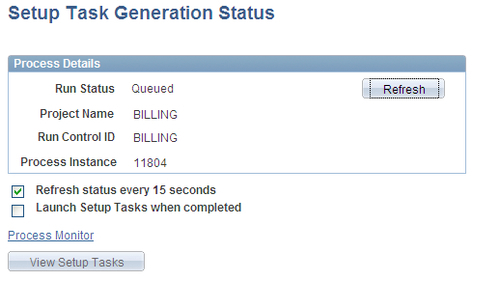
Click the Generate Setup Tasks button in this page to automatically create the list of configuration tasks. The following screenshot shows the process status page:

This triggers a batch process in the background with its Run Status as Queued. When the process is completed, the run status automatically changes to Success.
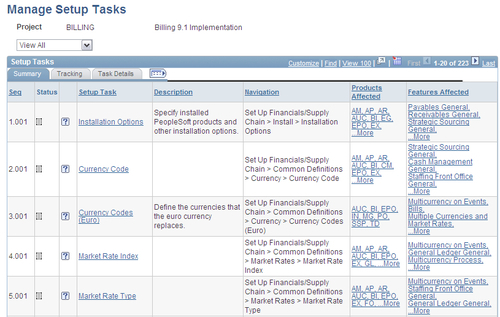
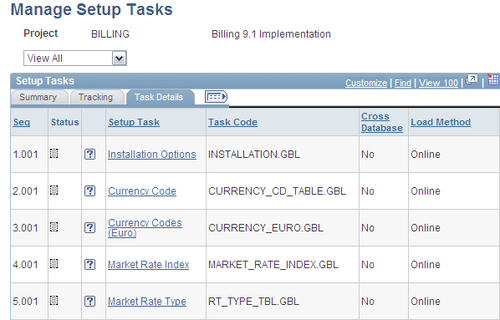
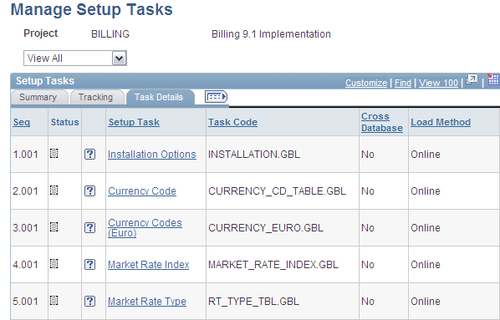
Click the View Setup Tasks button to see the configuration activities. The following screenshot shows the Manage Setup Tasks page that opens:

This page lists out all the necessary configuration activities in the appropriate sequence.
The Status field shows the current status for the setup task. Place the cursor over the icon to see the status: Not started, In progress, or Complete.
Setup Task: Clicking the hyperlink transfers the control to the appropriate page in order to perform the required setup activity.
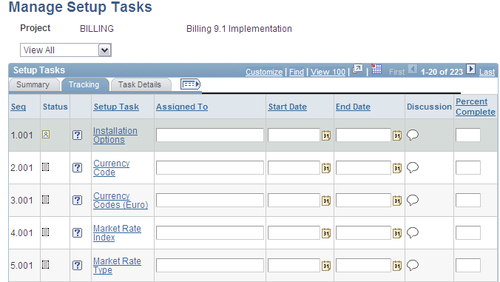
Click the Tracking tab to record progress of setup activities. The following screenshot shows the details of Tracking tab:

Click the Task Details tab. The following screenshot shows the details of Task Details tab:

Let's look at a different set of tasks. The following screenshot shows a few setup tasks for the Billing module:

As you can see, configuring Adjustment Type and Book Code can be done by Online method alone. On the other hand, configuration for other tasks can be done either by Component Interface or Online method.
Let's understand these different configuration methods:
So, this is what we'll need to do as we go along the configuration of a PeopleSoft module:
Change the font size
Change margin width
Change background colour