Sign In Start Free Trial
Account

Add to playlist

Create a Playlist

Modal Close icon
You need to login to use this feature.
  • Book Overview & Buying SAP ABAP Advanced Cookbook
  • Table Of Contents Toc
SAP ABAP Advanced Cookbook

SAP ABAP Advanced Cookbook

By : Rehan Zaidi
4.9 (7)
close
close
SAP ABAP Advanced Cookbook

SAP ABAP Advanced Cookbook

4.9 (7)
By: Rehan Zaidi

Overview of this book

ABAP (Advanced Business Application Programming) is SAP's proprietary 4th Generation Language (4GL). SAP core is written almost entirely in ABAP.ABAP is a high level programming language used in SAP for development and other customization processes."SAP ABAP Advanced Cookbook"ù covers advanced SAP programming applications with ABAP. It teaches you to enhance SAP applications by developing custom reports and interfaces with ABAP programming. This cookbook has quick and advanced real world recipes for programming ABAP.It begins with the applications of ABAP Objects and ALV tips and tricks. It then covers Design Patterns and Dynamic Programming in detail.You will also learn the usage of quality improvement tools such as transaction SAT, SQL Trace, and the Code Inspector.Simple transformations and its application in Excel Downloading will also be discussed, as well as the newest topics of Adobe Interactive Forms and the consumption and creation of Web services. The book comes to an end by covering advanced usage of Web Dynpro for ABAP and the latest advancement in Floorplan Manager.
Table of Contents (17 chapters)
close
close
16
Index

Generating transformations for dictionary table types


In this recipe, we will see how we can create transformations for dictionary table types. We will first create a table type using SE11 and then generate its transformation using the graphical tool editor of the transaction XSLT_TOOL.

We will create a table type, ZST6_TT_PER, that will comprise of employee number, PERNR, employee name, NAME, and grade field, GRADE.

How to do it...

We will now carry out the following steps:

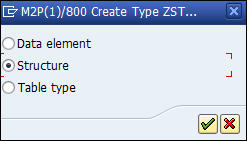
  1. Call transaction SE11. We will first create a line type by the name of ZST6_ST_PER. Enter the name in the Data Type field. Then, click on the Create button and choose the Structure option in the dialog box that appears.

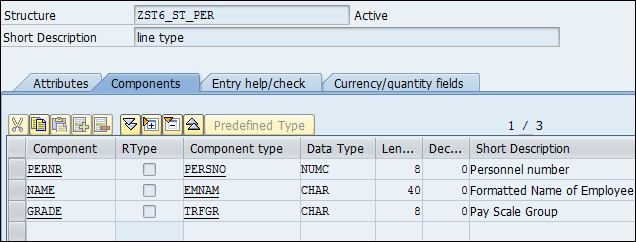
  2. Next, we specify the fields of the line type. These are: PERNR, GRADE, and NAME. These are based upon the component types, PERSNO, TRFGR, and EMNAM, respectively.

  3. We then create a table type using the transaction SE11. We give it the name ZST_TT_PER. We make sure that the line type defined earlier is used as...

CONTINUE READING
83
Tech Concepts
36
Programming languages
73
Tech Tools
Icon Unlimited access to the largest independent learning library in tech of over 8,000 expert-authored tech books and videos.
Icon Innovative learning tools, including AI book assistants, code context explainers, and text-to-speech.
Icon 50+ new titles added per month and exclusive early access to books as they are being written.
SAP ABAP Advanced Cookbook
notes
bookmark Notes and Bookmarks search Search in title playlist Add to playlist font-size Font size

Change the font size

margin-width Margin width

Change margin width

day-mode Day/Sepia/Night Modes

Change background colour

Close icon Search
Country selected

Close icon Your notes and bookmarks

Confirmation

Modal Close icon
claim successful

Buy this book with your credits?

Modal Close icon
Are you sure you want to buy this book with one of your credits?
Close
YES, BUY

Submit Your Feedback

Modal Close icon
Modal Close icon
Modal Close icon