Sign In Start Free Trial
Account

Add to playlist

Create a Playlist

Modal Close icon
You need to login to use this feature.
  • Book Overview & Buying FusionCharts Beginner's Guide: The Official Guide for FusionCharts Suite
  • Table Of Contents Toc
FusionCharts Beginner's Guide: The Official Guide for FusionCharts Suite

FusionCharts Beginner's Guide: The Official Guide for FusionCharts Suite

5 (1)
close
close
FusionCharts Beginner's Guide: The Official Guide for FusionCharts Suite

FusionCharts Beginner's Guide: The Official Guide for FusionCharts Suite

5 (1)

Overview of this book

User experience can make or break any app these days, no matter whether it's a commercial product or an internal solution. While most web applications out there are boring and outdated when it comes to their charting, you can make yours both stunning and powerful using FusionCharts Suite. Once you have mastered it, you can give your users a delightful reporting experience in no time at all. FusionCharts Beginner's Guide is a practical, step-by-step guide to using FusionCharts Suite for creating delightful web reports and dashboards. Getting you started quickly, you will learn advanced reporting capabilities like drill-down and JavaScript integration, and charting best practices to make the most out of it. Filled with examples, real-life tips and challenges, this book is the firstofitstype in the visualization industry. The book teaches you to create delightful reports and dashboards for your web applications assuming no previous knowledge of FusionCharts Suite. It gets your first chart up in 15 minutes after which you can play around with different chart types and customize them. You will also learn how to create a powerful reporting experience using drill-down and advanced JavaScript capabilities. You will also connect your charts to server-side scripts pulling data from databases. Finally you round up the experience learning reporting best practices including right chart type selection and practical usability tips. By the end of the book, you will have a solid foundation in FusionCharts Suite and data visualization itself. You will be able to give your users a delightful reporting experience, from developers to management alike.
Table of Contents (16 chapters)
close
close
FusionCharts
Credits
About the Authors
About the Reviewer
www.PacktPub.com
Preface

Time for action — creating JavaScript only charts


  1. 1. Create a copy of our FirstChart.html in the same location and name it as JavaScriptChart.html.

  2. 2. Add the following lines of code, as highlighted, before the constructor.

    <html>
    <body>
    <div id="chartContainer">FusionCharts will load here!</div>
    <script type="text/javascript">
    <!--FusionCharts.setCurrentRenderer('javascript');
    var myChart = new FusionCharts("../FusionCharts/Column3D.swf", "myChartId", "400", "300", "0", "1" );
    myChart.setXMLUrl("Data.xml");
    myChart.render("chartContainer");// -->
    </script>
    </body>
    </html>
    
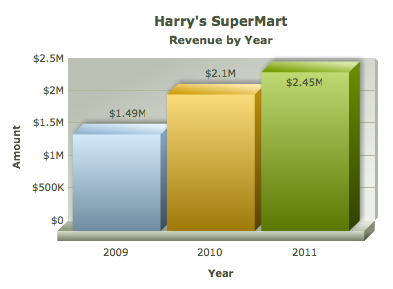
  3. 3. Open the page in a browser. You should see the same chart as earlier, but this time rendered using JavaScript. It has animations and interactivity similar to the Flash version as shown in the following screenshot:

Note

How different is the Flash rendering from JavaScript rendering?

The JavaScript version of FusionCharts behaves similar to the Flash version, offering most of the functional and cosmetic configuration. With the exception of a true 3D chart, all charts look and behave almost the same as their Flash counterpart. There are minor visual differences in the JavaScript version such as the width of columns, effect of shadows, handling of long x-axis labels, appearance of scroll bars, and so on. A detailed list of such differences are present in FusionCharts Documentation | Introduction | JavaScript Charting Capabilities | How different is JavaScript charts from Flash charts?

What just happened?

You just converted the previous chart to a pure JavaScript chart, irrespective of the device it is now viewed on. The following snippet of code instructs FusionCharts to switch the rendering mode to JavaScript:

FusionCharts.setCurrentRenderer('javascript');

If your page contains multiple charts, this setting applies to all such charts that are defined after this line of code. Hence, if you declare this at the beginning, all the charts in the page will render using JavaScript. You would not need to declare the same for each chart in the page.

Note

JavaScript cannot access data stored on your hard drive in some browsers

Some browsers restrict JavaScript from accessing the local filesystem due to security reasons. Hence, the JavaScript charts, when running from your local hard drive, would not be able to access XML or JSON data provided as a URL. However, when run from a server, including localhost, they will run fine. An alternate method to get JavaScript charts working locally is to use the Data String method, which we will explore in the next section.

Have a go hero — build a dashboard for Harry

In this example, you created a standalone Column 3D chart. How about inching towards building a complete dashboard? To do so, convert the existing chart to a Column 2D chart and add the following three charts to this page. In addition, specify different width and height for each chart to accommodate the amount of data it presents, and also place them in order of importance of the chart to Harry.

  • A Line 2D chart, using Line.swf, comparing monthly revenues for this year. For this, you need to create an XML data with the<set> element for each month of the year.

  • A Pie 2D chart, using Pie2D.swf, showing the composition of expenses of this year split under these categories: Salary, Cost of Goods, Marketing Costs, Overheads, and Administration.

  • A Column 2D chart, using Column2D.swf, showing the top five salespersons for the year.

All these charts use the same single-series XML format that you had earlier created. Remember to provide a different ID for each chart and its container DIV. Also, do not forget to encode special characters such as& (ampersand) or' (apostrophe) in XML.

Once you are done, let us explore the other way to provide XML data to FusionCharts—as a string, instead of providing a URL, for example, Data.xml.

Visually different images
CONTINUE READING
83
Tech Concepts
36
Programming languages
73
Tech Tools
Icon Unlimited access to the largest independent learning library in tech of over 8,000 expert-authored tech books and videos.
Icon Innovative learning tools, including AI book assistants, code context explainers, and text-to-speech.
Icon 50+ new titles added per month and exclusive early access to books as they are being written.
FusionCharts Beginner's Guide: The Official Guide for FusionCharts Suite
notes
bookmark Notes and Bookmarks search Search in title playlist Add to playlist font-size Font size

Change the font size

margin-width Margin width

Change margin width

day-mode Day/Sepia/Night Modes

Change background colour

Close icon Search
Country selected

Close icon Your notes and bookmarks

Confirmation

Modal Close icon
claim successful

Buy this book with your credits?

Modal Close icon
Are you sure you want to buy this book with one of your credits?
Close
YES, BUY

Submit Your Feedback

Modal Close icon
Modal Close icon
Modal Close icon