Sign In Start Free Trial
Account

Add to playlist

Create a Playlist

Modal Close icon
You need to login to use this feature.
  • Book Overview & Buying Learning ROS for Robotics Programming Second Edition
  • Table Of Contents Toc
Learning ROS for Robotics Programming Second Edition

Learning ROS for Robotics Programming Second Edition

By : Anil Mahtani, Aaron Martinez
4 (8)
close
close
Learning ROS for Robotics Programming Second Edition

Learning ROS for Robotics Programming Second Edition

4 (8)
By: Anil Mahtani, Aaron Martinez

Overview of this book

If you have ever tried building a robot, then you know how cumbersome programming everything from scratch can be. This is where ROS comes into the picture. It is a collection of tools, libraries, and conventions that simplifies the robot building process. What’s more, ROS encourages collaborative robotics software development, allowing you to connect with experts in various fields to collaborate and build upon each other's work. Packed full of examples, this book will help you understand the ROS framework to help you build your own robot applications in a simulated environment and share your knowledge with the large community supporting ROS. Starting at an introductory level, this book is a comprehensive guide to the fascinating world of robotics, covering sensor integration, modeling, simulation, computer vision, navigation algorithms, and more. You will then go on to explore concepts like topics, messages, and nodes. Next, you will learn how to make your robot see with HD cameras, or navigate obstacles with range sensors. Furthermore, thanks to the contributions of the vast ROS community, your robot will be able to navigate autonomously, and even recognize and interact with you in a matter of minutes. What’s new in this updated edition? First and foremost, we are going to work with ROS Hydro this time around. You will learn how to create, visualize, and process Point Cloud information from different sensors. This edition will also show you how to control and plan motion of robotic arms with multiple joints using MoveIt! By the end of this book, you will have all the background you need to build your own robot and get started with ROS.
Table of Contents (12 chapters)
close
close
11
Index

How to install VirtualBox and Ubuntu

VirtualBox is a general-purpose, full virtualizer for x86 hardware, targeted at server, desktop, and embedded use. VirtualBox is free and supports all the major operating systems and pretty much every Linux flavor out there.

If you don't want to change the operating system of your computer to Ubuntu, tools such as VirtualBox help us virtualize a new operating system in our computers without making any changes.

In the following section, we are going to show you how to install VirtualBox and a new installation of Ubuntu. After this virtual installation, you should have a clean installation for restarting your development machine if you have any problems, or to save all the setups necessary for your robot in the machine.

Downloading VirtualBox

The first step is to download the VirtualBox installation file. The latest version at the time of writing this book is 4.3.12; you can download the Linux version of it from http://download.virtualbox.org/virtualbox/4.3.12/. If you're using Windows, you can download it from http://download.virtualbox.org/virtualbox/4.3.12/VirtualBox-4.3.12-93733-Win.exe.

Once installed, you need to download the image of Ubuntu; for this tutorial we will use a copy of Ubuntu 15.10 from OSBOXES found at http://www.osboxes.org/ubuntu/; then we will simply install ROS Kinetic following the same instructions described in the previous section. In particular, the Ubuntu 15.10 image can be downloaded from http://sourceforge.net/projects/osboxes/files/vms/vbox/Ubuntu/15.10/Ubuntu_15.10-64bit.7z/download.

This would download a .7z file. In Linux, it can be uncompressed with the following:

$ 7z x Ubuntu_15.10-64bit.7z

If the .7z command is not installed, it can be installed with the following:

$ sudo apt-get install p7zip-full

The virtual machine file will go into the 64-bit folder with the name: Ubuntu 15.10 Wily (64bit).vdi

Creating the virtual machine

Creating a new virtual machine with the downloaded file is very easy; just proceed with the following steps. Open VirtualBox and click on New. We are going to create a new virtual machine that will use the Ubuntu 15.10 Wily (64bit).vdi file downloaded before, which is a hard disk image with Ubuntu 15.10 already installed. Set the name, type, and version of the virtual machine as shown in the following screenshot:

Creating the virtual machine

You can configure the parameters of the new virtual machine in the windows that follow. Keep the default configuration and change only the name for the virtual system. This name is how you distinguish this virtual machine from others. For the RAM, we advise that you use as much as possible, but 8 GB should be enough.

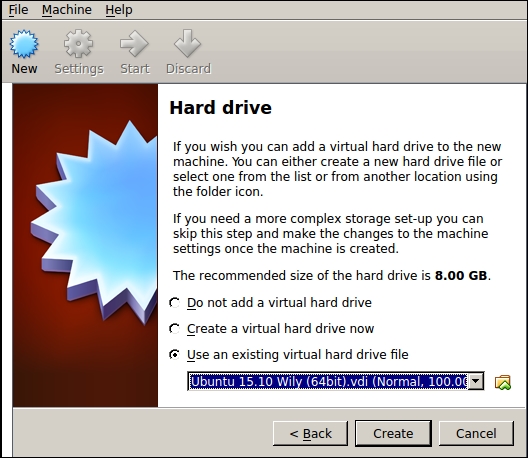
For the hard drive, use the existing virtual hard drive file Ubuntu 15.10 Wily (64bit).vdi downloaded before, as shown in the following screenshot:

Creating the virtual machine

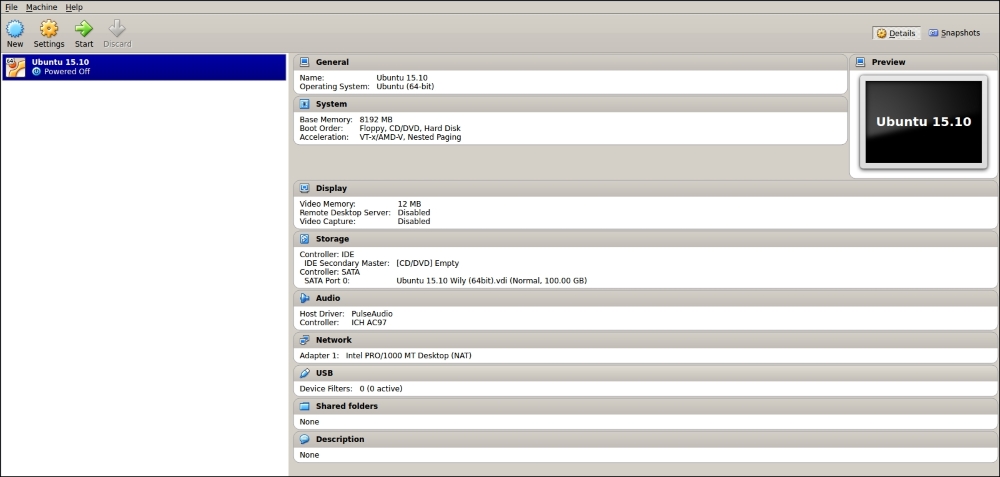
After this, you can start your virtual machine by clicking on the Start button. Remember to select the right machine before you start it. In our case, we only have one, but you could have more:

Creating the virtual machine

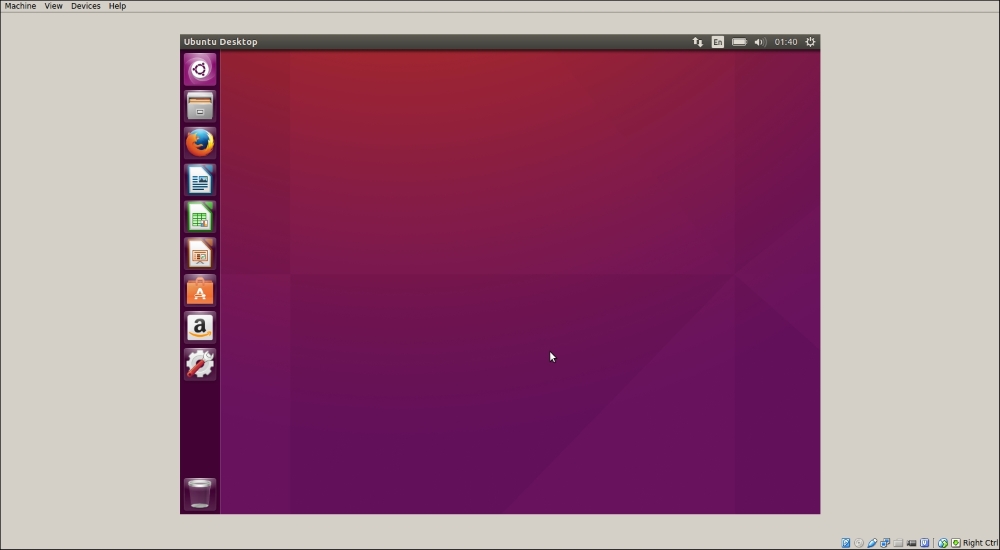
Once the virtual machine starts, you should see another window, as seen in the following screenshot. It is the Ubuntu 15.10 OS with ROS installed (use osboxes.org as the password to log in):

Creating the virtual machine

When you finish these steps, install ROS Kinetic as you would on a regular computer following the steps of the previous sections, and you will have a full copy of ROS Kinetic that can be used with this book. You can run all the examples and stacks that we are going to work with. Unfortunately, VirtualBox has problems when working with real hardware, and it's possible that you may not be able to use this copy of ROS Kinetic with the examples given in Chapter 4, 3D Modeling and Simulation.

CONTINUE READING
83
Tech Concepts
36
Programming languages
73
Tech Tools
Icon Unlimited access to the largest independent learning library in tech of over 8,000 expert-authored tech books and videos.
Icon Innovative learning tools, including AI book assistants, code context explainers, and text-to-speech.
Icon 50+ new titles added per month and exclusive early access to books as they are being written.
Learning ROS for Robotics Programming Second Edition
notes
bookmark Notes and Bookmarks search Search in title playlist Add to playlist download Download options font-size Font size

Change the font size

margin-width Margin width

Change margin width

day-mode Day/Sepia/Night Modes

Change background colour

Close icon Search
Country selected

Close icon Your notes and bookmarks

Confirmation

Modal Close icon
claim successful

Buy this book with your credits?

Modal Close icon
Are you sure you want to buy this book with one of your credits?
Close
YES, BUY

Submit Your Feedback

Modal Close icon
Modal Close icon
Modal Close icon