Sign In Start Free Trial
Account

Add to playlist

Create a Playlist

Modal Close icon
You need to login to use this feature.
  • Book Overview & Buying Learning C for Arduino
  • Table Of Contents Toc
Learning C for Arduino

Learning C for Arduino

By : Omar Faruk Towaha
2.5 (10)
close
close
Learning C for Arduino

Learning C for Arduino

2.5 (10)
By: Omar Faruk Towaha

Overview of this book

This book will start with the fundamentals of C programming and programming topics, such data types, functions, decision making, program loops, pointers, and structures, with the help of an Arduino board. Then you will get acquainted with Arduino interactions with sensors, LEDs, and autonomous systems and setting up the Arduino environment. Moving on you will also learn how to work on the digital and analog I/O, establish serial communications with autonomous systems, and integrate with electronic devices. By the end of the book, you will be able to make basic projects such as LED cube and smart weather system that leverages C.
Table of Contents (11 chapters)
close
close

Connecting your Arduino

In the previous chapter, we learned how to connect an Arduino to our system. Let's do it again.

First, connect your A-B cable to your PC, and then connect the cable to the board. Your PC will make a sound to confirm that the Arduino has connected to the PC, and the on-board on/off LED will turn on.

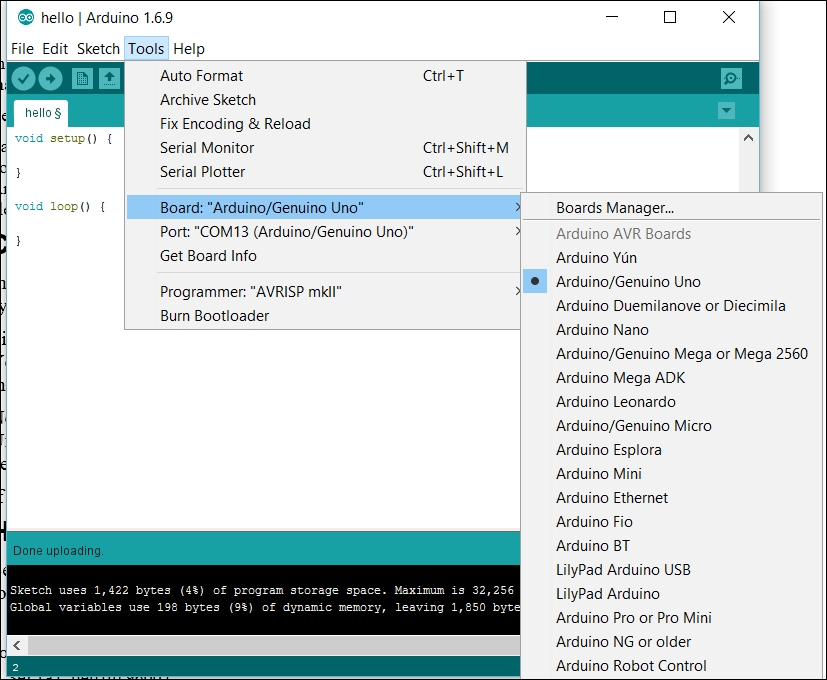
Now open the Arduino IDE. From the menu, go to Tools | Board | Arduino/Genuino Uno. You can select any board you have bought from the list. See the following screenshot for the list:

Connecting your Arduino

Now let's do the tricky part. You have to select the port on which the Arduino is connected. There are a lot of things you can do to find out. We will discuss few of them in Chapter 10, Few Error Handlings. If you have the latest version of Arduino IDE and go to Tools | Port , and you will see a bunch of port lists, but on the port on which your Arduino is connected, you will see something similar to the following. In my case, it is port number COM13 (on Windows). Select the...

Visually different images
CONTINUE READING
83
Tech Concepts
36
Programming languages
73
Tech Tools
Icon Unlimited access to the largest independent learning library in tech of over 8,000 expert-authored tech books and videos.
Icon Innovative learning tools, including AI book assistants, code context explainers, and text-to-speech.
Icon 50+ new titles added per month and exclusive early access to books as they are being written.
Learning C for Arduino
notes
bookmark Notes and Bookmarks search Search in title playlist Add to playlist font-size Font size

Change the font size

margin-width Margin width

Change margin width

day-mode Day/Sepia/Night Modes

Change background colour

Close icon Search
Country selected

Close icon Your notes and bookmarks

Confirmation

Modal Close icon
claim successful

Buy this book with your credits?

Modal Close icon
Are you sure you want to buy this book with one of your credits?
Close
YES, BUY

Submit Your Feedback

Modal Close icon
Modal Close icon
Modal Close icon