Sign In Start Free Trial
Account

Add to playlist

Create a Playlist

Modal Close icon
You need to login to use this feature.
  • Book Overview & Buying ESP8266 Internet of Things Cookbook
  • Table Of Contents Toc
ESP8266 Internet of Things Cookbook

ESP8266 Internet of Things Cookbook

By : Marco Schwartz
3.2 (5)
close
close
ESP8266 Internet of Things Cookbook

ESP8266 Internet of Things Cookbook

3.2 (5)
By: Marco Schwartz

Overview of this book

The ESP8266 Wi-Fi Module is a self contained System on Chip (SOC) with an integrated TCP/IP protocol stack and can give any microcontroller access to your Wi-Fi network. It is capable of either hosting an application or offloading all Wi-Fi networking functions from another application processor. This book contains practical recipes that will help you master all ESP8266 functionalities. You will start by configuring and customizing the chip in line with your requirements. Then you will focus on core topics such as on-board processing, sensors, GPIOs, programming, networking, integration with external components, and so on. We will also teach you how to leverage Arduino using the ESP8266 and you'll learn about its libraries, file system, OTA updates, and so on. The book also provide recipes on web servers, testing, connecting with the cloud, and troubleshooting techniques. Programming aspects include MicroPython and how to leverage it to get started with the ESP8266. Towards the end, we will use these concepts and create an interesting project (IOT). By the end of the book, readers will be proficient enough to use the ESP8266 board efficiently.
Table of Contents (9 chapters)
close
close
8
Index

Setting up the Arduino development environment for the ESP8266

To start us off, we will look at how to set up an Arduino IDE development environment so that we can use it to program the ESP8266. This will involve installing the Arduino IDE and getting the board definitions for our ESP8266 module.

Getting ready

The first thing you should do is download the Arduino IDE if you do not already have it installed on your computer. You can do that from this link:

https://www.arduino.cc/en/Main/Software.

The web page will appear as shown. It features that latest version of the Arduino IDE. Select your operating system and download the latest version that is available when you access the link (it was 1.6.13 at the time of writing):

Getting ready

When the download is complete, install the Arduino IDE and run it on your computer.

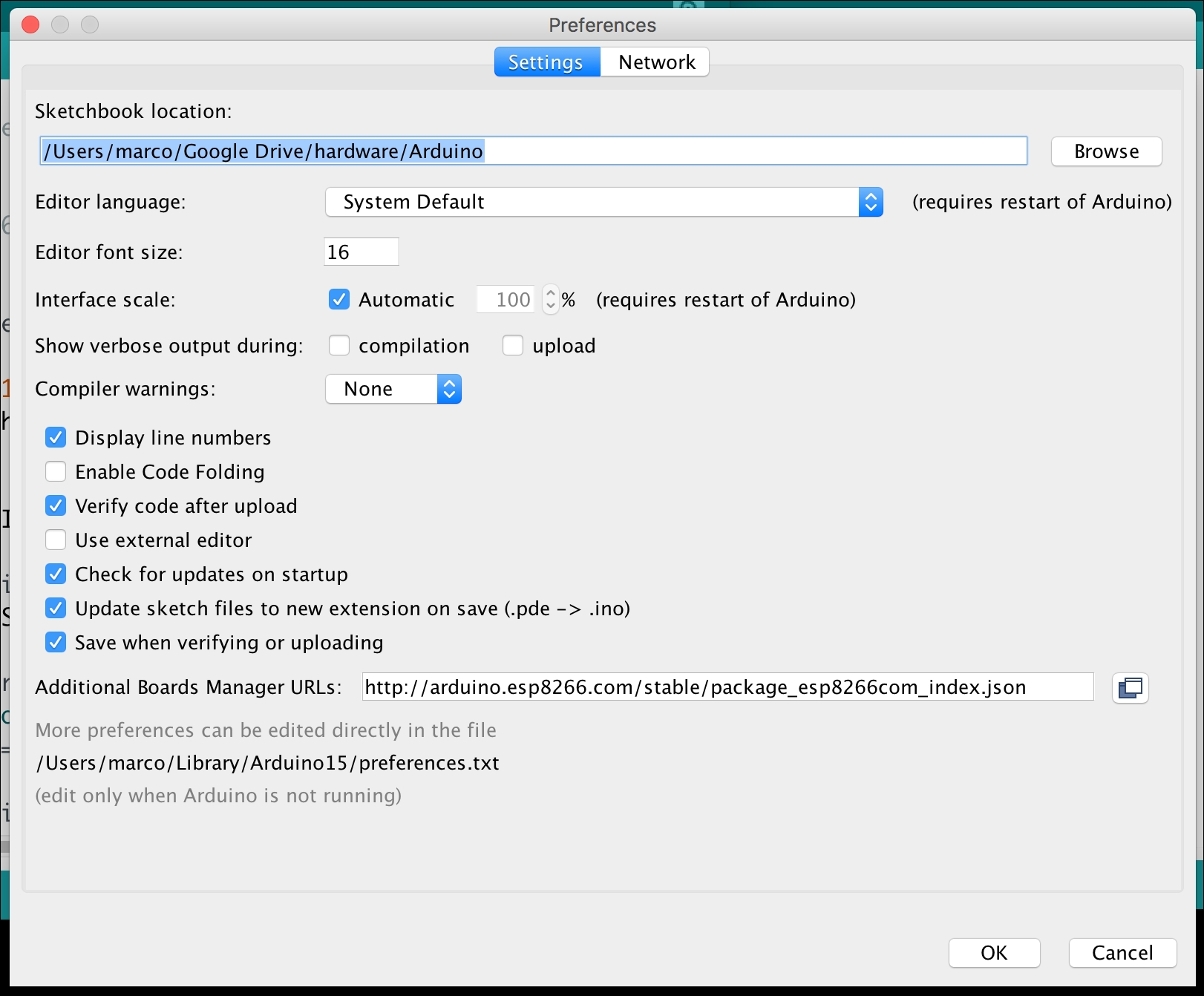
Now that the installation is complete, it is time to get the ESP8266 definitions. Open the preference window in the Arduino IDE from File|Preferences or by pressing CTRL + Comma.

Copy this URL: http://arduino.esp8266.com/stable/package_esp8266com_index.json.

Paste it in the file labeled Additional Board Manager URLs, as shown in the following screenshot. If you are adding other URLs too, use a comma to separate them:

Getting ready

Open the board manager from the Tools|Board menu and install the ESP8266 platform. The board manager will download the board definition files from the link provided in the preferences window and install them. When the installation is complete, the ESP8266 board definitions should appear as shown in the screenshot. Now you can select your ESP8266 board from the Tools|Board menu:

Getting ready

How it works…

The Arduino IDE is an open source development environment used for programming Arduino boards and Arduino-based boards. It is also used to upload sketches to other open source boards, such as the ESP8266. This makes it an important accessory when creating Internet of Things (IoT) projects.

See also

These are the basics for the Arduino framework and they will be applied throughout this book to develop IoT projects.

Visually different images
CONTINUE READING
83
Tech Concepts
36
Programming languages
73
Tech Tools
Icon Unlimited access to the largest independent learning library in tech of over 8,000 expert-authored tech books and videos.
Icon Innovative learning tools, including AI book assistants, code context explainers, and text-to-speech.
Icon 50+ new titles added per month and exclusive early access to books as they are being written.
ESP8266 Internet of Things Cookbook
notes
bookmark Notes and Bookmarks search Search in title playlist Add to playlist download Download options font-size Font size

Change the font size

margin-width Margin width

Change margin width

day-mode Day/Sepia/Night Modes

Change background colour

Close icon Search
Country selected

Close icon Your notes and bookmarks

Confirmation

Modal Close icon
claim successful

Buy this book with your credits?

Modal Close icon
Are you sure you want to buy this book with one of your credits?
Close
YES, BUY

Submit Your Feedback

Modal Close icon
Modal Close icon
Modal Close icon