The text data that we are going to discuss here is unstructured text data, which consists of written sentences. Most of the time, this text data cannot be used as it is for analysis because it contains some noisy elements, that is, elements that do not really contribute much to the meaning of the sentence at all. These noisy elements need to be removed because they do not contribute to the meaning and semantics of the text. If they're not removed, they can not only waste system memory and processing time, but also negatively impact the accuracy of the results. Data cleaning is the art of extracting meaningful portions from data by eliminating unnecessary details. Consider the sentence, "He tweeted, 'Live coverage of General Elections available at this.tv/show/ge2019. _/\_ Please tune in :) '. "
In this example, to perform NLP tasks on the sentence, we will need to remove the emojis, punctuation, and stop words, and then change the words into their base grammatical form.
To achieve this, methods such as stopword removal, tokenization, and stemming are used. We will explore them in detail in the upcoming sections. Before we do so, let's get acquainted with some basic NLP libraries that we will be using here:
Re: This is a standard Python library that's used for string searching and string manipulation. It contains methods such as match(), search(), findall(), split(), and sub(), which are used for basic string matching, searching, replacing, and more, using regular expressions. A regular expression is nothing but a set of characters in a specific order that represents a pattern. This pattern is searched for in the texts.textblob: This is an open source Python library that provides different methods for performing various NLP tasks such as tokenization and PoS tagging. It is similar to nltk, which was introduced in Chapter 1, Introduction to Natural Language Processing. It is built on the top of nltk and is much simpler as it has an easier to use interface and excellent documentation. In projects that don't involve a lot of complexity, it should be preferable to nltk.keras: This is an open source, high-level neural network library that's was developed on top of another neural network library called TensorFlow. In addition to neural network functionality, it also provides methods for basic text processing and NLP tasks.
Tokenization
Tokenization and word tokenizers were briefly described in Chapter 1, Introduction to Natural Language Processing. Tokenization is the process of splitting sentences into their constituents; that is, words and punctuation. Let's perform a simple exercise to see how this can be done using various packages.
Exercise 2.01: Text Cleaning and Tokenization
In this exercise, we will clean some text and extract the tokens from it. Follow these steps to complete this exercise:
- Open a Jupyter Notebook.
- Import the
re package:import re
- Create a method called
clean_text() that will delete all characters other than digits, alphabetical characters, and whitespaces from the text and split the text into tokens. For this, we will use the text which matches with all non-alphanumeric characters, and we will replace all of them with an empty string:def clean_text(sentence):
return re.sub(r'([^\s\w]|_)+', ' ', sentence).split()
- Store the sentence to be cleaned in a variable named
sentence and pass it through the preceding function. Add the following code to this: implementsentence = 'Sunil tweeted, "Witnessing 70th Republic Day "\
"of India from Rajpath, New Delhi. "\
"Mesmerizing performance by Indian Army! "\
"Awesome airshow! @india_official "\
"@indian_army #India #70thRepublic_Day. "\
"For more photos ping me [email protected] :)"'
clean_text(sentence)
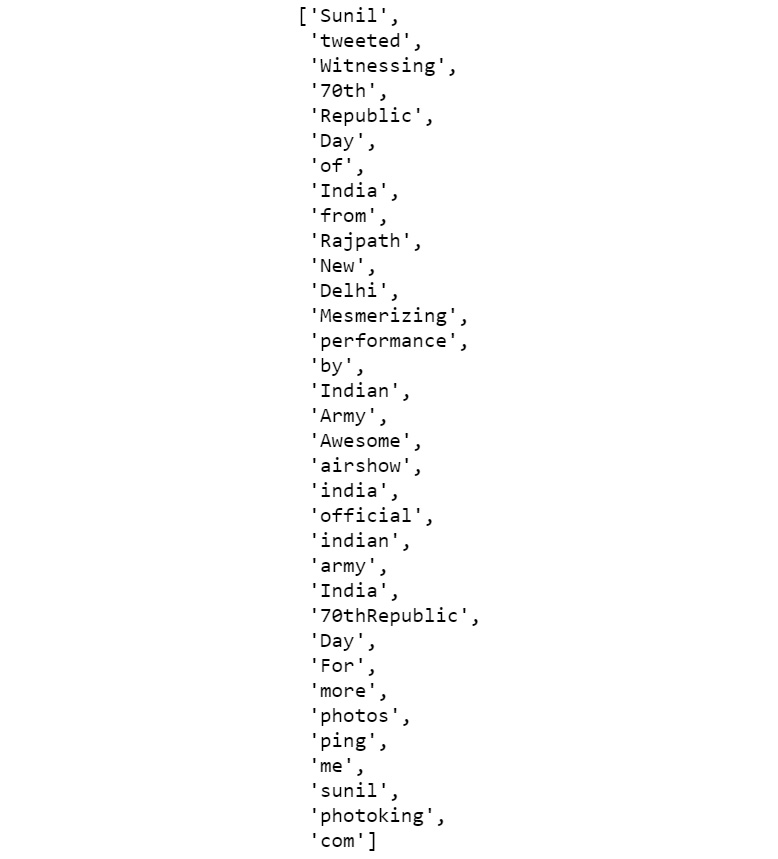
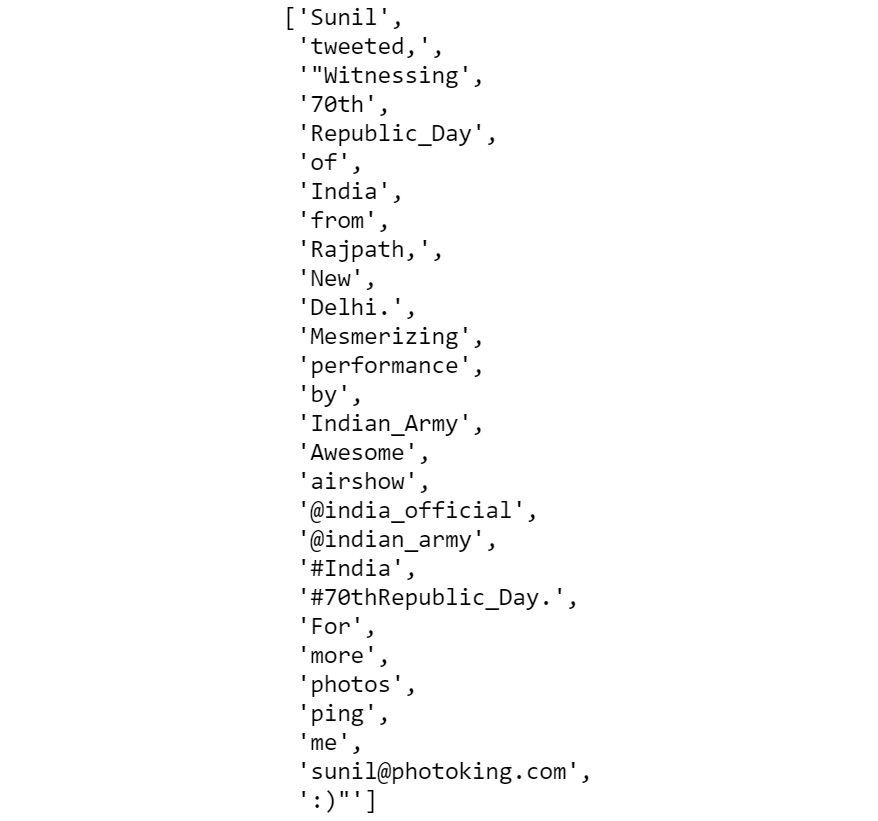
The preceding command fragments the string wherever any blank space is present. The output should be as follows:
Figure 2.6: Fragmented string
With that, we have learned how to extract tokens from text. Often, extracting each token separately does not help. For instance, consider the sentence, "I don't hate you, but your behavior." Here, if we process each of the tokens, such as "hate" and "behavior," separately, then the true meaning of the sentence would not be comprehended. In this case, the context in which these tokens are present becomes essential. Thus, we consider n consecutive tokens at a time. n-grams refers to the grouping of n consecutive tokens together.
Note
To access the source code for this specific section, please refer to https://packt.live/2CQikt7.
You can also run this example online at https://packt.live/33cn0nF.
Next, we will look at an exercise where n-grams can be extracted from a given text.
Exercise 2.02: Extracting n-grams
In this exercise, we will extract n-grams using three different methods. First, we will use custom-defined functions, and then the nltk and textblob libraries. Follow these steps to complete this exercise:
- Open a Jupyter Notebook.
- Import the
re package and create a custom-defined function, which we can use to extract n-grams. Add the following code to do this:import re
def n_gram_extractor(sentence, n):
tokens = re.sub(r'([^\s\w]|_)+', ' ', sentence).split()
for i in range(len(tokens)-n+1):
print(tokens[i:i+n])
In the preceding function, we are splitting the sentence into tokens using regex, then looping over the tokens, taking n consecutive tokens at a time.
- If
n is 2, two consecutive tokens will be taken, resulting in bigrams. To check the bigrams, we pass the function the text and with n=2. Add the following code to do this:n_gram_extractor('The cute little boy is playing with the kitten.', \
2)The preceding code generates the following output:
['The', 'cute']
['cute', 'little']
['little', 'boy']
['boy', 'is']
['is', 'playing']
['playing', 'with']
['with', 'the']
['the', 'kitten']
- To check the trigrams, we pass the function with the text and with
n=3. Add the following code to do this:n_gram_extractor('The cute little boy is playing with the kitten.', \
3)The preceding code generates the following output:
['The', 'cute', 'little']
['cute', 'little', 'boy']
['little', 'boy', 'is']
['boy', 'is', 'playing']
['is', 'playing', 'with']
['playing', 'with', 'the']
['with', 'the', 'kitten']
- To check the bigrams using the
nltk library, add the following code:from nltk import ngrams
list(ngrams('The cute little boy is playing with the kitten.'\
.split(), 2))The preceding code generates the following output:
[('The', 'cute'),
 ('cute', 'little'),
 ('little', 'boy'),
 ('boy', 'is'),
 ('is', 'playing'),
 ('playing', 'with'),
 ('with', 'the'),
 ('the', 'kitten')]
- To check the trigrams using the
nltk library, add the following code:list(ngrams('The cute little boy is playing with the kitten.'.split(), 3))The preceding code generates the following output:
[('The', 'cute', 'little'),
 ('cute', 'little', 'boy'),
 ('little', 'boy', 'is'),
 ('boy', 'is', 'playing'),
 ('playing', 'with', 'the'),
 ('with', 'the', 'kitten.')]
- To check the bigrams using the
textblob library, add the following code:!pip install -U textblob
from textblob import TextBlob
blob = TextBlob("The cute little boy is playing with the kitten.")
blob.ngrams(n=2)The preceding code generates the following output:
[WordList(['The', 'cute']),
 WordList(['cute', 'little']),
 WordList(['little', 'boy']),
 WordList(['boy', 'is']),
 WordList(['is', 'playing']),
 WordList(['playing', 'with']),
 WordList(['with', 'the']),
 WordList(['the', 'kitten'])]
- To check the trigrams using the
textblob library, add the following code:blob.ngrams(n=3)
The preceding code generates the following output:
[WordList(['The', 'cute', 'little']),
 WordList(['cute', 'little', 'boy']),
 WordList(['little', 'boy', 'is']),
 WordList(['boy', 'is' 'playing']),
 WordList(['is', 'playing' 'with']),
 WordList(['playing', 'with' 'the']),
 WordList(['with', 'the' 'kitten'])]
In this exercise, we learned how to generate n-grams using various methods.
Note
To access the source code for this specific section, please refer to https://packt.live/2PabHUK.
You can also run this example online at https://packt.live/2XbjFRX.
Exercise 2.03: Tokenizing Text with Keras and TextBlob
In this exercise, we will use keras and textblob to tokenize texts. Follow these steps to complete this exercise:
- Open a Jupyter Notebook and insert a new cell.
- Import the
keras and textblob libraries and declare a variable named sentence, as follows.from keras.preprocessing.text import text_to_word_sequence
from textblob import TextBlob
sentence = 'Sunil tweeted, "Witnessing 70th Republic Day "\
"of India from Rajpath, New Delhi. "\
"Mesmerizing performance by Indian Army! "\
"Awesome airshow! @india_official "\
"@indian_army #India #70thRepublic_Day. "\
"For more photos ping me [email protected] :)"'
- To tokenize using the
keras library, add the following code:def get_keras_tokens(text):
return text_to_word_sequence(text)
get_keras_tokens(sentence)
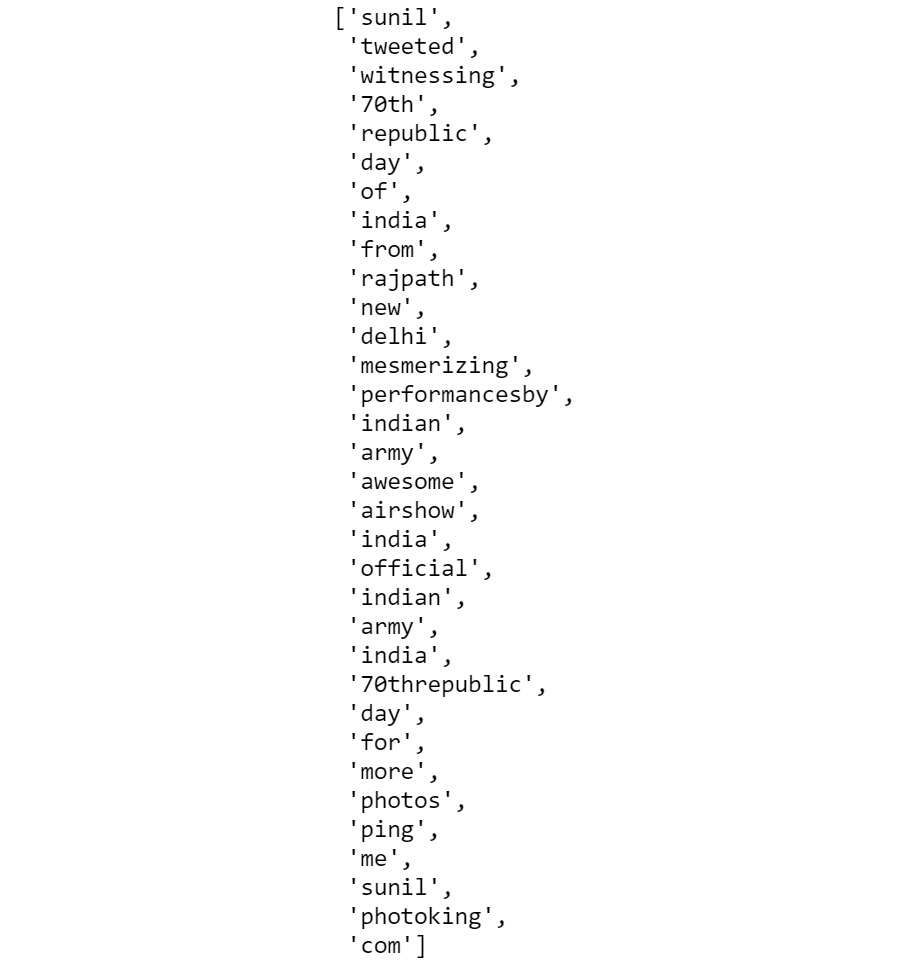
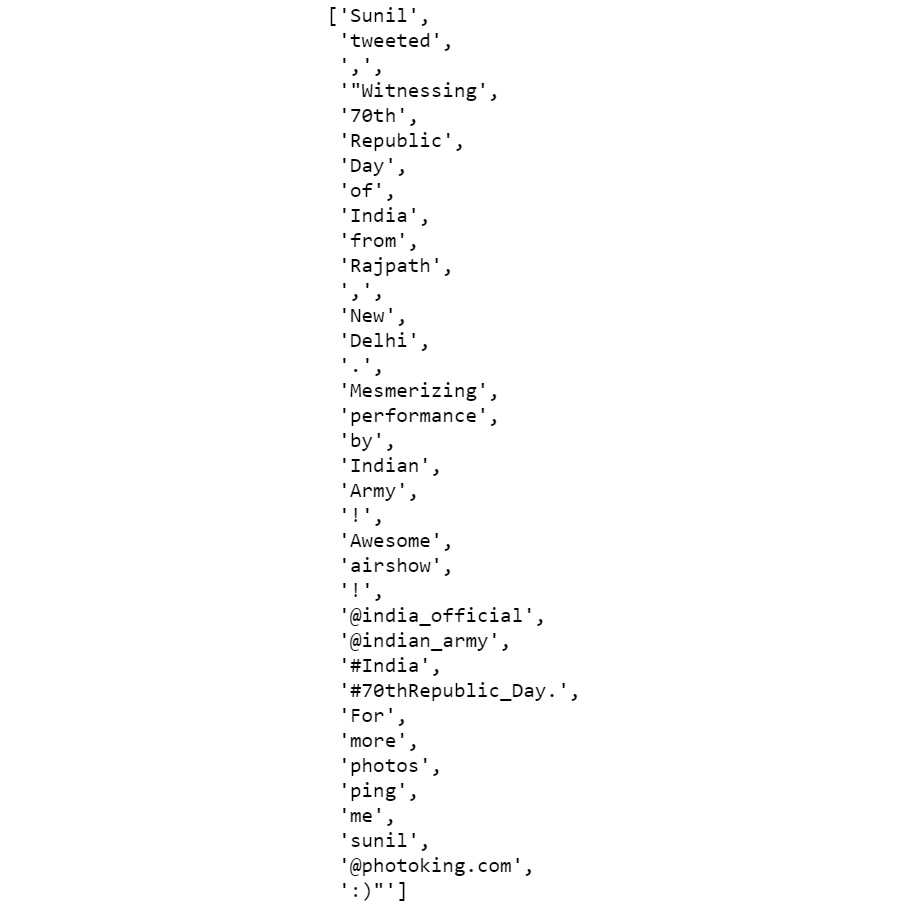
The preceding code generates the following output:
Figure 2.7: Tokenization using Keras
- To tokenize using the
textblob library, add the following code:def get_textblob_tokens(text):
blob = TextBlob(text)
return blob.words
get_textblob_tokens(sentence)
The preceding code generates the following output:
Figure 2.8: Tokenization using textblob
With that, we have learned how to tokenize texts using the keras and textblob libraries.
Note
To access the source code for this specific section, please refer to https://packt.live/3393hFi.
You can also run this example online at https://packt.live/39Dtu09.
In the next section, we will discuss the different types of tokenizers.
Types of Tokenizers
There are different types of tokenizers that come in handy for specific tasks. Let's look at the ones provided by nltk one by one:
- Whitespace tokenizer: This is the simplest type of tokenizer. It splits a string wherever a space, tab, or newline character is present.
- Tweet tokenizer: This is specifically designed for tokenizing tweets. It takes care of all the special characters and emojis used in tweets and returns clean tokens.
- MWE tokenizer: MWE stands for Multi-Word Expression. Here, certain groups of multiple words are treated as one entity during tokenization, such as "United States of America," "People's Republic of China," "not only," and "but also." These predefined groups are added at the beginning with
mwe() methods.
- Regular expression tokenizer: These tokenizers are developed using regular expressions. Sentences are split based on the occurrence of a specific pattern (a regular expression).
- WordPunctTokenizer: This splits a piece of text into a list of alphabetical and non-alphabetical characters. It actually splits text into tokens using a fixed
regex, that is, '\w+|[^\w\s]+'.
Now that we have learned about the different types of tokenizers, in the next section, we will carry out an exercise to get a better understanding of them.
Exercise 2.04: Tokenizing Text Using Various Tokenizers
In this exercise, we will use different tokenizers to tokenize text. Perform the following steps to implement this exercise:
- Open a Jupyter Notebook.
- Insert a new cell and the following code to import all the tokenizers and declare a variable sentence:
from nltk.tokenize import TweetTokenizer
from nltk.tokenize import MWETokenizer
from nltk.tokenize import RegexpTokenizer
from nltk.tokenize import WhitespaceTokenizer
from nltk.tokenize import WordPunctTokenizer
sentence = 'Sunil tweeted, "Witnessing 70th Republic Day "\
            "of India from Rajpath, New Delhi. "\
            "Mesmerizing performance by Indian Army! "\
            "Awesome airshow! @india_official "\
            "@indian_army #India #70thRepublic_Day. "\
            "For more photos ping me [email protected] :)"'
- To tokenize the text using
TweetTokenizer, add the following code:def tokenize_with_tweet_tokenizer(text):
# Here will create an object of tweetTokenizer
tweet_tokenizer = TweetTokenizer()
"""
Then we will call the tokenize method of
tweetTokenizer which will return token list of sentences.
"""
return tweet_tokenizer.tokenize(text)
tokenize_with_tweet_tokenizer(sentence)
Note
The # symbol in the code snippet above denotes a code comment. Comments are added into code to help explain specific bits of logic.
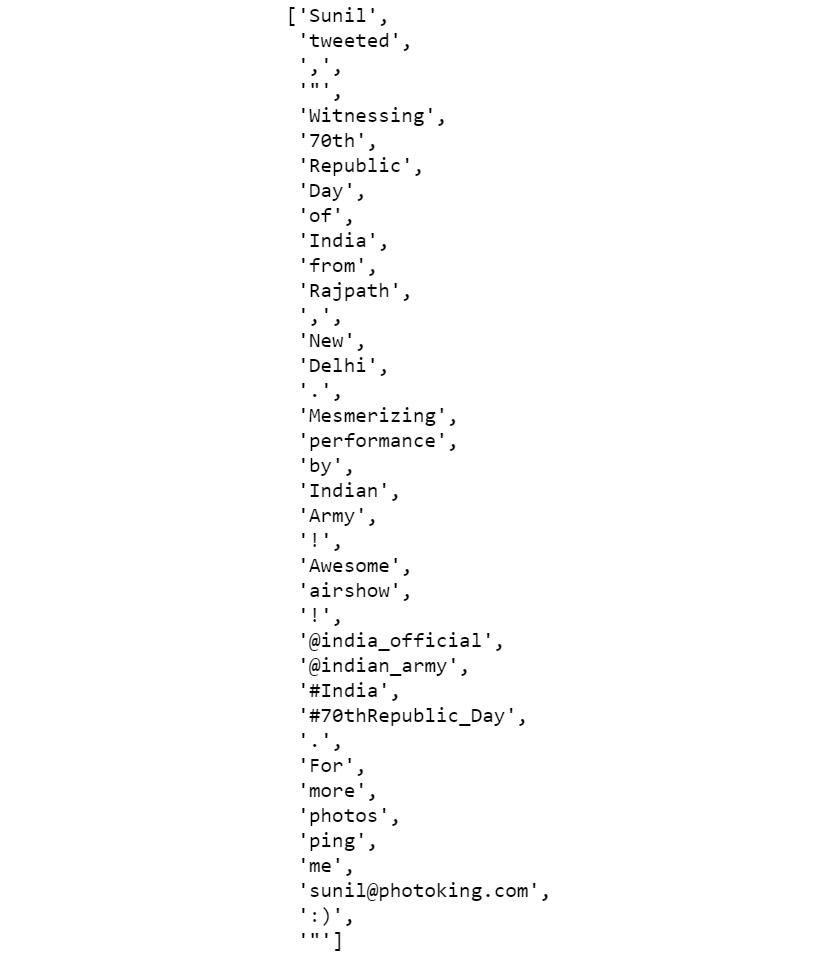
The preceding code generates the following output:
Figure 2.9: Tokenization using TweetTokenizer
As you can see, the hashtags, emojis, websites, and Twitter IDs are extracted as single tokens. If we had used the white space tokenizer, we would have got hash, dots, and the @ symbol as separate tokens.
- To tokenize the text using
MWETokenizer, add the following code:def tokenize_with_mwe(text):
mwe_tokenizer = MWETokenizer([('Republic', 'Day')])
mwe_tokenizer.add_mwe(('Indian', 'Army'))
return mwe_tokenizer.tokenize(text.split())
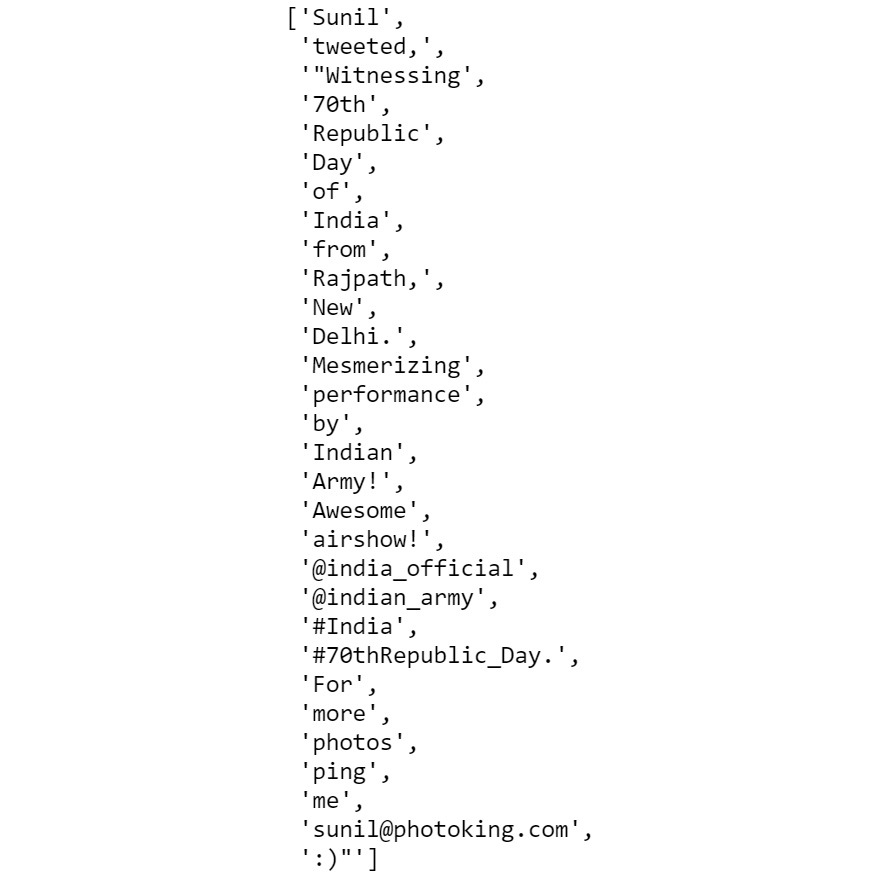
tokenize_with_mwe(sentence)The preceding code generates the following output:
Figure 2.10: Tokenization using the MWE tokenizer
In the preceding screenshot, the words "Indian" and "Army!", which should have been treated as a single identity, were treated separately. This is because "Army!" (not "Army") is treated as a token. Let's see how this can be fixed in the next step.
- Add the following code to fix the issues in the previous step:
tokenize_with_mwe(sentence.replace('!',''))The preceding code generates the following output:
Figure 2.11: Tokenization using the MWE tokenizer after removing the "!" sign
Here, we can see that instead of being treated as separate tokens, "Indian" and "Army" are treated as a single entity.
- To tokenize the text using the regular expression tokenizer, add the following code:
def tokenize_with_regex_tokenizer(text):
    reg_tokenizer = RegexpTokenizer('\w+|\$[\d\.]+|\S+')
    return reg_tokenizer.tokenize(text)
tokenize_with_regex_tokenizer(sentence)
The preceding code generates the following output:
Figure 2.12: Tokenization using the regular expression tokenizer
- To tokenize the text using the whitespace tokenizer, add the following code:
def tokenize_with_wst(text):
    wh_tokenizer = WhitespaceTokenizer()
    return wh_tokenizer.tokenize(text)
tokenize_with_wst(sentence)
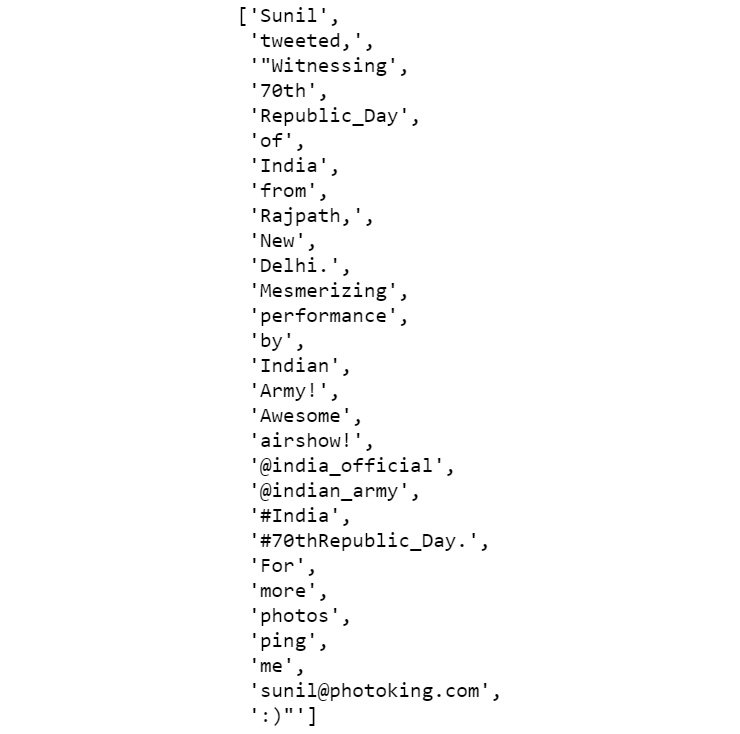
The preceding code generates the following output:
Figure 2.13: Tokenization using the whitespace tokenizer
- To tokenize the text using the Word Punct tokenizer, add the following code:
def tokenize_with_wordpunct_tokenizer(text):
    wp_tokenizer = WordPunctTokenizer()
    return wp_tokenizer.tokenize(text)
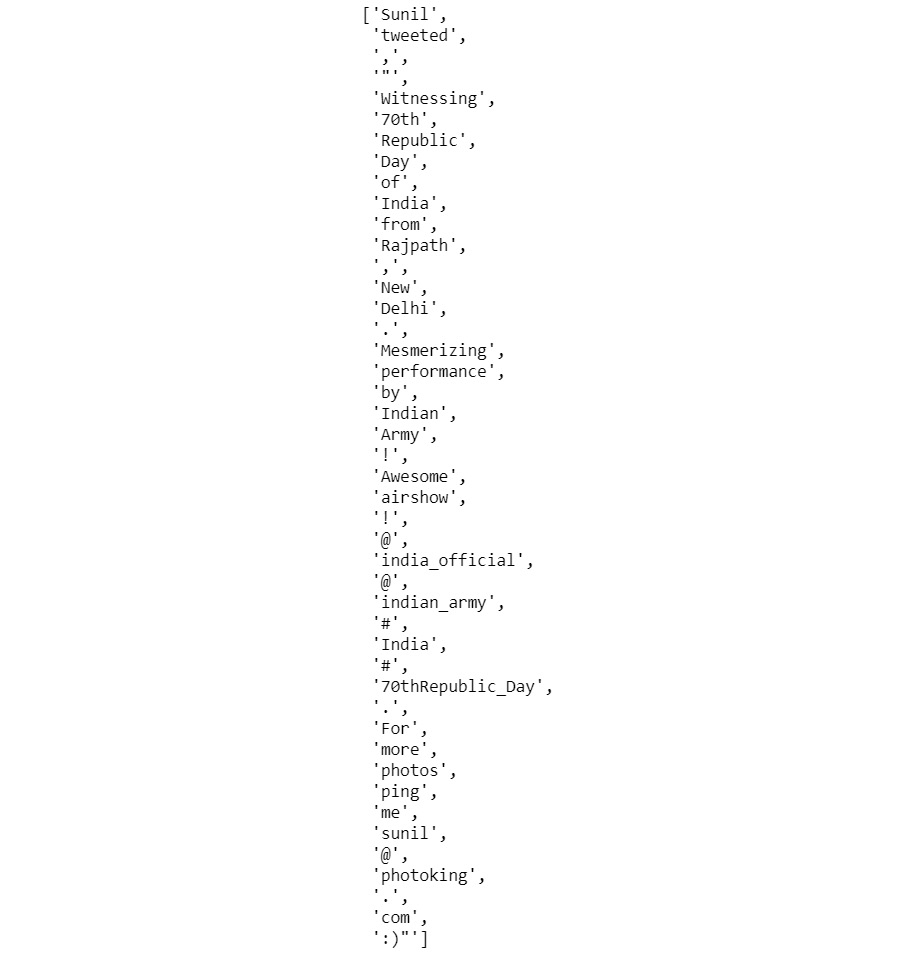
tokenize_with_wordpunct_tokenizer(sentence)
The preceding code generates the following output:
Figure 2.14: Tokenization using the Word Punct tokenizer
In this section, we have learned about different tokenization techniques and their nltk implementation.
Note
To access the source code for this specific section, please refer to https://packt.live/3hSbDWi.
You can also run this example online at https://packt.live/3hOi7oR.
Now, we're ready to use them in our programs.
Stemming
In many languages, the base forms of words change when they're used in sentences. For example, the word "produce" can be written as "production" or "produced" or even "producing," depending on the context. The process of converting a word back into its base form is known as stemming. It is essential to do this, because without it, algorithms would treat two or more different forms of the same word as different entities, despite them having the same semantic meaning. So, the words "producing" and "produced" would be treated as different entities, which can lead to erroneous inferences. In Python, RegexpStemmer and PorterStemmer are the most widely used stemmers. Let's explore them one at a time.
RegexpStemmer
RegexpStemmer uses regular expressions to check whether morphological or structural prefixes or suffixes are present. For instance, in many cases, verbs in the present continuous tense (the present tense form ending with "ing") can be restored to their base form simply by removing "ing" from the end; for example, "playing" becomes "play".
Let's complete the following exercise to get some hands-on experience with RegexpStemmer.
Exercise 2.05: Converting Words in the Present Continuous Tense into Base Words with RegexpStemmer
In this exercise, we will use RegexpStemmer on text to convert words into their basic form by removing some generic suffixes such as "ing" and "ed". To use nltk's regex_stemmer, we have to create an object of RegexpStemmer by passing the regex of the suffix or prefix and an integer, min, which indicates the minimum length of the stemmed string. Follow these steps to complete this exercise:
- Open a Jupyter Notebook.
- Insert a new cell and import
RegexpStemmer:from nltk.stem import RegexpStemmer
- Use
regex_stemmer to stem each word of the sentence variable. Add the following code to do this:def get_stems(text):
"""
Creating an object of RegexpStemmer, any string ending
with the given regex 'ing$' will be removed.
"""
regex_stemmer = RegexpStemmer('ing$', min=4)
"""
The below code line will convert every word into its
stem using regex stemmer and then join them with space.
"""
return ' '.join([regex_stemmer.stem(wd) for \
wd in text.split()])
sentence = "I love playing football"
get_stems(sentence)The preceding code generates the following output:
'I love play football'
As we can see, the word playing has been changed into its base form, play. In this exercise, we learned how we can perform stemming using nltk's RegexpStemmer.
Note
To access the source code for this specific section, please refer to https://packt.live/3hRYUm6.
You can also run this example online at https://packt.live/2D0Ztvk.
The Porter Stemmer
The Porter stemmer is the most common stemmer for dealing with English words. It removes various morphological and inflectional endings (such as suffixes, prefixes, and the plural "s") from English words. In doing so, it helps us extract the base form of a word from its variations. To get a better understanding of this, let's carry out a simple exercise.
Exercise 2.06: Using the Porter Stemmer
In this exercise, we will apply the Porter stemmer to some text. Follow these steps to complete this exercise:
- Open a Jupyter Notebook.
- Import
nltk and any related packages and declare a sentence variable. Add the following code to do this:from nltk.stem.porter import *
sentence = "Before eating, it would be nice to "\
"sanitize your hands with a sanitizer"
- Now, we'll make use of the Porter stemmer to stem each word of the
sentence variables:def get_stems(text):
ps_stemmer = PorterStemmer()
return ' '.join([ps_stemmer.stem(wd) for \
wd in text.split()])
get_stems(sentence)
The preceding code generates the following output:
'befor eating, it would be nice to sanit your hand wash with a sanit'
Note
To access the source code for this specific section, please refer to https://packt.live/2CUqelc.
You can also run this example online at https://packt.live/2X8WUhD.
PorterStemmer is a generic rule-based stemmer that tries to convert a word into its basic form by removing common suffixes and prefixes of the English language.
Though stemming is a useful technique in NLP, it has a severe drawback. As we can see from this exercise, we find that, while eating has been converted into eat (which is its proper grammatical base form), the word sanitize has been converted into sanit (which isn't the proper grammatical base form). This may lead to some problems if we use it. To overcome this issue, there is another technique we can use called lemmatization.
Lemmatization
As we saw in the previous section, there is a problem with stemming. It often generates meaningless words. Lemmatization deals with such cases by using vocabulary and analyzing the words' morphologies. It returns the base forms of words that can be found in dictionaries. Let's walk through a simple exercise to understand this better.
Exercise 2.07: Performing Lemmatization
In this exercise, we will perform lemmatization on some text. Follow these steps to complete this exercise:
- Open a Jupyter Notebook.
- Import
nltk and its related packages, and then declare a sentence variable. Add the following code to implement this:import nltk
from nltk.stem import WordNetLemmatizer
from nltk import word_tokenize
nltk.download('wordnet')
nltk.download('punkt')
sentence = "The products produced by the process today are "\
"far better than what it produces generally."
- To lemmatize the tokens, we extracted from the sentence, add the following code:
lemmatizer = WordNetLemmatizer()
def get_lemmas(text):
    lemmatizer = WordNetLemmatizer()
    return ' '.join([lemmatizer.lemmatize(word) for \
                     word in word_tokenize(text)])
get_lemmas(sentence)
The preceding code generates the following output:
'The product produced by the process today are far better than what it produce generally.'
With that, we learned how to generate the lemma of a word. The lemma is the correct grammatical base form. They use the vocabulary to match the word to its correct nearest grammatical form.
Note
To access the source code for this specific section, please refer to https://packt.live/2X5JEKA.
You can also run this example online at https://packt.live/30Zqt6v.
In the next section, we will deal with other kinds of word variations by looking at singularizing and pluralizing words using textblob.
Exercise 2.08: Singularizing and Pluralizing Words
In this exercise, we will make use of the textblob library to singularize and pluralize words in the given text. Follow these steps to complete this exercise:
- Open a Jupyter Notebook.
- Import
TextBlob and declare a sentence variable. Add the following code to implement this:from textblob import TextBlob
sentence = TextBlob('She sells seashells on the seashore')To check the list of words in the sentence, type the following code:
sentence.words
The preceding code generates the following output:
WordList(['She', 'sells', 'seashells', 'on', 'the', 'seashore'])
- To singularize the third word in the sentence, type the following code:
def singularize(word):
    return word.singularize()
singularize(sentence.words[2])
The preceding code generates the following output:
'seashell'
- To pluralize the fifth word in the given sentence, type the following code:
def pluralize(word):
    return word.pluralize()
pluralize(sentence.words[5])
The preceding code generates the following output:
'seashores'
Note
To access the source code for this specific section, please refer to https://packt.live/3gooUoQ.
You can also run this example online at https://packt.live/309Gqrm.
Now, in the next section, we will learn about another preprocessing task: language translation.
Language Translation
You might have used Google Translate before, which gives the exact translation of a word in another language; this is an example of language translation or machine translation. In Python, we can use TextBlob to translate text from one language into another. TextBlob provides a method called translate(), in which you have to pass text in the source language. The method will return the translated word in the destination language. Let's look at how this is done.
Exercise 2.09: Language Translation
In this exercise, we will make use of the TextBlob library to translate a sentence from Spanish into English. Follow these steps to implement this exercise:
- Open a Jupyter Notebook.
- Import
TextBlob, as follows:from textblob import TextBlob
- Make use of the
translate() function of TextBlob to translate the input text from Spanish to English. Add the following code to do this:def translate(text,from_l,to_l):
en_blob = TextBlob(text)
return en_blob.translate(from_lang=from_l, to=to_l)
translate(text='muy bien',from_l='es',to_l='en')
The preceding code generates the following output:
TextBlob("very well")
With that, we have seen how we can use TextBlob to translate from one language to another.
Note
To access the source code for this specific section, please refer to https://packt.live/2XquGiH.
You can also run this example online at https://packt.live/3hQiVK8.
In the next section, we will look at another preprocessing task: stop-word removal.
Stop-Word Removal
Stop words, such as "am," "the," and "are," occur frequently in text data. Although they help us construct sentences properly, we can find the meaning even if we remove them. This means that the meaning of text can be inferred even without them. So, removing stop words from text is one of the preprocessing steps in NLP tasks. In Python, nltk, and textblob, text can be used to remove stop words from text. To get a better understanding of this, let's look at an exercise.
Exercise 2.10: Removing Stop Words from Text
In this exercise, we will remove the stop words from a given text. Follow these steps to complete this exercise:
- Open a Jupyter Notebook.
- Import
nltk and declare a sentence variable with the text in question:from nltk import word_tokenize
sentence = "She sells seashells on the seashore"
- Define a
remove_stop_words method and remove the custom list of stop words from the sentence by using the following lines of code:def remove_stop_words(text,stop_word_list):
return ' '.join([word for word in word_tokenize(text) \
if word.lower() not in stop_word_list])
custom_stop_word_list = ['she', 'on', 'the', 'am', 'is', 'not']
remove_stop_words(sentence,custom_stop_word_list)
The preceding code generates the following output:
'sells seashells seashore'
Thus, we've seen how stop words can be removed from a sentence.
Note
To access the source code for this specific section, please refer to https://packt.live/337aMwH.
You can also run this example online at https://packt.live/30buvJF.
In the next activity, we'll put our knowledge of preprocessing steps into practice.
Activity 2.01: Extracting Top Keywords from the News Article
In this activity, you will extract the most frequently occurring keywords from a sample news article.
Note
The new article that's being used for this activity can be found at https://packt.live/314mg1r.
The following steps will help you implement this activity:
- Open a Jupyter Notebook.
- Import
nltk and any other necessary libraries.
- Define some functions to help you load the text file, convert the string into lowercase, tokenize the text, remove the stop words, and perform stemming on all the remaining tokens. Finally, define a function to calculate the frequency of all these words.
- Load
news_article.txt using a Python file reader into a single string.
- Convert the text string into lowercase.
- Split the string into tokens using a white space tokenizer.
- Remove any stop words.
- Perform stemming on all the tokens.
- Calculate the frequency of all the words after stemming.
Note
The solution for this activity can be found via this link.
With that, we have learned about the various ways we can clean unstructured data. Now, let's examine the concept of extracting features from texts.





 Free Chapter