Sign In Start Free Trial
Account

Add to playlist

Create a Playlist

Modal Close icon
You need to login to use this feature.
  • Book Overview & Buying Instant jsoup How-to
  • Table Of Contents Toc
Instant jsoup How-to

Instant jsoup How-to

By : Pete Houston
2.4 (5)
close
close
Instant jsoup How-to

Instant jsoup How-to

2.4 (5)
By: Pete Houston

Overview of this book

As you might know, there are a lot of Java libraries that support parsing HTML content out there. Jsoup is yet another HTML parsing library, but it provides a lot of functionalities and boasts much more interesting features when compared to others. Give it a try, and you will see the difference! Instant jsoup How-to provides simple and detailed instructions on how to use the Jsoup library to manipulate HTML content to suit your needs. You will learn the basic aspects of data crawling, as well as the various concepts of Jsoup so you can make the best use of the library to achieve your goals. Instant jsoup How-to will help you learn step-by-step using real-world, practical problems. You will begin by learning several basic topics, such as getting input from a URL, a file, or a string, as well as making use of DOM navigation to search for data. You will then move on to some advanced topics like how to use the CSS selector and how to clean dirty HTML data. HTML data is not always safe, and because of that, you will learn how to sanitize the dirty documents to prevent further XSS attacks. Instant jsoup How-to is a book for every Java developer who wants to learn HTML manipulation quickly and effectively. This book includes the sample source code for you to refer to with a detailed explanation of every feature of the library.
Table of Contents (2 chapters)
close
close

Extracting data using DOM (Must know)

As the input is ready for extraction, we will begin with HTML parsing using the DOM method.

Note

If you don't know what DOM is, you can have a quick start with the DOM tutorial at:

http://www.w3schools.com/htmldom/

Let's move on to the details of how it works in Jsoup.

Getting ready

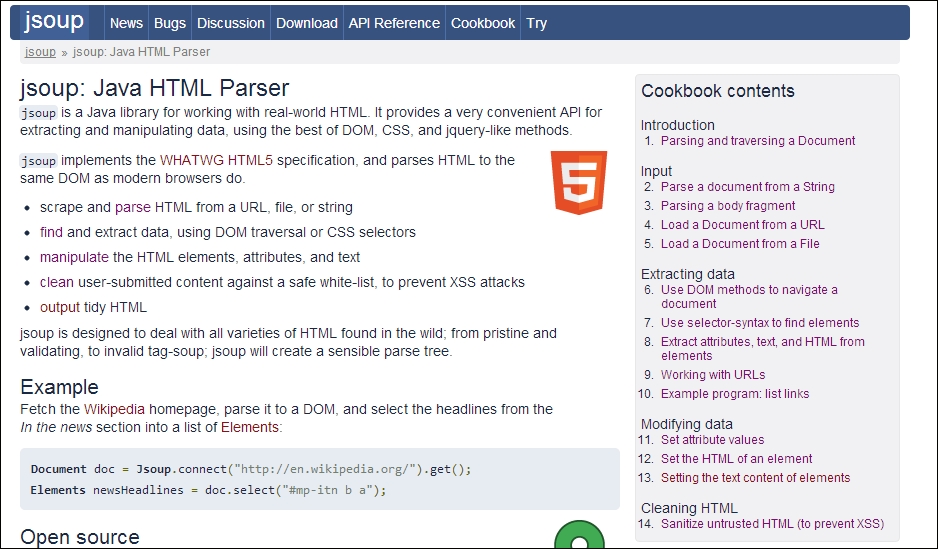
This section will parse the content of the page at, http://jsoup.org.

The index.html file in the project is provided if you want to have a file as input, instead of connecting to the URL.

How to do it...

The following screenshot shows the page that is going to be parsed:

How to do it...

By viewing the source code for this HTML page, we know the site structure.

The Jsoup library is quite supportive of the DOM navigation method; it provides ways to find elements and extract their contents efficiently.

  1. Create the Document class structure by connecting to the URL.
    Document doc = Jsoup.connect("http://jsoup.org").get();
  2. Navigate to the menu tag whose class is nav-sections.
    Elements navDivTag = doc.getElementsByClass("nav-sections");
  3. Get the list of all menu tags that are owned by <a>.
    Elements list = navDivTag.get(0).getElementsByTag("a");
  4. Extract content from each Element class in the previous menu list.
    for(Element menu: list) {
    System.out.print(String.format("[%s]", menu.html()));
    }

The output should look like the following screenshot after running the code:

How to do it...

The complete example source code for this section is placed at \source\Section02.

Note

The API reference for this section is available at:

http://jsoup.org/apidocs/org/jsoup/nodes/Element.html

How it works...

Let's have a look at the navigation structure:

html > body.n1-home > div.wrap > div.header > div.nav-sections > ul > li.n1-news > a

The div class="nav-sections" tag is the parent of the navigation section, so by using getElementsByClass("nav-sections"), it will move to this tag. Since there is only one tag with this class value in this example, we only need to extract the first found element; we will get it at index 0 (first item of results).

Elements navDivTag = doc.getElementsByClass("nav-sections");

The Elements object in Jsoup represents a collection (Collection<>) or a list (List<>); therefore, you can easily iterate through this object to get each element, which is known as an Element object.

When at a parent tag, there are several ways to get to the children. Navigate from subtag <ul>, and deeper to each <li> tag, and then to the <a> tag. Or, you can directly make a query to find all the <a> tags. That's how we retrieved the list that we found, as shown in the following code:

Elements list = navDivTag.get(0).getElementsByTag("a");

The final part is to print the extracted HTML content of each <a> tag.

Beware of the list value; even if the navigation fails to find any element, it is always not null, and therefore, it is good practice to check the size of the list before doing any other task.

Additionally, the Element.html() method is used to return the HTML content of a tag.

There's more...

Jsoup is quite a powerful library for DOM navigation. Besides the following mentioned methods, the other navigation types to find and extract elements are also supported in the Element class. The following are the common methods for DOM navigation:

Methods

Descriptions

getElementById(String id)

Finds an element by ID, including its children.

getElementsByTag(String c)

Finds elements, including and recursively under the element that calls this method, with the specified tag name (in this case, c).

getElementsByClass(String className)

Finds elements that have this class, including or under the element that calls this method. Case insensitive.

getElementsByAttribute(String key)

Find elements that have a named attribute set. Case insensitive.

This method has several relatives, such as:

  • getElementsByAttributeStarting(String keyPrefix)
  • getElementsByAttributeValue(String key, String value)
  • getElementsByAttributeValueNot(String key, String value)

getElementsMatchingText(Pattern pattern)

Finds elements whose text matches the supplied regular expression.

getAllElements()

Finds all elements under the specified element (including self and children of children).

There is a need to mention all methods that are used to extract content from an HTML element. The following table shows the common methods for extracting elements:

Methods

Descriptions

id()

This retrieves the ID value of an element.

className()

This retrieves the class name value of an element.

attr(String key)

This gets the value of a specific attribute.

attributes()

This is used to retrieve all the attributes.

html()

This is used to retrieve the inner HTML value of an element.

data()

This is used to retrieve the data content, usually applied for getting content from the <script> and <style> tags.

text()

This is used to retrieve the text content.

This method will return the combined text of all inner children and removes all HTML tags, while the html() method returns everything between its open and closed tags.

tag()

This retrieves the tag of the element.

The following code will print the correspondent relative path of each <a> tag found in the menu list to demonstrate the use of the attr()method to get attribute content.

System.out.println("\nMenu and its relative path:");
for(Element menu: list) {
  System.out.println(String.format("[%s] href = %s", menu.html(), menu.attr("href")));
}
CONTINUE READING
83
Tech Concepts
36
Programming languages
73
Tech Tools
Icon Unlimited access to the largest independent learning library in tech of over 8,000 expert-authored tech books and videos.
Icon Innovative learning tools, including AI book assistants, code context explainers, and text-to-speech.
Icon 50+ new titles added per month and exclusive early access to books as they are being written.
Instant jsoup How-to
notes
bookmark Notes and Bookmarks search Search in title playlist Add to playlist font-size Font size

Change the font size

margin-width Margin width

Change margin width

day-mode Day/Sepia/Night Modes

Change background colour

Close icon Search
Country selected

Close icon Your notes and bookmarks

Confirmation

Modal Close icon
claim successful

Buy this book with your credits?

Modal Close icon
Are you sure you want to buy this book with one of your credits?
Close
YES, BUY

Submit Your Feedback

Modal Close icon
Modal Close icon
Modal Close icon