Sign In Start Free Trial
Account

Add to playlist

Create a Playlist

Modal Close icon
You need to login to use this feature.
  • Book Overview & Buying Microsoft Visio 2013 Business Process Diagramming and Validation
  • Table Of Contents Toc
Microsoft Visio 2013 Business Process Diagramming and Validation

Microsoft Visio 2013 Business Process Diagramming and Validation - Second Edition

3.9 (7)
close
close
Microsoft Visio 2013 Business Process Diagramming and Validation

Microsoft Visio 2013 Business Process Diagramming and Validation

3.9 (7)

Overview of this book

Microsoft Visio is a diagramming program which ultimately allows business professionals to explore and communicate complex information more effectively. Through easy-to-understand visual representations, Visio enables you to present complicated data in a clear and communicative way. Therefore, productivity is increased by utilizing the wide variety of diagrams that can convey information at a glance as data can be understood and acted upon quickly. This book enables business developers to unleash the full potential of Visio 2013 Professional Edition. Microsoft Visio 2013 Business Process Diagramming and Validation is a focused tutorial with a range of practical examples and downloadable code that shows you how to create business process diagramming templates with Visio, enabling you to effectively visualize business information. It draws on real business examples and needs and covers all the new features of Visio 2013 Professional Edition. This focused tutorial will enable you to get to grips with diagram validation in Visio 2013 Professional Edition to the fullest extent, enabling you to perform powerful automatic diagram verification based on custom logic and assuring correct and compliant diagrams. You will learn how to create and publish rules and how to use the ShapeSheet to write formulae. There is also a special focus on extending and enhancing the capabilities of Visio 2013 diagram validation and on features that are not found in the out-of-the-box product, like installing and using the new Rules Tools add-on complete with source code, reviewing the new diagramming rules in flowcharts and BPMN templates, and creating your own enhanced Data Flow Model Diagram template complete with validation rules. Microsoft Visio 2013 Business Process Diagramming and Validation begins by covering the basic functions of Visio 2013 before moving on to discuss how to formulate your own validation rules and how to use the Visio Object Model. ShapeSheet functions are explored in detail as well as how to create validation rule sets and visualizing issues, with practical demonstrations along the way. It also covers integration with SharePoint 2013 and Office365 and how to build a Rules Tools add-on using C#, how to create test and filter expressions, and how to publish validation rules for others to use. Finally, the book concludes with the creation and implementation of a new RuleSet for Data Flow Model Diagrams with a worked example. By following the practical and immediately deployable examples found in this book, you will successfully learn how to use the features of Microsoft Visio 2013 and how to extend the functionality provided in the box.
Table of Contents (14 chapters)
close
close
10
10. A Worked Example for Data Flow Model Diagrams – Part 2
13
Index

Validation of process diagrams

Validation ensures that the diagram is compliant with the required business logic by checking that it is properly constructed. Therefore, you need to be able to verify that the ruleset being used is the one that your business requires. Visio will not provide instant feedback at the moment that you transgress a rule. However, it will check your diagram against a ruleset only when you select Check Diagram. It will then provide you with feedback on why any given rule has been broken.

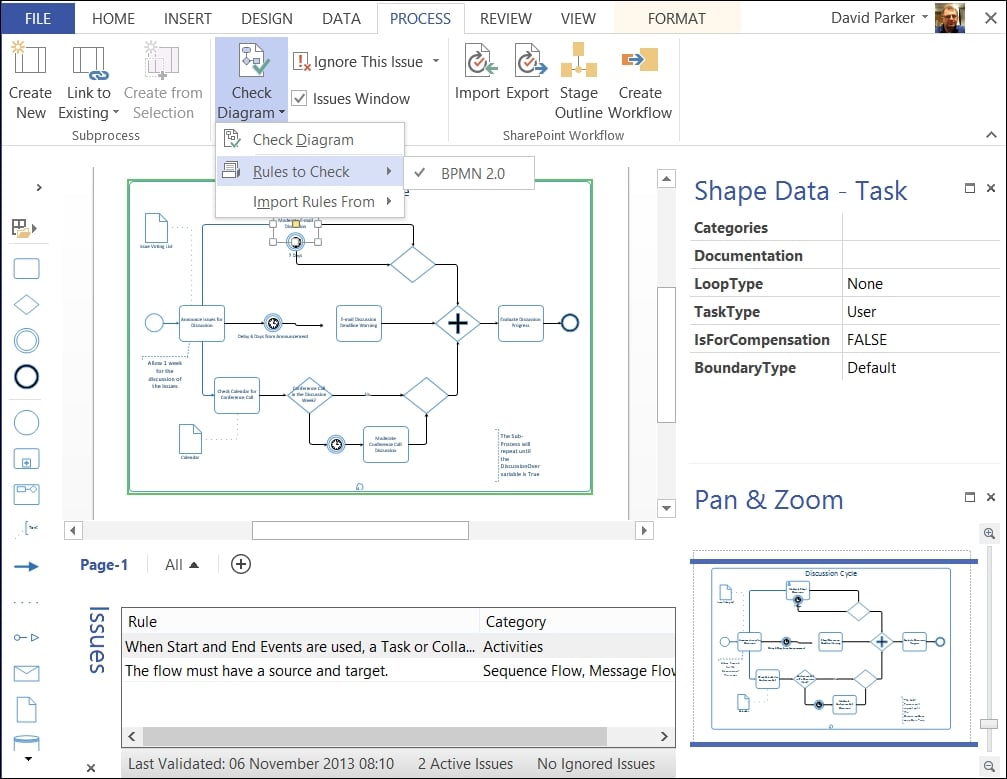
Some of the Validation API can be accessed via the PROCESS tab on the Diagram Validation group; however, but there is more that is available only to developers, thus enabling you to automate some tasks if necessary. The following example of a BPMN diagram has some errors in it they would be difficult to spot if it were not for the Issues window that lists them, because the diagram has been validated.

Validation of process diagrams

The PROCESS tab is split into three ribbon groups. The first group on the PROCESS tab, Subprocess, is for the creation of Subprocesses, and the third group is for the Import and Export of a SharePoint Workflow, but it is the second group, Diagram Validation, that is of most interest here.

In this second group, the first button, Check Diagram, validates the whole document against the selected ruleset(s). You can have more than one ruleset in a document that can be enabled or disabled as required. The drop-down menu on the Check Diagram button (shown in the following screenshot) enables you to select which Rules to Check, and also to Import Rules From another open Visio document. It is a pity that you cannot export to/ import from XML, but we will create our own tool to do that in a later chapter.

Validation of process diagrams

Analyzing the structure of a Visio document

At this point, we should be aware that Visio documents used to either be saved as binary (normally with a *.vsd extension) or XML format (normally with a *.vdx extension); however, in Visio 2013 they are in a new XML format that follows the Open Packaging Convention.

Visio 2013 diagram files have either a *.vsdx extension, or a *.vsdm extension if they contain macros. The easiest way to look at the contents of a Visio 2013 file is to change the extension to *.zip, and then just double-click to open it. Inside the zip file, you will find a visio folder, and inside that is a validation.xml file if there are any rules within the document, as shown in the following screenshot:

Analyzing the structure of a Visio document

Simply double-clicking on the xml file will open it in the associated program, which in my case is Internet Explorer.

If we expand a RuleSets branch, and one of the Rule sub-branches, then we can see how a rule is defined, as shown in the following screenshot:

Analyzing the structure of a Visio document

Later, we will be going into these definitions in much greater detail but, for now, notice that the RuleFilter and RuleTest elements contain formulae that precisely define what constitutes the particular rule.

The Diagram Validation group also has the option to show/hide the Issues Window, which has a right mouse menu that is identical (apart from the additional Arrange By menu option) to the drop-down menu on the Ignore This Issue button, as shown in the following screenshot:

Analyzing the structure of a Visio document

Now that we can see that a Rule has an ID, and belongs to a RuleSet that also has an ID, we can begin to understand how an issue can be associated with a shape. So, if we expand an Issue element in the Visio document XML, we can see that Issue has IssueTarget and RuleInfo elements, as at the bottom of the following screenshot of the Validation XML.

Analyzing the structure of a Visio document

We can then use the ShapeID and the PageID from the preceding Issue to find the actual shape in the relevant page XML, by reviewing the Shape elements under the Shapes collection of PageContents, also identified by its ID, as shown in the following screenshot:

Analyzing the structure of a Visio document

In fact, the PageID and ShapeID elements of an IssueTarget are optional because an Issue may just be associated with a page, or even with the whole document.

We will use the new Validation API to explore these RuleSets, Rules, and Issues in later chapters, and we will expose them to scrutiny so that your business can be satisfied that you have modeled the business logic correctly.

CONTINUE READING
83
Tech Concepts
36
Programming languages
73
Tech Tools
Icon Unlimited access to the largest independent learning library in tech of over 8,000 expert-authored tech books and videos.
Icon Innovative learning tools, including AI book assistants, code context explainers, and text-to-speech.
Icon 50+ new titles added per month and exclusive early access to books as they are being written.
Microsoft Visio 2013 Business Process Diagramming and Validation
notes
bookmark Notes and Bookmarks search Search in title playlist Add to playlist font-size Font size

Change the font size

margin-width Margin width

Change margin width

day-mode Day/Sepia/Night Modes

Change background colour

Close icon Search
Country selected

Close icon Your notes and bookmarks

Confirmation

Modal Close icon
claim successful

Buy this book with your credits?

Modal Close icon
Are you sure you want to buy this book with one of your credits?
Close
YES, BUY

Submit Your Feedback

Modal Close icon
Modal Close icon
Modal Close icon