Sign In Start Free Trial
Account

Add to playlist

Create a Playlist

Modal Close icon
You need to login to use this feature.
  • Book Overview & Buying Mastering SoapUI
  • Table Of Contents Toc
Mastering SoapUI

Mastering SoapUI

By : Pranai Nandan
5 (1)
close
close
Mastering SoapUI

Mastering SoapUI

5 (1)
By: Pranai Nandan

Overview of this book

SoapUI is an open-source cross-platform testing application that provides complete test coverage and supports all the standard protocols and technologies. This book includes real-time examples of implementing SoapUI to achieve quality and business assurance. Starting with the features and functionalities of SoapUI, the book will then focus on functional testing, load testing, and security testing of web services. Furthermore, you will learn how to automate your services and then design data-driven, keyword-driven, and hybrid-driven frameworks in SoapUI. Then the book will show you how to test UIs and services using SoapUI with the help of Selenium. You will also learn how to integrate SoapUI with Jenkins for CI and SoapUI test with QC with backward- and forward-compatibility. The final part of the book will show you how to virtualize a service response in SoapUI using Service Mocking. You will finish the journey by discovering the best practices for SoapUI test automation and preparing yourself for the online certification of SoapUI.
Table of Contents (12 chapters)
close
close
7
7. SoapUI Integration with Jenkins and HP QC
11
Index

Configuring boundary scan types

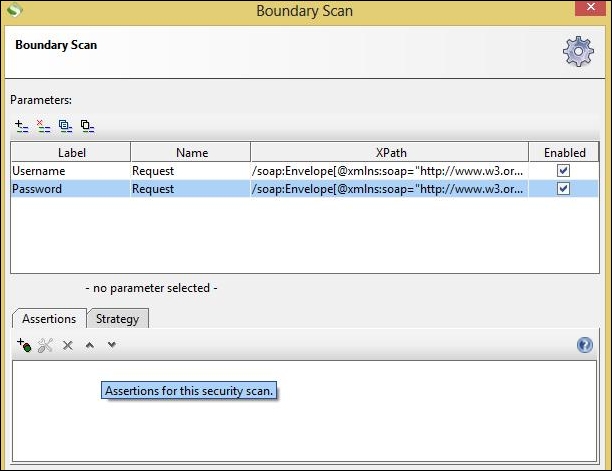
Let's see how we configure a boundary scan in SoapUI:

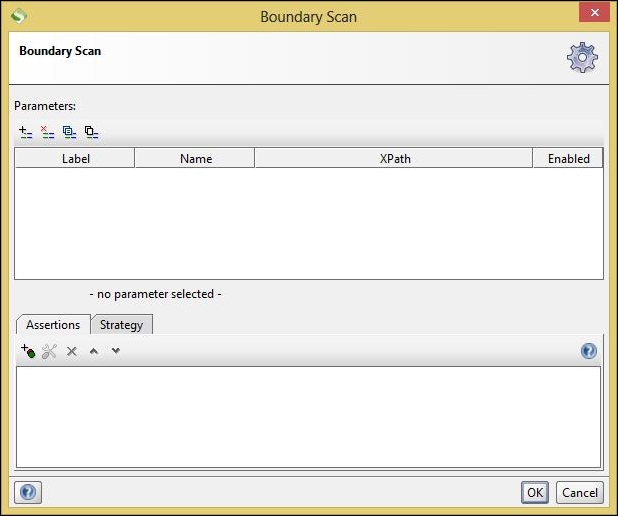
  1. The following screenshot displays the configuration parameters for configuring a Boundary Scan:
    Configuring boundary scan types
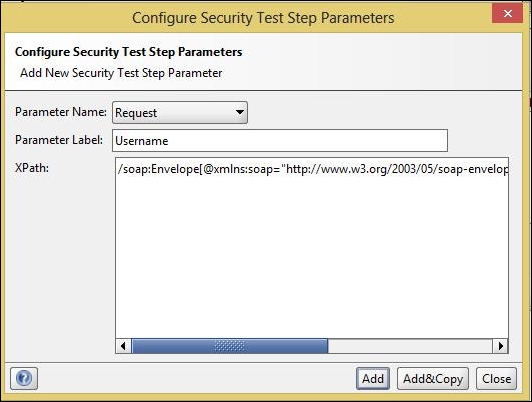
  2. In the preceding screenshot, click on the + button in the top right of the left hand side of the window. This will further open a pop-up dialog box for further configuration.
    Configuring boundary scan types
  3. In the preceding screenshot we can see that we have configured three values:
    • Parameter Name: Target parameter Request
    • Parameter label: Relevant name of the parameter of the request
    • XPath: XPath of the parameter
  4. After configuring this, click on the Add button and this will add the attack.
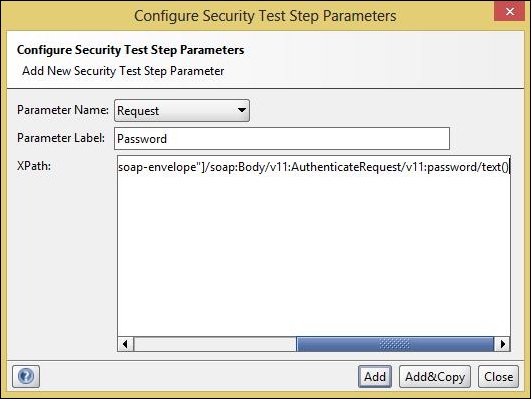
  5. Similarly, we configure another parameter; Password.
    Configuring boundary scan types
  6. Now we have configured a Boundary Scan for authentication service:
    Configuring boundary scan types
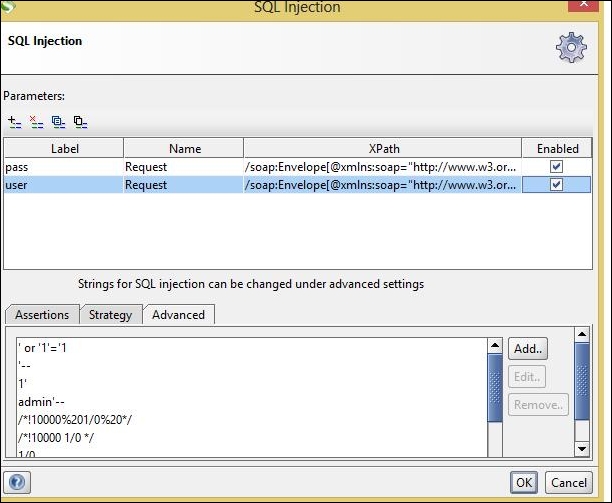
  7. Similarly we configure a SQL injection test:
    Configuring boundary scan types

    Note

    Note: We can also configure and add SQL injection strings using the Advanced tab, as shown in the preceding screenshot.

  8. The steps to configure the third scan, which is XPath injection, are the...
CONTINUE READING
83
Tech Concepts
36
Programming languages
73
Tech Tools
Icon Unlimited access to the largest independent learning library in tech of over 8,000 expert-authored tech books and videos.
Icon Innovative learning tools, including AI book assistants, code context explainers, and text-to-speech.
Icon 50+ new titles added per month and exclusive early access to books as they are being written.
Mastering SoapUI
notes
bookmark Notes and Bookmarks search Search in title playlist Add to playlist download Download options font-size Font size

Change the font size

margin-width Margin width

Change margin width

day-mode Day/Sepia/Night Modes

Change background colour

Close icon Search
Country selected

Close icon Your notes and bookmarks

Confirmation

Modal Close icon
claim successful

Buy this book with your credits?

Modal Close icon
Are you sure you want to buy this book with one of your credits?
Close
YES, BUY

Submit Your Feedback

Modal Close icon
Modal Close icon
Modal Close icon