Sign In Start Free Trial
Account

Add to playlist

Create a Playlist

Modal Close icon
You need to login to use this feature.
  • Book Overview & Buying Mastering Python High Performance
  • Table Of Contents Toc
Mastering Python High Performance

Mastering Python High Performance

By : Fernando Donglio
4.2 (5)
close
close
Mastering Python High Performance

Mastering Python High Performance

4.2 (5)
By: Fernando Donglio

Overview of this book

Simply knowing how to code is not enough; on mission-critical pieces of code, every bit of memory and every CPU cycle counts, and knowing how to squish every bit of processing power out of your code is a crucial and sought-after skill. Nowadays, Python is used for many scientific projects, and sometimes the calculations done in those projects require some serious fine-tuning. Profilers are tools designed to help you measure the performance of your code and help you during the optimization process, so knowing how to use them and read their output is very handy. This book starts from the basics and progressively moves on to more advanced topics. You’ll learn everything from profiling all the way up to writing a real-life application and applying a full set of tools designed to improve it in different ways. In the middle, you’ll stop to learn about the major profilers used in Python and about some graphic tools to help you make sense of their output. You’ll then move from generic optimization techniques onto Python-specific ones, going over the main constructs of the language that will help you improve your speed without much of a change. Finally, the book covers some number-crunching-specific libraries and how to use them properly to get the best speed out of them. After reading this book, you will know how to take any Python code, profile it, find out where the bottlenecks are, and apply different techniques to remove them.
Table of Contents (10 chapters)
close
close

Profiling best practices

Profiling is a repetitive task. You'll do it several times inside the same project in order to get the best results, and you'll do it again on the next project. Just like with any other repetitive task in software development, there is a set of best practices you can follow to ensure that you get the most out of the process. Let's look at some of them:

Build a regression-test suite

Before starting any kind of optimization process, you need to make sure that the changes you make to the code will not affect its functioning in a bad way. The best way to do this, especially when it's a big code base, is to create a test suite. Make sure that your code coverage is high enough to provide the confidence you need to make the changes. A test suite with 60 percent code coverage can lead to very bad results.

A regression-test suite will allow you to make as many optimization tries as you need to without fear of breaking the code.

Mind your code

Functional code tends to be easier to refactor, mainly because the functions structured that way tend to avoid side effects. This reduces any risk of affecting unwanted parts of your system. If your functions avoid a local mutable state, that's another winning point for you. This is because the code should be pretty straightforward for you to understand and change. Functions that don't follow the previously mentioned guidelines will require more work and care while refactoring.

Be patient

Profiling is not fast, not easy, and not an exact process. What this means is that you should not expect to just run the profiler and expect the data from it to point directly to your problem. That could happen, yes. However, most of the time, the problems you're trying to solve are the ones that simple debugging couldn't fix. This means you'll be browsing through data, plotting it to try to make sense of it, and narrowing down the source of your problem until you either need to start again, or you find it.

Keep in mind that the deeper you get into the profiled data, the deeper into the rabbit hole you get. Numbers will stop making sense right away, so make sure you know what you're doing and that you have the right tools for the job before you start. Otherwise, you'll waste your time and end up with nothing but frustration.

Gather as much data as you can

Depending on the type and size of software you're dealing with, you might want to get as much data as you can before you start analyzing it. Profilers are a great source for this. However, there are other sources, such as server logs from web applications, custom logs, system resources snapshots (like from the OS task manager), and so on.

Preprocess your data

After you have all the information from your profilers, your logs, and other sources, you will probably need to preprocess the data before analyzing it. Don't shy away from unstructured data just because a profiler can't understand it. Your analysis of the data will benefit from the extra numbers.

For instance, getting the web server logs is a great idea if you're profiling a web application, but those files are normally just text files with one line per request. By parsing it and getting the data into some kind of database system (like MongoDB, MySQL, or the like), you'll be able to give that data meaning (by parsing the dates, doing geolocation by source IP address, and so on) and query that information afterwards.

The formal name for the stage is ETL, which stands for extracting the data from it's sources, transforming it into something with meaning, and loading it into another system that you can later query.

Visualize your data

If you don't know exactly what it is that you're looking for and you're just looking for ways to optimize your code before something goes wrong, a great idea to get some insight into the data you've already preprocessed is to visualize it. Computers are great with numbers, but humans, on the other hand, are great with images when we want to find patterns and understand what kind of insight we can gather from the information we have.

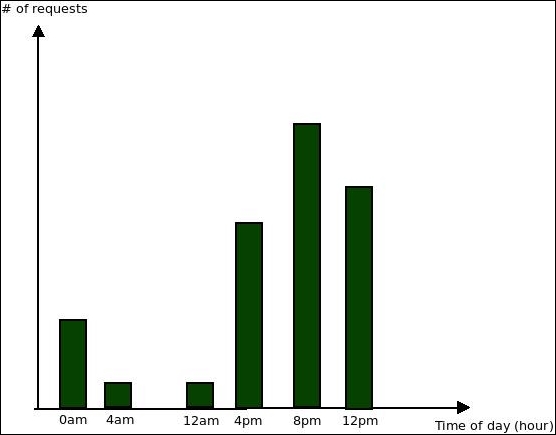
For instance, to continue with the web server logs example, a simple plot (such as the ones you can do with MS Excel) for the requests by hour can provide some insight into the behavior of your users:

Visualize your data

The preceding chart clearly shows that the majority of requests are done during late afternoon and continue into the night. You can use this insight later on for further profiling. For instance, an optional improvement of your setup here would be to provide more resources for your infrastructure during that time (something that can be done with service providers such as Amazon Web Services).

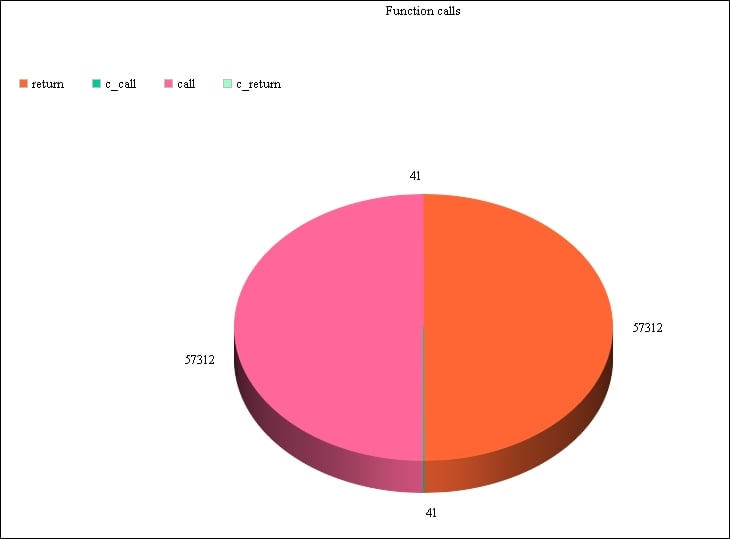
Another example, using custom profiling data, could be the following chart:

Visualize your data

It uses data from the first code example of this chapter by counting the number of each event that triggers the profile function. We can then plot it and get an idea of the most common events. In our case, the call and return events are definitely taking up most of our program's time.

CONTINUE READING
83
Tech Concepts
36
Programming languages
73
Tech Tools
Icon Unlimited access to the largest independent learning library in tech of over 8,000 expert-authored tech books and videos.
Icon Innovative learning tools, including AI book assistants, code context explainers, and text-to-speech.
Icon 50+ new titles added per month and exclusive early access to books as they are being written.
Mastering Python High Performance
notes
bookmark Notes and Bookmarks search Search in title playlist Add to playlist font-size Font size

Change the font size

margin-width Margin width

Change margin width

day-mode Day/Sepia/Night Modes

Change background colour

Close icon Search
Country selected

Close icon Your notes and bookmarks

Confirmation

Modal Close icon
claim successful

Buy this book with your credits?

Modal Close icon
Are you sure you want to buy this book with one of your credits?
Close
YES, BUY

Submit Your Feedback

Modal Close icon
Modal Close icon
Modal Close icon