Sign In Start Free Trial
Account

Add to playlist

Create a Playlist

Modal Close icon
You need to login to use this feature.
  • Book Overview & Buying Learning RSLogix 5000 Programming
  • Table Of Contents Toc
Learning RSLogix 5000 Programming

Learning RSLogix 5000 Programming

By : Austin Scott
3.7 (30)
close
close
Learning RSLogix 5000 Programming

Learning RSLogix 5000 Programming

3.7 (30)
By: Austin Scott

Overview of this book

RSLogix 5000 and Studio 5000's Logix Designer are user-friendly interfaces used for programming the current generation of Rockwell Automation Controllers including ControlLogix, CompactLogix, and SoftLogix. When engineering automation solutions using Logix, it is important to study the changes to the platform introduced with Studio 5000 and the various controllers, modules, and form factors available today. RSLogix 5000 programming packages help you maximize performance, save project development time, and improve productivity. This book provides a detailed overview of the Logix platform including ControlLogix, CompactLogix, and SoftLogix and explains the significant changes introduced in Studio 5000. A clear understanding of the recent Logix platform changes is critical for anyone developing a Rockwell Automation solution. It provides an easy-to-follow, step-by-step approach to learning the essential Logix hardware and software components and provides beginners with a solid foundation in the Logix platform features and terminology. By the end of this book, you will have a clear understanding of the capabilities of the Logix platform and the ability to navigate the Rockwell Automation Literature Library Resources.
Table of Contents (13 chapters)
close
close
11
A. Rockwell Automation Literature Library Resource
12
Index

Writing structured routines


To get started with structure text, let's write a simple routine and break down the components.

Simple routine

We have taken a brief look at the structured text editor, and now we will write a simple structured text routine to introduce some of the syntax and conventions. Our first structured text routine will provide an alarm count totalizer. The first version of this we create will have a few small errors, which we will correct as we learn more about structured text. Perform the following steps:

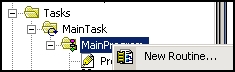
  1. Open the Controller Organizer pane and navigate to Tasks | Main Tasks | Main Program. Right-click on Main Program and select New Routine, as shown in the following screenshot:

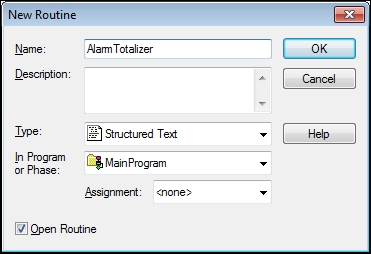
  2. Configure a new structured text routine by setting the following values:

    • Name: AlarmTotalizer

    • Description: Digital Alarms

    • Type: Structured Text

  3. In the structured text editor, enter the following code:

    (*****  Alarm Totalizer  *****)
    if ( FC1001_FLT_ALM.InAlarm AND NOT FC1001_FLT_ALM.Disabled ) then...
CONTINUE READING
83
Tech Concepts
36
Programming languages
73
Tech Tools
Icon Unlimited access to the largest independent learning library in tech of over 8,000 expert-authored tech books and videos.
Icon Innovative learning tools, including AI book assistants, code context explainers, and text-to-speech.
Icon 50+ new titles added per month and exclusive early access to books as they are being written.
Learning RSLogix 5000 Programming
notes
bookmark Notes and Bookmarks search Search in title playlist Add to playlist font-size Font size

Change the font size

margin-width Margin width

Change margin width

day-mode Day/Sepia/Night Modes

Change background colour

Close icon Search
Country selected

Close icon Your notes and bookmarks

Confirmation

Modal Close icon
claim successful

Buy this book with your credits?

Modal Close icon
Are you sure you want to buy this book with one of your credits?
Close
YES, BUY

Submit Your Feedback

Modal Close icon
Modal Close icon
Modal Close icon