Sign In Start Free Trial
Account

Add to playlist

Create a Playlist

Modal Close icon
You need to login to use this feature.
  • Book Overview & Buying Learning PHP 7 High Performance
  • Table Of Contents Toc
Learning PHP 7 High Performance

Learning PHP 7 High Performance

By : Iltaf (Altaf) Hussain Gul, Raul Mesa Ros
close
close
Learning PHP 7 High Performance

Learning PHP 7 High Performance

By: Iltaf (Altaf) Hussain Gul, Raul Mesa Ros

Overview of this book

PHP is a great language for building web applications. It is essentially a server-side scripting language that is also used for general-purpose programming. PHP 7 is the latest version, providing major backward-compatibility breaks and focusing on high performance and speed. This fast-paced introduction to PHP 7 will improve your productivity and coding skills. The concepts covered will allow you, as a PHP programmer, to improve the performance standards of your applications. We will introduce you to the new features in PHP 7 and then will run through the concepts of object-oriented programming (OOP) in PHP 7. Next, we will shed some light on how to improve your PHP 7 applications' performance and database performance. Through this book, you will be able to improve the performance of your programs using the various benchmarking tools discussed. At the end, the book discusses some best practices in PHP programming to help you improve the quality of your code.
Table of Contents (11 chapters)
close
close
10
Index

Setting up Vagrant

Vagrant is a tool used by developers for development environments. Vagrant provides an easy command-line interface to set up virtual machines with all the tools required. Vagrant uses boxes called Vagrant Boxes that can have a Linux operating system and other tools according to this box. Vagrant supports both Oracle VM VirtualBox and VMware. For the purpose of this book, we will use VirtualBox, which we assume is installed on your machine as well.

Vagrant has several boxes for PHP 7, including Laravel Homestead and Rasmus PHP7dev. So, let's get started by configuring the Rasmus PHP7dev box on Windows and Mac OS X.

Note

We assume that both VirutalBox and Vagrant are installed on our machine. VirtualBox can be downloaded from https://www.virtualbox.org/wiki/Downloads, and Vagrant can be downloaded from https://www.vagrantup.com/downloads.html for different platforms. Details about Rasmus PHP7dev VagrantBox can be found at https://github.com/rlerdorf/php7dev.

Perform the following steps:

  1. Make a directory in one of the drives. For example, we made a php7 directory in our D drive. Then, open the command line in this specific folder directly by holding the Shift key, right-clicking, and then selecting Open command window here.
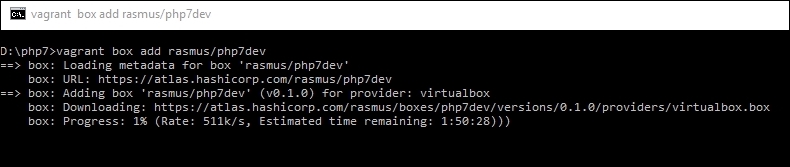
  2. Now, issue the following command in the command window:
    vagrant box add rasmus/php7dev
    

    It will start downloading the Vagrant box, as shown in the following screenshot:

    Setting up Vagrant
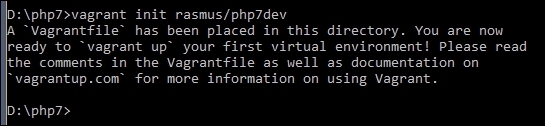
  3. Now, when the download is completed, we need to initialize it so that the box is configured and added to VirtualBox for us. Issue the following command in the command window:
    vagrant init rasmus/php7dev
    

    This will start adding the box to VirtualBox and configuring it. When the process is completed, it will display a message, as in the following screenshot:

    Setting up Vagrant
  4. Now, issue the following command, which will completely set up the Vagrant box and start it up and running:
    vagrant up
    

    This process will take a little bit of time. When it is completed, your box is ready and running and can be used.

  5. Now, the first thing to do after it is up is to update everything. This box uses Ubuntu, so open the command window in the same php7dev directory and issue the following command:
    vagrant ssh
    

    It will connect us with the virtual machines through SSH.

    Note

    In Windows, if SSH in not installed or not configured in the PATH variable, PuTTY can be used. It can be downloaded from http://www.chiark.greenend.org.uk/~sgtatham/putty/download.html. For PuTTY, the host will be 127.0.0.1, and the port will be 2222. Vagrant is both the username and password for SSH.

  6. When we are logged in to the box OS, issue the following commands to update the system:
    sudo apt-get update
    sudo apt-get upgrade
    

    This will update the core system, NGINX, MySQL, PHP 7, and other installed tools if new versions are available.

  7. The box is now ready to use for development purposes. The box can be accessed in the browser by typing its IP address in the browser window. To find the IP address of the box, issue the following command in the SSH-connected command window:
    sudo ifconfig
    

    This will display some details. Find out the IPv4 details there and take the IP of the box.

CONTINUE READING
83
Tech Concepts
36
Programming languages
73
Tech Tools
Icon Unlimited access to the largest independent learning library in tech of over 8,000 expert-authored tech books and videos.
Icon Innovative learning tools, including AI book assistants, code context explainers, and text-to-speech.
Icon 50+ new titles added per month and exclusive early access to books as they are being written.
Learning PHP 7 High Performance
notes
bookmark Notes and Bookmarks search Search in title playlist Add to playlist download Download options font-size Font size

Change the font size

margin-width Margin width

Change margin width

day-mode Day/Sepia/Night Modes

Change background colour

Close icon Search
Country selected

Close icon Your notes and bookmarks

Confirmation

Modal Close icon
claim successful

Buy this book with your credits?

Modal Close icon
Are you sure you want to buy this book with one of your credits?
Close
YES, BUY

Submit Your Feedback

Modal Close icon
Modal Close icon
Modal Close icon