Sign In Start Free Trial
Account

Add to playlist

Create a Playlist

Modal Close icon
You need to login to use this feature.
  • Book Overview & Buying Learning ArcGIS Runtime SDK for .NET
  • Table Of Contents Toc
Learning ArcGIS Runtime SDK for .NET

Learning ArcGIS Runtime SDK for .NET

By : Ron Vincent
1 (1)
close
close
Learning ArcGIS Runtime SDK for .NET

Learning ArcGIS Runtime SDK for .NET

1 (1)
By: Ron Vincent

Overview of this book

ArcGIS is a geographic information system (GIS) that enables you to work with maps and geographic information. It can be used to create and utilize maps, compile geographic data, analyze mapped information, share and discover geographic information and manage geographic information in a database. This book starts by showing you where ArcGIS Runtime fits within Esri’s overall platform strategy. You'll create an initial map using the SDK, then use it to get an understanding of the MVVM model. You'll find out about the different kinds of layers and start adding layers, and you'll learn to transform maps into a 3D scene. The next chapters will help you comprehend and extract information contained in the maps using co-ordinates and layer objects. Towards the end, you will learn to set the symbology, decide whether to use 2D or 3D, see how to implement 2D or 3D, and learn to search and find objects. You'll also get to grips with many other standard features of the Application Programming Interface (API), including create applications and finally testing, licensing, and deploying them. Once completed, you will be able to meet most of the common requirements of any mapping application for desktop or mobile platforms.
Table of Contents (14 chapters)
close
close
3
3. Maps and Layers
8
8. Geocoding and Routing
12
12. Configuring, Licensing, and Deploying
13
Index

IdentifyTask


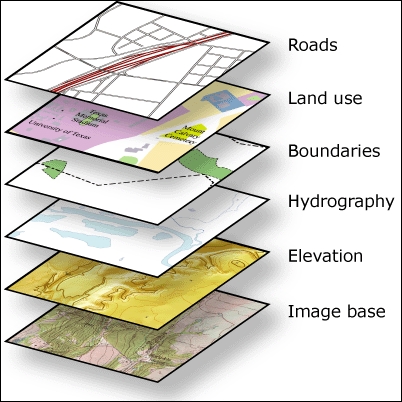
Imagine for a moment that you have multiple layers in your map or scene, and you want to click on a particular location and find everything at that location. See the following image:

If you click on these layers, the IdentifyTask object will return every feature in every layer that is located where you clicked. The IdentifyTask class uses the concept of a hit test. A hit test simply means that if the point where the user clicks intersects with any feature in any layer, those features are returned to IdentifyTask. It's possible to perform an Identify operation on both online and offline data. Let's look at an online example first, and then explore this further with the same kind of operation but with offline data.

All examples in this section are in the code provided with this book, which is called Chapter7a.

The online Identify task

Let's add some code, and then discuss how IdentifyTask works using an online service:

  1. In your project, open the MapViewBehavior.cs file and add the following...

CONTINUE READING
83
Tech Concepts
36
Programming languages
73
Tech Tools
Icon Unlimited access to the largest independent learning library in tech of over 8,000 expert-authored tech books and videos.
Icon Innovative learning tools, including AI book assistants, code context explainers, and text-to-speech.
Icon 50+ new titles added per month and exclusive early access to books as they are being written.
Learning ArcGIS Runtime SDK for .NET
notes
bookmark Notes and Bookmarks search Search in title playlist Add to playlist font-size Font size

Change the font size

margin-width Margin width

Change margin width

day-mode Day/Sepia/Night Modes

Change background colour

Close icon Search
Country selected

Close icon Your notes and bookmarks

Confirmation

Modal Close icon
claim successful

Buy this book with your credits?

Modal Close icon
Are you sure you want to buy this book with one of your credits?
Close
YES, BUY

Submit Your Feedback

Modal Close icon
Modal Close icon
Modal Close icon