Sign In Start Free Trial
Account

Add to playlist

Create a Playlist

Modal Close icon
You need to login to use this feature.
  • Book Overview & Buying Mastering Zendesk
  • Table Of Contents Toc
Mastering Zendesk

Mastering Zendesk

By : Cedric F. Jacob
4 (3)
close
close
Mastering Zendesk

Mastering Zendesk

4 (3)
By: Cedric F. Jacob

Overview of this book

Zendesk is a cloud-based customer service solution that is widely used because it is easy, efficienct, flexible, and low cost. It is highly scalable and is great for organizations of all sizes. If you’re a Zendesk administrator and are looking to explore advanced-level concepts, then this book is for you. It covers the core functionalities such as managing users, groups, and the organization, and creating and adding custom fields. You will learn how to add customized ticket channels to your account. Then, you will focus on customizing business rules and extending Zendesk with JIRA and Salesforce. Towards the end, the book emphasizes security and troubleshooting aspects as well as providing tips and tricks to create a more efficient support environment. By the end of this book, you will be able to turn a basic Zendesk setup into a highly customized working environment.
Table of Contents (11 chapters)
close
close

Groups

Groups, unlike organizations, are only meant for agents and each agent must be at least in one group. Groups play a major role when it comes to support workflows and they can be used in many different ways. How to use groups becomes apparent when planning your support workflow.

In our case, we have four types of support tickets:

  • Tier 1 Support
  • Tier 2 Support
  • VIP Support
  • Internal Support

Each type of ticket is supposed to be answered by specific agents only. In order to achieve this, we can create one group for each type of ticket and later assign these groups to our agents accordingly.

In order to review and edit already existing groups, simply follow these steps:

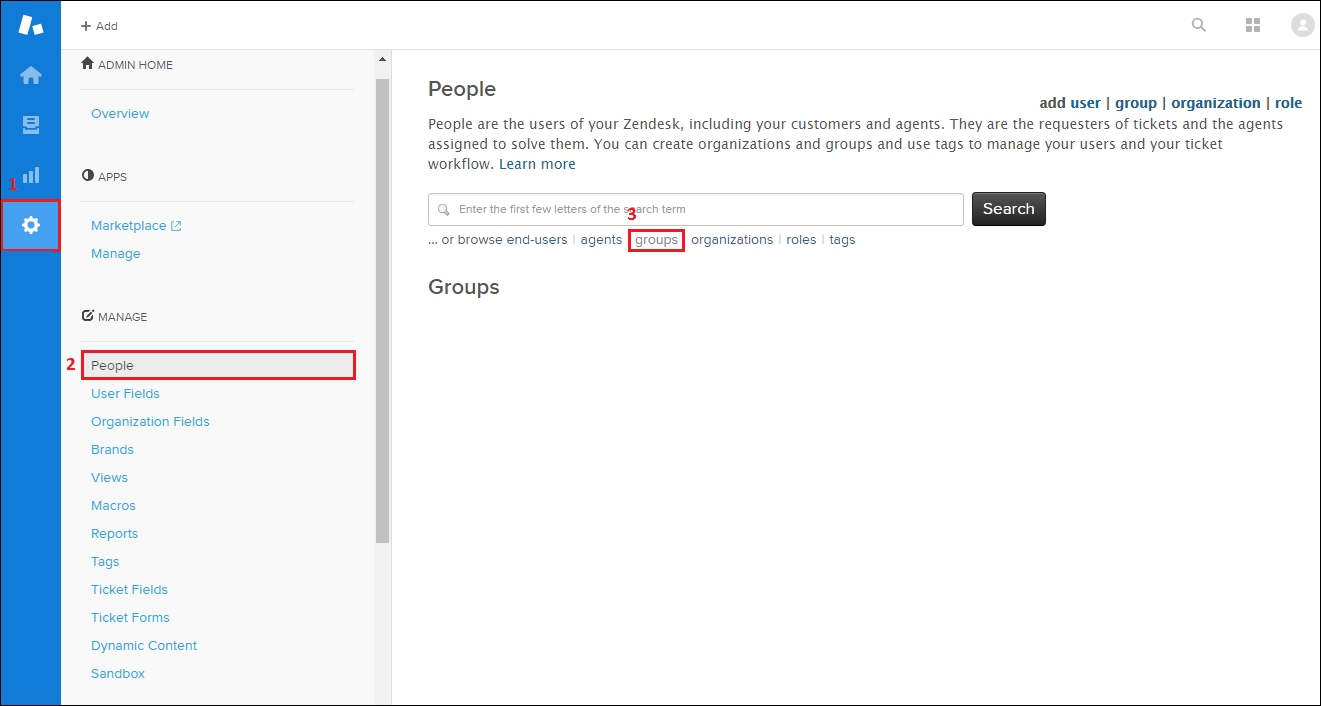
  1. Click on the Admin icon (gear symbol) located in Zendesk's sidebar.
  2. Click on People located under MANAGE within the admin menu.
  3. Click on groups located under the search bar within the main area:

    Groups

As per our example, we will need four groups. In order to add a new group, simply follow these steps:

  1. Click on the Admin icon (gear...
Visually different images
CONTINUE READING
83
Tech Concepts
36
Programming languages
73
Tech Tools
Icon Unlimited access to the largest independent learning library in tech of over 8,000 expert-authored tech books and videos.
Icon Innovative learning tools, including AI book assistants, code context explainers, and text-to-speech.
Icon 50+ new titles added per month and exclusive early access to books as they are being written.
Mastering Zendesk
notes
bookmark Notes and Bookmarks search Search in title playlist Add to playlist download Download options font-size Font size

Change the font size

margin-width Margin width

Change margin width

day-mode Day/Sepia/Night Modes

Change background colour

Close icon Search
Country selected

Close icon Your notes and bookmarks

Confirmation

Modal Close icon
claim successful

Buy this book with your credits?

Modal Close icon
Are you sure you want to buy this book with one of your credits?
Close
YES, BUY

Submit Your Feedback

Modal Close icon
Modal Close icon
Modal Close icon