Sign In Start Free Trial
Account

Add to playlist

Create a Playlist

Modal Close icon
You need to login to use this feature.
  • Book Overview & Buying Beginning ASP.NET [Instructor Edition]
  • Table Of Contents Toc
Beginning ASP.NET [Instructor Edition]

Beginning ASP.NET [Instructor Edition]

By : Onur Gumus
2 (1)
close
close
Beginning ASP.NET [Instructor Edition]

Beginning ASP.NET [Instructor Edition]

2 (1)
By: Onur Gumus

Overview of this book

Building robust web applications is the need of the hour in the web world. ASP.NET Core is known for building and deploying robust crossplatform applications. ASP.NET Core MVC (that makes use of the Model-View-Controller architecture) has in it the ingredients required for efficient development of applications. In today's age, it's important for a developer to possess the ability to separate the programming and business logic. There are few courses available on ASP.NET Core 2 that imbibes this ability to a developer. This course offers a tried & tested way to build cross-platform applications. It presents the fundamentals and philosophies of ASP.NET Core. Starting with an overview of the MVC pattern, you'll quickly dive into the aspects that you need to know to get started with ASP. NET. You'll learn about the core architecture of model, view, and control. Finally, build your own shopping cart application, and gain all the skills to develop real-world applications with ASP. NET Core 2.
Table of Contents (10 chapters)
close
close

Create EF Context and Migrations


For starters, we need to install Entity Framework and its tools to our Infrastructure project.

Follow these steps to create the EF context:

  1. Just right-click on dependencies and select Manage NuGet Packages.
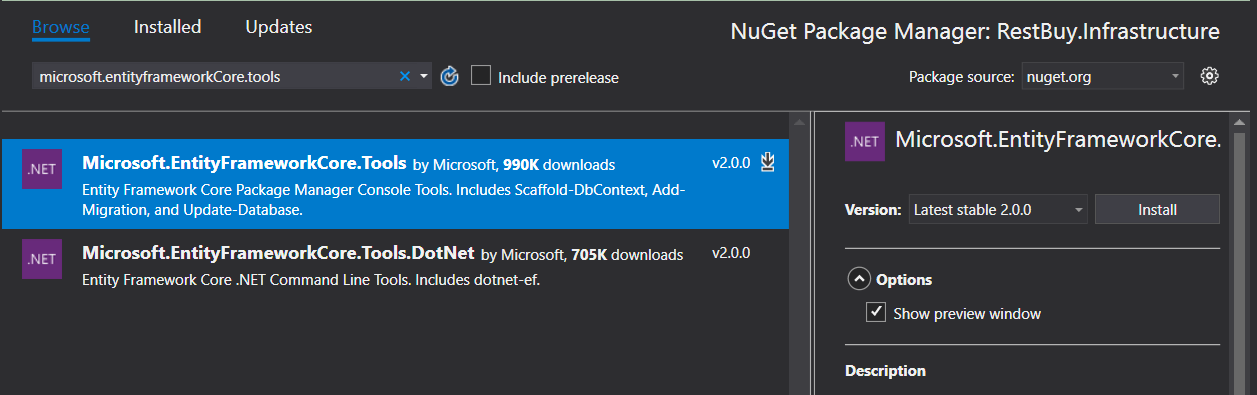
  2. Afterwards write Microsoft.EntityFramework.Core.SqlServer in the search box and install it.

Your screen should look as follows:

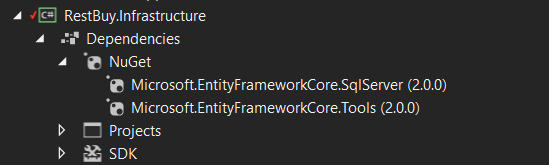
  1. Similarly, install the Microsot.EntityFrameworkCore.Tools package, as follows:

So, your project folder for Infrastructure looks as follows:

  1. Next, we create the EF folder in the Infrastructure project and implement our DbContext with a class called RestBuyContext. Make sure you have a reference to the RestBuy project from Infrastructure. Use this code:

Note

Go to https://goo.gl/wYLwRA to access the code.

using Microsoft.EntityFrameworkCore;
using Microsoft.EntityFrameworkCore.Metadata.Builders;
using RestBuy.Entities;
using System;
using System.Collections.Generic;
using System.Text;
...
void ConfigureStockAmount(EntityTypeBuilder<StockAmount...
CONTINUE READING
83
Tech Concepts
36
Programming languages
73
Tech Tools
Icon Unlimited access to the largest independent learning library in tech of over 8,000 expert-authored tech books and videos.
Icon Innovative learning tools, including AI book assistants, code context explainers, and text-to-speech.
Icon 50+ new titles added per month and exclusive early access to books as they are being written.
Beginning ASP.NET [Instructor Edition]
notes
bookmark Notes and Bookmarks search Search in title playlist Add to playlist font-size Font size

Change the font size

margin-width Margin width

Change margin width

day-mode Day/Sepia/Night Modes

Change background colour

Close icon Search
Country selected

Close icon Your notes and bookmarks

Confirmation

Modal Close icon
claim successful

Buy this book with your credits?

Modal Close icon
Are you sure you want to buy this book with one of your credits?
Close
YES, BUY

Submit Your Feedback

Modal Close icon
Modal Close icon
Modal Close icon