Sign In Start Free Trial
Account

Add to playlist

Create a Playlist

Modal Close icon
You need to login to use this feature.
  • Book Overview & Buying  The Ultimate Zoom Cookbook
  • Table Of Contents Toc
 The Ultimate Zoom Cookbook

The Ultimate Zoom Cookbook

By : Patrick Kelley
5 (6)
close
close
 The Ultimate Zoom Cookbook

The Ultimate Zoom Cookbook

5 (6)
By: Patrick Kelley

Overview of this book

The last few years have completely changed the way we collaborate and communicate. Whether it’s internally with coworkers at a large enterprise or externally with prospective clients and customers, Zoom has created a new way to interact with people in real-time as well as asynchronously. This cookbook delves into all aspects of Zoom, moving beyond just meetings. You’ll get started by exploring key areas such as audio, video, chat, webinars, advanced reporting, and analytics. Next, you’ll progress from discovering simple Zoom video and audio calls to understanding features such as whiteboards, hardware integration, and phone capabilities. Gradually, you'll discover advanced techniques for effective content presentation, while configuring users and features from the admin portal. The last set of chapters cover advanced features on security and privacy as well as how to make the most of AI Companion to reach out to your audience with better content, clarity, and expertise. By the end of this Zoom book, you’ll be well-versed with the entire Zoom app and all the modalities available.
Table of Contents (14 chapters)
close
close

Using Phone Assistant

You can certainly use the full Zoom client to place and receive calls, but Zoom includes a Zoom Phone Assistant tool as well. This is a small form-factor phone client that includes most of the functionality of Zoom Phone, just in a widget-type application. This allows you to stay focused on a particular application without having the bigger screen real estate of the Zoom Phone client take over. For example, I might be on a call discussing the details of a large spreadsheet. I want to use my full screen for my Excel file and not have the Zoom Phone client taking over the desktop. I can easily use Zoom Phone Assistant and move it out of the way but still have most of my call functionality easily available.

How to do it…

  1. From your Zoom client, go to Settings, and then make sure you are in the General tab.
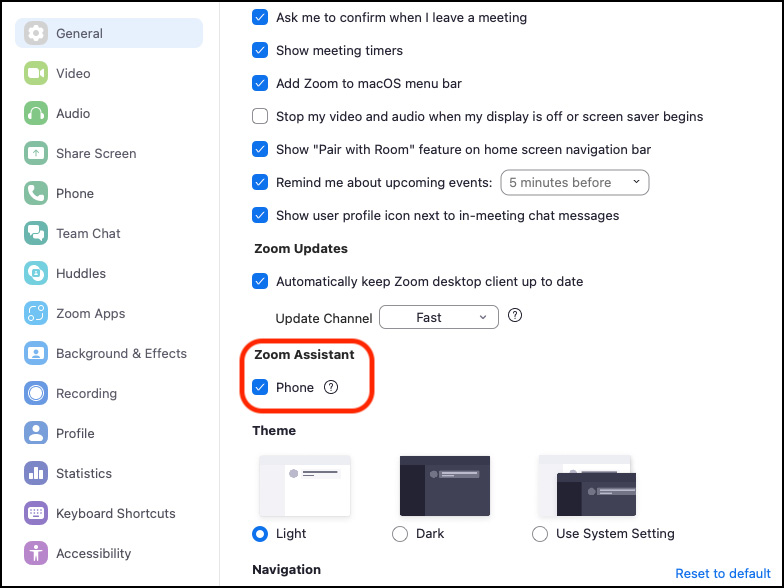
  2. Scroll down until you see the Zoom Assistant tab. Toggle in on.
Figure 4.29 – The Zoom Assistant toggle

Figure 4.29 – The Zoom Assistant toggle...

CONTINUE READING
83
Tech Concepts
36
Programming languages
73
Tech Tools
Icon Unlimited access to the largest independent learning library in tech of over 8,000 expert-authored tech books and videos.
Icon Innovative learning tools, including AI book assistants, code context explainers, and text-to-speech.
Icon 50+ new titles added per month and exclusive early access to books as they are being written.
 The Ultimate Zoom Cookbook
notes
bookmark Notes and Bookmarks search Search in title playlist Add to playlist font-size Font size

Change the font size

margin-width Margin width

Change margin width

day-mode Day/Sepia/Night Modes

Change background colour

Close icon Search
Country selected

Close icon Your notes and bookmarks

Confirmation

Modal Close icon
claim successful

Buy this book with your credits?

Modal Close icon
Are you sure you want to buy this book with one of your credits?
Close
YES, BUY

Submit Your Feedback

Modal Close icon
Modal Close icon
Modal Close icon