Sign In Start Free Trial
Account

Add to playlist

Create a Playlist

Modal Close icon
You need to login to use this feature.
  • Book Overview & Buying Java Web Internals
  • Table Of Contents Toc
Java Web Internals

Java Web Internals

By : Francisco Isidro Massetto
5 (1)
close
close
Java Web Internals

Java Web Internals

5 (1)
By: Francisco Isidro Massetto

Overview of this book

Ever wondered how web servers like Tomcat process requests, or what really happens behind frameworks such as Spring? This book takes you beneath the surface of Java web development to uncover the why behind the tools you use every day. Rather than focusing solely on coding recipes, this book emphasizes the underlying concepts and design principles that govern how web servers and frameworks operate. Starting with low-level socket programming, you’ll build a multithreaded HTTP server from the ground up and extend it into a lightweight application server capable of handling dynamic content. Along the way, you’ll master HTTP request parsing, response generation, servlet-like request handling, and Java reflection and annotations for metaprogramming. As you progress, you’ll evolve this infrastructure into your own Java framework with embedded Tomcat, annotation-driven routing, object serialization with Jackson, and basic dependency injection modeled on Jakarta CDI. By the end of this journey, you’ll understand the principles behind them, enabling you to reason about system design, troubleshoot complex issues, and apply these concepts across frameworks and programming languages. *Email sign-up and proof of purchase required
Table of Contents (15 chapters)
close
close
14
Index

Understanding sockets

Sockets are operating system resources for communicating information between remote applications. They abstract the addressing of an application within the operating system and provide a bidirectional channel for this information exchange. To do this, we need to understand that there are two types of sockets:

  • Connected sockets use TCP as a transport protocol, ensuring communication delivery and reliability
  • Unconnected sockets use UDP as a transport protocol, providing no guarantee of delivery

The focus of this chapter is not to exhaust the subject of network communication using Java. It is just to show an example of how we can create a way for two entities to communicate through a connected protocol (TCP). If you want to delve deeper into network programming concepts, an excellent reference is the book Learning Network Programming with Java: Harness the hidden power of Java to build network-enabled applications with lower network traffic and faster processes, by Richard M. Reese, available in the Packt catalog. Also, if you are interested in Java fundamentals, a great reference is the book Learn Java 17 Programming: Learn the fundamentals of Java Programming with this updated guide with the latest features, Second Edition, by Nick Samoylov, also available in the Packt catalog.

In Java, the use of TCP sockets is simplified, allowing you to create very robust applications.

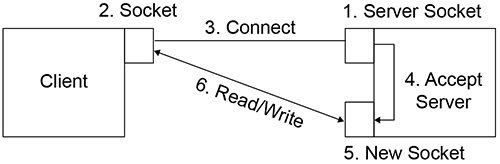
Observe the following figure, where we apply the concept of connected sockets to a client/server application.

Image 6

Figure 1.6: Socket and server socket

For us to correctly identify a process on a machine, we need two fundamental pieces of information – the machine's IP address (or its hostname) and the port:

  • The IP address identifies only the machine we want to connect.
  • The port identifies which application we want to communicate with. As a modern operating system can run multiple applications simultaneously, the port (which ranges from 1 to 65535) uniquely identifies the process on the machine)

In our example, CalcServer (as we will call our server application) creates a ServerSocket (step 1 in the preceding figure) by assigning it the port on which it will wait for connections. This function is exclusive to this class. The client application (which we will call CalcClient) also creates a socket (step 2) and assigns the remote server address (IP address and port) for connection (step 3). CalcServer receives the connection request and accepts it (step 4), creating another socket, which will be responsible for the effective exchange of messages (step 5), exactly as in the following scheme. Finally, both entities can send and receive messages by reading from and writing to sockets (step 6).

So, let's implement the code, starting with our communication protocol.

In this case, two classes are necessary: the Request class and the Response class to enable communication operations. Note that both classes implement the java.io.Serializable interface so that objects are converted to byte arrays when transmitted over the network. This is because, in this example, we are using a Java application to communicate with another Java application. If we eventually want something more flexible, allowing clients developed in other languages to communicate with our server made in Java, we will choose to serialize the objects to text (for example, a JSON format) rather than to bytes, to increase compatibility.

These conversions (from objects to byte arrays, and vice versa) are called marshaling and unmarshaling. We have the following details:

  • Marshaling – When you have an object or a data structure, you can encode it to a byte array (or a character array – a string).
  • Unmarshaling – You receive a byte (or character) array and parse it, decoding it to another structure; easier to handle in your code.

Let us explore the definition of our Request class in this code snippet:

Class Request.java
public record Request(Double op1, Double op2, String oper) {
}

Now, we can explore our Response class definition in the following code:

Class Response.java
public record Response(String status, Double value){
}

Now, let us understand how CalcServer works. In general terms, every server has a common behavior: it works in an infinite loop, accepting requests, manipulating their data, and generating responses, exactly like in the request/response model we saw earlier. The following algorithm depicts its behavior.

Create server socket to listen and bind it to a port number
while (true) {
Accepts new connections to a new socket
Reads data from new socket and assign to a request object
Creates a response object
Handle data (in this case analyzing operator and   operands
If operator is supported and operands are correct, performs the operation and sets the response status to "OK" and the operation result
If an operand is incorrect (e.g., division by zero), sets an "Invalid Operand error" on response and result is null
If an operand is not supported, sets an "Unsupported Operation" status and result is null
Sends the Response object to sender
}

The complete source code of this server is available in the following GitHub repository: https://github.com/PacktPublishing/Java-Web-Internals/tree/main/Chapter01.

If we analyze the source code, we can quickly identify each algorithm step. Every step is commented in the source code, and you can identify them easily:

// step 1
ServerSocket serverSocket = new ServerSocket(8350);
// step 2
while (true) {
    // step 2.1
    Socket socket = serverSocket.accept();
    // step 2.2
    ObjectInputStream in = new ObjectInputStream(
    socket.getInputStream());
    Request req = (Request)in.readObject();
    // step 2.3
    Response rep;;
    // step 2.4 - handling data
    switch(req.getOper()) {
        // other cases to handle ...
        case "/":
            // step 2.5
            if (req.getOp2() != 0) {
                rep = new Response("Ok",req.op1()/req.op2());
                rep.setStatus("Ok");
                rep.setValue(req.getOp1()/req.getOp2());}
            // step 2.6
            else {

                rep =  new Response("Invalid", null);
            }
            break;
        default:
            // step 2.7
            rep = new Response("Unsupported", null);
    }
    // step 2.8
    ObjectOutputStream out = new ObjectOutputStream(
    socket.getOutputStream());
    out.writeObject(rep);
}

Finally, let's explore our CalcClient class code. Its objective is only to interact with the user, receiving (according to the desired operation) the value of each operand, assembling the request, sending it, and waiting for the response to finally display it. The following algorithm describes the Client application:

  1. Reads data from the input (operation and first operand).
  2. Depending on the math operator, reads the second operand.
  3. Creates a Request object with that data.
  4. Connects to the Server application.
  5. Sends a Request object.
  6. Receives a response.
  7. Prints the result.

The complete source code is available on GitHub at https://github.com/PacktPublishing/Java-Web-Internals/tree/main/Chapter01/CalcClient/, and we can identify each step as follows:

void main(){
    // step 1
    String oper;
    Double op1, op2=null;
    oper = scanner.nextLine();
    op1 = Double.parseDouble(scanner.nextLine());
    // step 1.1
    switch(oper) {
        case "+":
        case "-":
        case "*":
        case "/":
        case "^":
            op2 = Double.parseDouble(scanner.nextLine());
            break;
    }
    // step 2
    Request req = new Request(op1, op2, oper);
    // step 3 – If you know your IP Address, you can use
    //          it. It proves the packet actually hits
    //          the whole network stack
    Socket socket = new Socket("localhost", 8350);
    // step 4
    ObjectOutputStream out = new ObjectOutputStream(socket.getOutputStream());
    out.writeObject(req);
    // step 5
    ObjectInputStream in = new ObjectInputStream(socket.getInputStream());
    Response rep = (Response)in.readObject();
    // step 6
    System.out.println(rep);
}

Okay, the code is understandable. But how do we implement this in practice?

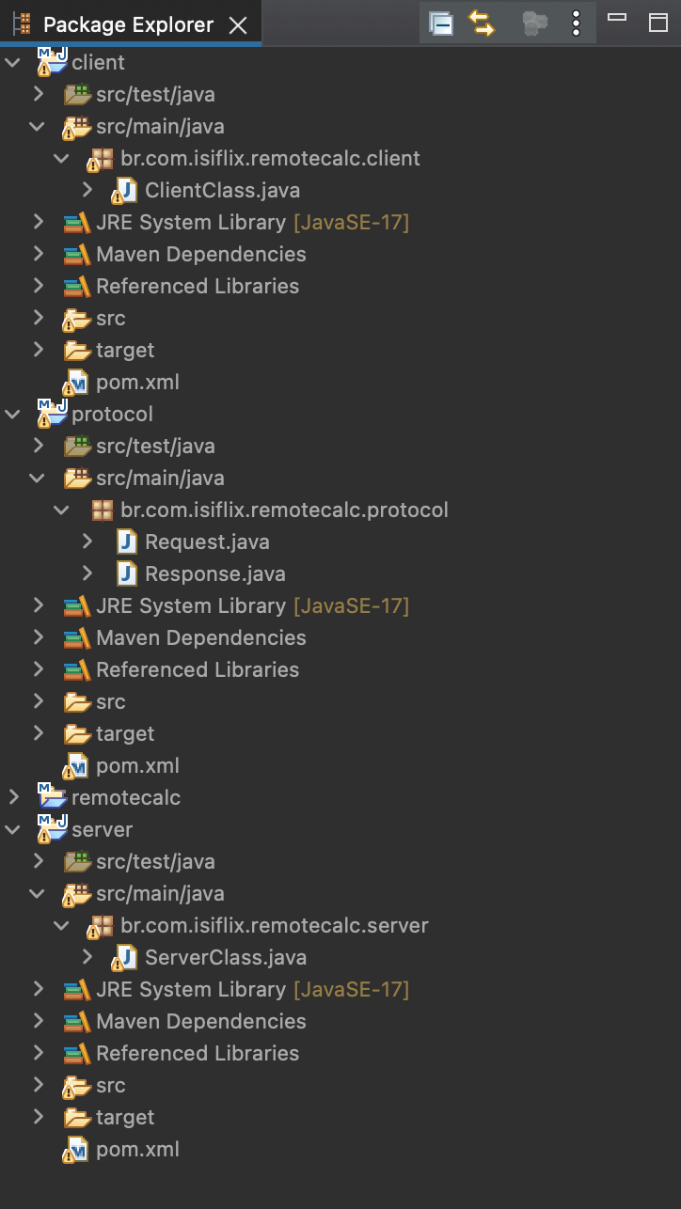
In Java, if you use an IDE such as Eclipse, NetBeans, or IntelliJ, I suggest you create three different projects:

  • One to maintain the classes that define your protocol (this could also be a library)
  • One for CalcServer
  • One for CalcClient

The key point is to reference, in both projects (CalcServer and CalcClient), the project (or library) that contains your protocol classes. This way, you maintain a single code base (without duplication) and can make communication between the server and the client compatible.

Setting up projects with an Eclipse IDE

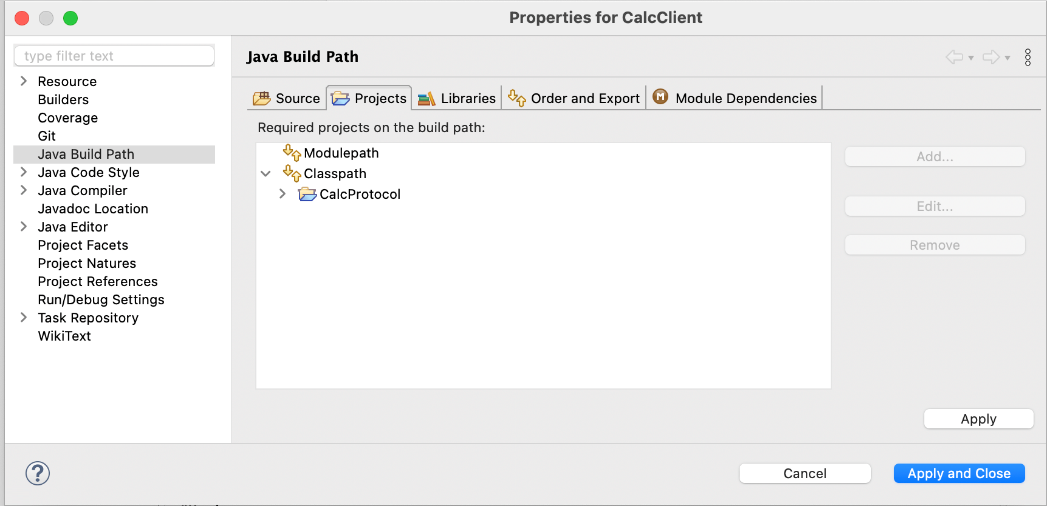
You must import each project separately in your Eclipse IDE (protocol, server, and client). To make the server and client use the protocol classes (Request and Response), you configure the build path:

Project PropertiesBuild PathConfigure Build Path

On the screen, go to the Projects tab, and in the Classpath item, add the CalcProtocol project, as depicted in the following figure.

Image 7

Figure 1.7: Configuring the project build path on Eclipse

Remember that you must do the same operation on the CalcServer project.

Image 8

Figure 1.8: Project structure on Eclipse

Setting up a project manually

If you are not using an IDE to develop your applications, you can do it manually using command-line tools. It is necessary for you to have practice with CLI tools (bash, Windows command line, PowerShell, and others).

The protocol project (which contains Request and Response classes) is a common module for the other two projects (Server and Client). If you want to reuse it, the best alternative is to generate a JAR file for this project as follows. Step 1: you must go to your project.

Step 1: Generate a JAR file for your protocol

  1. Go to your protocol project root folder.
  2. Create (if it does not exist) a folder for your compiled classes (let's call it "bin").
  3. Compile your Java files (assuming that your files are in the src folder).
    javac -d bin *.java
  4. Generate a JAR file containing your compiled classes
    jar –create –file protocol.jar -C bin

Step 2: Compiling and Running your Server project

  1. Go to your protocol project root folder and create your bin folder.
  2. Compile your Java classes (this step is not necessary since Java 11, but if you want to ensure that your code is correct before running, you can do this). In this step (regardless of which way you choose), you must reference your protocol JAR file in the Classpath parameter.
    javac -cp <your protocol jar file> -d bin src/*.java
  3. Once your files are compiled, you have to run your Server main class (here we will assume that the filename is ServerClass).
    java -cp <your protocol jar file> bin/ServerClass

Step 3: Compiling and Running your Client project

Previously, open another terminal window.

  1. Go to your protocol project root folder and create your bin folder.
  2. Compile your Java classes (this step is not necessary since Java 11, but if you want to ensure that your code is correct before running, you can do this). In this step (regardless of which way you choose), you must reference your protocol JAR file in the Classpath parameter.
    javac -cp <your protocol jar file> -d bin src/*.java
  3. Once your files are compiled, you have to run your Server main class (here we will assume that the filename is ClientClass).
    java –cp <your protocol jar file> bin/ClientClass

Now, regardless of which option you choose, let us run our applications. You must first run the server project (because it creates the socket that listens for connections), followed by the client project to interact with the user and send/receive messages.

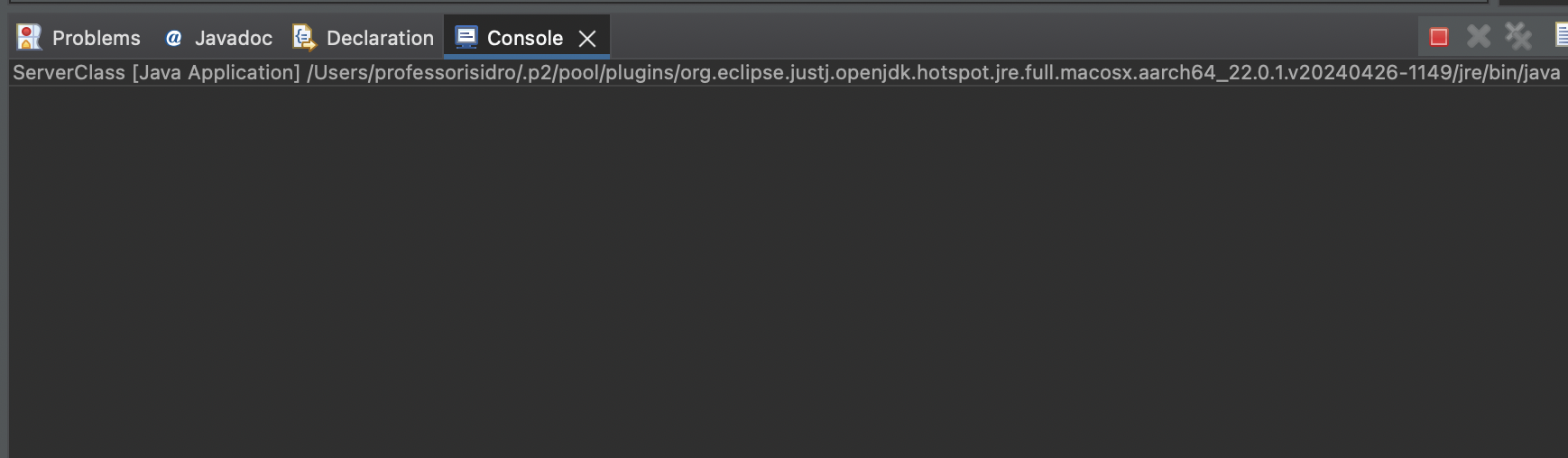
The following figures show both application behaviors. Figure 1.9 depicts the server showing no console interaction, waiting for the client's request:

Image 9

Figure 1.9: Server running showing no messages waiting for the client's request

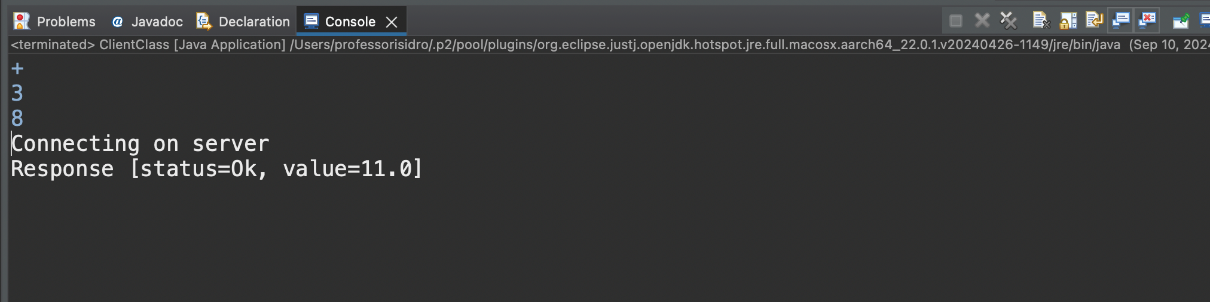
Figure 1.10 shows the client interacting with the user, who inputs the operation (+) and two operands (3 and 8).

Image 10

Figure 1.10: Client interacting with the user

Figure 1.11 depicts the server receiving the client's request.

Image 11

Figure 1.11: Server receiving client's request and printing messages on the console

Figure 1.12 depicts the client printing the result output.

Image 12

Figure 1.12: Client receiving server's response and outputting the result

CONTINUE READING
83
Tech Concepts
36
Programming languages
73
Tech Tools
Icon Unlimited access to the largest independent learning library in tech of over 8,000 expert-authored tech books and videos.
Icon Innovative learning tools, including AI book assistants, code context explainers, and text-to-speech.
Icon 50+ new titles added per month and exclusive early access to books as they are being written.
Java Web Internals
notes
bookmark Notes and Bookmarks search Search in title playlist Add to playlist download Download options font-size Font size

Change the font size

margin-width Margin width

Change margin width

day-mode Day/Sepia/Night Modes

Change background colour

Close icon Search
Country selected

Close icon Your notes and bookmarks

Confirmation

Modal Close icon
claim successful

Buy this book with your credits?

Modal Close icon
Are you sure you want to buy this book with one of your credits?
Close
YES, BUY

Submit Your Feedback

Modal Close icon
Modal Close icon
Modal Close icon