-
Book Overview & Buying
-
Table Of Contents
C++ STL Cookbook - Second Edition
By :
Defined in C++23, the new mdspan class provides a multidimensional view of any contiguous container, including primitive C arrays.
The mdspan class uses the new C++23 multidimensional extension to the subscript operator [] to provide access to individual elements in a multidimensional space.
The multidimensional space is an abstraction superimposed over a contiguous container or primitive array.
Consider this primitive array:

Figure 1.1: A primitive array suitable for use with mdspan
This array is a simple one-dimensional vector of integers, increasing in value from 1 to 8. Each element in the array is accessed using a scalar index, from [0] for the first element to [7] for the eighth element.
Using mdspan, we can view this exact same data as a two-dimensional array:
mdspan m(array, 2, 4);
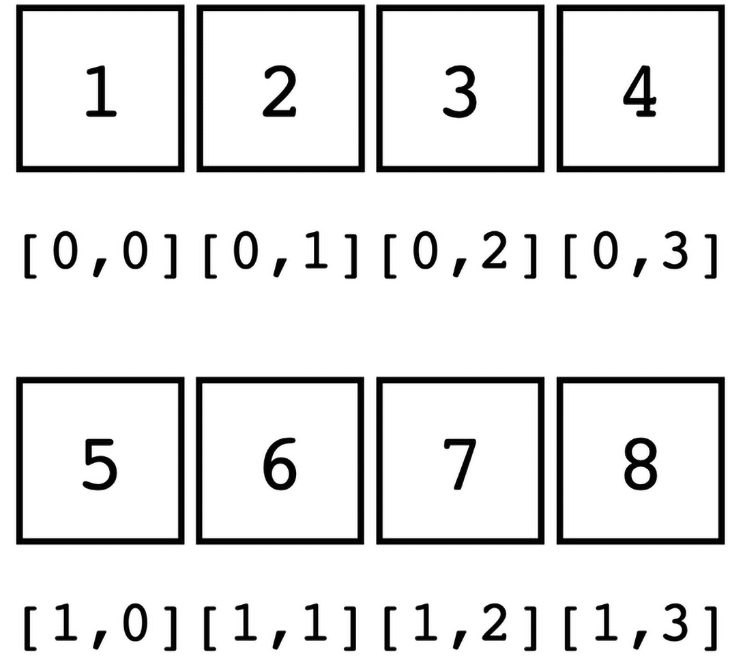
Now we can access this same data using two-dimensional subscripts:

Figure 1.2: A two-dimensional view using mdspan
This gives us a two-dimensional view of our array. The first dimension exposes elements [0] to [3] as m[0,0] to m[0,3], and the second exposes elements [4] to [7] as m[1,0] to m[1,3].
The mdspan class is defined in the <mdspan> header.
Compiler support
As of late 2025, mdspan is supported by the Apple clang and Microsoft Visual C++ compilers. The code in this section has been tested on Apple clang 17.0 and MSVC 19.44.
The mdspan class requires a contiguous data set, such as a primitive array, for its source data. STL containers that conform to this requirement include array and vector.
vector object as our source data:
vector v {1, 2, 3, 4, 5, 6, 7, 8, 9, 10, 11, 12};
We can access the underlying data of a vector using its data() method. This provides the contiguous data required by mdspan:
mdspan mds2(v.data(), 2, 6);
The mdspan object is named mds2 to indicate that it's a two-dimensional view. The first argument is a pointer to the contiguous array, as returned by the data() method of the vector object. The subsequent arguments are the extents of the view dimensions. Each extent specifies the number of elements in that dimension.
In this example, we have two dimensions with extents of 2 and 6. The product of the extents must not exceed the number of underlying elements. Our source vector has 12 elements and the product of 2 × 6 is 12, so the product of our extents and the size of our source data are equal.
This creates a two-dimensional mdspan object, with 2 elements in one dimension, and each of those elements has its own span of 6 elements.
for (size_t i1 {0}; i1 < mds2.extent(0); ++i1) {
for (size_t i2 {0}; i2 < mds2.extent(1); ++i2) {
print("[{},{}] {:02d} ", i1, i2, mds2[i1,i2]);
}
println("");
}
The output looks like this:
[0,0] 01 [0,1] 02 [0,2] 03 [0,3] 04 [0,4] 05 [0,5] 06
[1,0] 07 [1,1] 08 [1,2] 09 [1,3] 10 [1,4] 11 [1,5] 12
We format the output to include the subscripts so we can clearly see the position of each element in the two-dimensional array. Each element's integer value is formatted with leading zeros, using the formatter specification {:02d}, so the values align visually.
mdspan object:
mdspan mds3(v.data(), 2, 3, 2);
For this object, We pass the same data and specify three extents. This creates a new three-dimensional view into the same source data.
mds3 view using the same technique we used for two dimensions:
for (size_t i1 {0}; i1 < mds3.extent(0); ++i1) {
for (size_t i2 {0}; i2 < mds3.extent(1); ++i2) {
for (size_t i3 {0}; i3 < mds3.extent(2); ++i3) {
print("[{},{},{}] {:03d} ",
i1, i2, i3, mds3[i1,i2,i3]);
}
println("");
}
}
That gives us this output:
[0,0,0] 001 [0,0,1] 002
[0,1,0] 003 [0,1,1] 004
[0,2,0] 005 [0,2,1] 006
[1,0,0] 007 [1,0,1] 008
[1,1,0] 009 [1,1,1] 010
[1,2,0] 011 [1,2,1] 012
Both views may coexist because the underlying data remains in its original location. The mdspan class merely provides a view into that data set.
The constructor for the mdspan class looks like this:
template<class... OtherIndexTypes>
mdspan(data_handle_type p, OtherIndexTypes... exts);
The first argument is a pointer to a contiguous data source. The exts argument(s) is (are) variadic template argument(s) that take one or more extents, which specify the dimensions of the mdspan object.
The C++23 specification provides new multidimensional support for the subscript [] operator. This means that we may now use comma-separated values in the subscript operator.
The multidimensional subscript operator uses a variadic template to pass arguments as a parameter pack. We can demonstrate this capability with a simplified example of a class that overloads a multidimensional subscript operator:
template <typename T>
struct multidim {
template <typename... I>
const T operator[](I... indices) const {
return (indices + ...);
}
};
This example uses a fold expression to return the sum of the indices passed to the subscript [] operator. We can call it like this:
multidim<int> m1 {};
println("multidim[1,1,1,1,1]: {}", m1[1,1,1,1,1]);
println("multidim[5,6,7]: {}", m1[5,6,7]);
And we get this output:
multidim[1,1,1,1,1]: 5
multidim[5,6,7]: 18
The mdspan class uses this new feature to provide support for multiple indices into the data, like this:
x = o[1,2,3];
This allows the mdspan object to use the subscript operator to access values in multiple dimensions.
Because the mdspan class uses an external data store and does not own the underlying data itself, it returns data elements as references. This allows you to both read and write those elements.
That means that if we start with a simple ordinal data set:
vector v {1, 2, 3, 4, 5, 6, 7, 8, 9, 10, 11, 12};
We can modify that data set like this:
for (size_t i1 {0}; i1 < mds2.extent(0); ++i1) {
for (size_t i2 {0}; i2 < mds2.extent(1); ++i2) {
mds2[i1, i2] = mds2[i1, i2] * 10 + (int)i2;
}
}
That modifies the data in the underlying vector object, so when we look at it:
for (auto n : v) {
print("{} ", n);
}
We now get this output:
10 21 32 43 54 65 70 81 92 103 114 125
While it's important to understand that this allows the data to be mutable, it's not always a good idea. If you want to minimize the risk of side effects, you should qualify your source data as const:
const vector v {1, 2, 3, 4, 5, 6, 7, 8, 9, 10, 11, 12};
It's generally good practice to const-qualify any variables that you don't need to modify.
Change the font size
Change margin width
Change background colour