Sign In Start Free Trial
Account

Add to playlist

Create a Playlist

Modal Close icon
You need to login to use this feature.
  • Book Overview & Buying JDBC 4.0 and Oracle JDeveloper for J2EE Development
  • Table Of Contents Toc
JDBC 4.0 and Oracle JDeveloper for J2EE Development

JDBC 4.0 and Oracle JDeveloper for J2EE Development

By : Deepak Vohra
3 (2)
close
close
JDBC 4.0 and Oracle JDeveloper for J2EE Development

JDBC 4.0 and Oracle JDeveloper for J2EE Development

3 (2)
By: Deepak Vohra

Overview of this book

Being a quick reference guide, this book has a focused approach. You will learn to develop J2EE applications with JDBC and JDeveloper in no time. The book covers lot of practical examples, which makes it developer-friendly learning material. The book is suitable for Java/J2EE and Oracle JDeveloper beginners. If you are a J2EE developer and want to use the JDeveloper IDE for J2EE development, this book is for you. JDeveloper developers who are new to J2EE will also benefit from the book. Most J2EE applications have a database component and the book is specially suited for database-based J2EE development in Oracle JDeveloper. You can also use this book if you are interested in learning how to utilize the new features offered in JDBC 4.0 for Java/J2EE development.
Table of Contents (17 chapters)
close
close
16
Index

Updating a Database Table

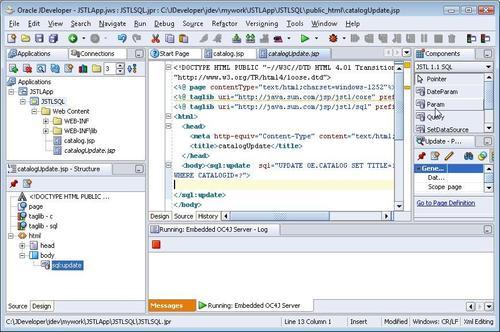
In this section, a database table row will be updated. Create a JSP catalogUpdate.jsp in the JSTLSQL project. As in the previous section, set the data source for the JSP page with the setDataSource tag. The UPDATE SQL statement is run with the sql:update tag. Add an Update tag to the JSP page from the Component Palette. The SQL statement has placeholders for specifying IN parameters for the UPDATE statement. Add the UPDATE SQL statement in the sql attribute of the sql:update tag.

<sql:update sql="UPDATE OE.CATALOG SET TITLE=?, AUTHOR=?
WHERE CATALOGID=?">
</sql:update>

The values for the IN parameters are specified with the sql:param tags. Position the cursor in the sql:update statement, and select the Param tag in the JSTL 1.1 SQL Component Palette.

Updating a Database Table

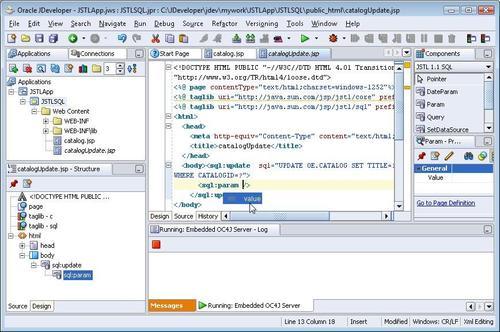
The param value is set with the value attribute in the sql:param tag. To add the value attribute, press the space bar in the sql:param tag and double-click on the value attribute.

Updating a Database Table

Specify the...

CONTINUE READING
83
Tech Concepts
36
Programming languages
73
Tech Tools
Icon Unlimited access to the largest independent learning library in tech of over 8,000 expert-authored tech books and videos.
Icon Innovative learning tools, including AI book assistants, code context explainers, and text-to-speech.
Icon 50+ new titles added per month and exclusive early access to books as they are being written.
JDBC 4.0 and Oracle JDeveloper for J2EE Development
notes
bookmark Notes and Bookmarks search Search in title playlist Add to playlist font-size Font size

Change the font size

margin-width Margin width

Change margin width

day-mode Day/Sepia/Night Modes

Change background colour

Close icon Search
Country selected

Close icon Your notes and bookmarks

Confirmation

Modal Close icon
claim successful

Buy this book with your credits?

Modal Close icon
Are you sure you want to buy this book with one of your credits?
Close
YES, BUY

Submit Your Feedback

Modal Close icon
Modal Close icon
Modal Close icon