-
Book Overview & Buying
-
Table Of Contents
Oracle Essbase 11 Development Cookbook
By :
In previous releases of Essbase, a developer had the option of building a hierarchy in ascending or descending alphabetical order via a build rule. If you wanted to sort the hierarchies in a different order, then you would go into Essbase Administrative Services (EAS). Then, open the outline, and drag and drop the members in the order that the business wanted or extract the dimension using an Outline Extract utility, sort the hierarchy, and use a build rule to rebuild the dimension. In contrast, when we are using Essbase Studio, in version 11.1.2.1, we are going to have to define the Sort Order in the relational environment. If you have the Oracle's data-governance software Data Relationship Management (DRM), this task will be handled there, but this recipe shows you how to load the Sort Order field with some SQL knowledge and Excel.
To get started, open SQL Server Management Studio, and add a database called TBC, if you have not already done it. In this recipe, we are using T-SQL and providing the PL\SQL equivalent where the syntax is different. You need to add a SCHEMA instead and use a tool like TOAD or Golden, if you are using Oracle. You should also open an Excel workbook.
YEARS table. We can change the script below to PL/SQL by replacing int with INTEGER and varchar() with VARCHAR2():--For T-SQL user Create Table YEARS( YEARID int NOT NULL, YEAR int NULL, QUARTER varchar(80) NULL, MONTH varchar(80) NULL, MONTH_ALIAS varchar(80) NULL, Constraint PK_YEAR_YEARID Primary Key(YEARID Asc) );
--This is the syntax in T-SQL Alter Table YEARS Add SORT_ORDER INT NULL; --This is the syntax in PL/SQL Alter Table YEARS Add SORT_ORDER INTEGER NULL;
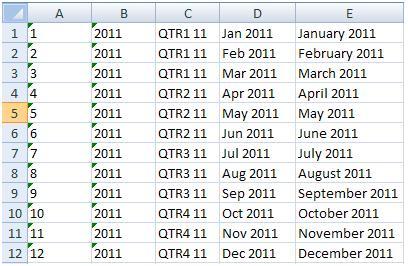
YEARS dimension's data starting with field A1, as follows:
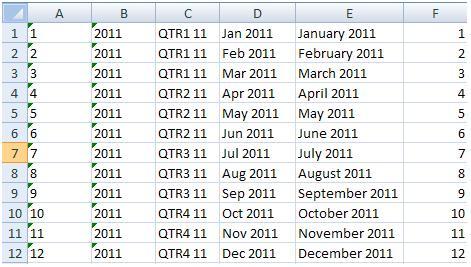
1 in cell F1 and formula =F1+1 in cell F2.

="Insert Into TIME Values (" & A1 & ", " & B1 & ", '"& C1 & "', '" & D1 & "', '" & E1 & "', '" & F1 & "');"TBC database, paste the range in the query window, and execute the following queries:Insert Into YEARS Values(1, 2011, 'QTR1 11', 'Jan 2011', 'January 2011', '1'); Insert Into YEARS Values(2, 2011, 'QTR1 11', 'Feb 2011', 'February 2011', '2'); Insert Into YEARS Values(3, 2011, 'QTR1 11', 'Mar 2011', 'March 2011', '3'); Insert Into YEARS Values(4, 2011, 'QTR2 11', 'Apr 2011', 'April 2011', '4'); Insert Into YEARS Values(5, 2011, 'QTR2 11', 'May 2011', 'May 2011', '5'); Insert Into YEARS Values(6, 2011, 'QTR2 11', 'Jun 2011', 'June 2011', '6');Insert Into YEARS Values(7, 2011, 'QTR3 11', 'Jul 2011', 'July 2011', '7'); Insert Into YEARS Values(8, 2011, 'QTR3 11', 'Aug 2011', 'August 2011', '8'); Insert Into YEARS Values(9, 2011, 'QTR3 11', 'Sep 2011', 'September 2011', '9'); Insert Into YEARS Values(10, 2011, 'QTR4 11', 'Oct 2011', 'October 2011', '10'); Insert Into YEARS Values(11, 2011, 'QTR4 11', 'Nov 2011', 'November 2011', '11'); Insert Into YEARS Values(12, 2011, 'QTR4 11', 'Dec 2011', 'December 2011', '12');
The following are the steps in this recipe:
YEARS table to the TBC database.SORT_ORDER column to the YEARS table.YEARS dimension into an Excel sheet and sorted our YEARS hierarchy.SORT_ORDER into column F1, we pasted the correct SORT_ORDER and concatenate Insert statements together with the values in Excel.Insert statements in the Excel workbook to update the YEARS table using the SQL Management Studio.The following is what your YEARS hierarchy should look like without the SORT_ORDER column:
|
| ||
|
| ||
|
| ||
|
| ||
|
| ||
|
| ||
|
| ||
|
| ||
|
| ||
|
| ||
|
| ||
|
| ||
|
| ||
|
| ||
|
| ||
|
| ||
|
|
Essbase Studio will enter February into the outline before January, May will be after June, August will be before July, and the fourth quarter will be completely out of order. For this reason, it is suggested that you add a SORT_ORDER column to all of your dimension tables.
Refer to the Using Sort Order on data elements recipe in Chapter 2 to learn how to set the sort order for your metadata elements.
Change the font size
Change margin width
Change background colour