Sign In Start Free Trial
Account

Add to playlist

Create a Playlist

Modal Close icon
You need to login to use this feature.
  • Book Overview & Buying Oracle BPM Suite 11g Developer's cookbook
  • Table Of Contents Toc
Oracle BPM Suite 11g Developer's cookbook

Oracle BPM Suite 11g Developer's cookbook

By : Vivek Acharya
4.2 (5)
close
close
Oracle BPM Suite 11g Developer's cookbook

Oracle BPM Suite 11g Developer's cookbook

4.2 (5)
By: Vivek Acharya

Overview of this book

Oracle Business Process Management Suite is a complete set of tools for creating, executing, and optimizing business processes.Oracle BPM Suite 11g offers the flexibility that business demands, hand-in-hand with the power IT requires. The result is an agile platform that brings together your existing applications, enabling you to react quickly to new business requirements.With this cookbook we will develop rich, interactive business processes using the Oracle Business Process Management suite.With Oracle BPM Suite 11g Developer's Cookbook, a common process model based on BPMN is presented to the specific role assigned to readers in each chapter. Explore Oracle BPM 11g with Modelling, Implementation, Simulation, Deployment, Exception Management, BPM and SOA in Concert, Advanced Rules and Human tasks, End User Interaction and Run-time.Oracle BPM Suite 11g Developer's Cookbook will help readers learn BPM 11g through a Real World Sample Process.This book is divided into four sections: the first section, Modeling, lays the foundation and demonstrates how to implement the Modeling of Business processes for a Use Case of a Fictitious Organization which needs BPM to be implemented at their site (with data objects and information handling). In the second section, Implementation, we learn about Process Implementation, Human Interaction, Business Rules, and much more. In the third section, Measuring, we learn about Post Process Development, Performance Analysis and Simulation Models. In the last section, Deployment, Migration and Run-Time, we learn deployment and migration, and Post Deployment Run-Time.
Table of Contents (15 chapters)
close
close
12
A. Oracle BPM—Application Development Lifecycle
14
Index

Controlling Process Flow—Implementing Exclusive Gateways

The Business Analyst will either reject the quote or approve it, to switch the token flow, based on Business Analyst Review User task.

How to do it...

Perform the following steps to implement Exclusive gateways:

  1. Create an Exclusive Gateway for the condition switch.
  2. Create an Exclusive Gateway to check on the Business Analyst Approval Outcome.
  3. Select Component Palette | BPM | Gateways and select Exclusive Gateway.
  4. Next, click on the BusinessAnalyst swimlane and position it where you want to create the condition switches. In this case, place it after the Review task (User task).
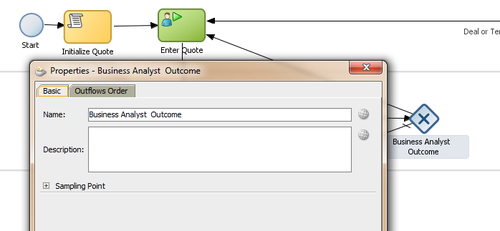
  5. It will open a Properties dialog box. Enter basic information, such as:
    • Name:Business Analyst Outcome
    How to do it...
  6. When you have finished the preceding steps, click Save.

Create a Process Data object to hold outcome of the Business Analyst Review User task as follows:

  1. Click the process name SalesToContract in the Project navigator.
  2. You can see that a Structure panel opens at the lower left corner of the JDeveloper screen.
  3. In the Structure panel, on the lower-left side, right-click Process Data Objects and click New, to create a new Data object.
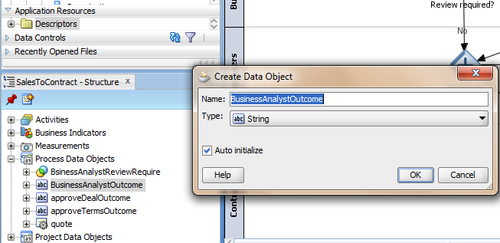
  4. Enter the following details for the Process Data object:
    • Data object name: BusinessAnalystOutcome
    • Type: String
    • Enable Auto Initialise.
      How to do it...
  5. When you have finished the preceding steps, click Save.
  6. Create Sequence flows by implementing the outcome scenario:

    If outcome of the Business Analyst Review is REJECT: Then, send a quote to the Sales Representative.

    Else: Send it to Approvers for approvals.

  7. Case: REJECT
    • Create a Conditional Sequence flow from Business Analyst Outcome Gateway to User Task (Enter Quote)
    • Click on sequence flow to open the Properties dialog
    • Enter basic information as follows:
    • In the Description tab ,enter Name: Business Analyst Rejected
    • In the Properties tab:
    • Select Type as Condition (to implement conditional sequence flow)
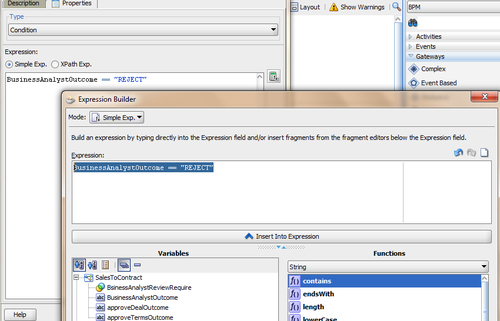
    • In the Expression section, click Expression Builder
    • In Expression Builder, select Mode as Simple expression
    • From the Variables section, chose the Data object BusinessAnalystOutcome and set value as: BusinessAnalystOutcome=="REJECT"
      How to do it...
    • Click OK
    • When you have finished the preceding steps, click Save.
  8. Case: APPROVE
    • Create an unconditional sequence flow from Gateway (Business Analyst Outcome )to Approvals(Parallel gateway), in the Approvers swimlane
    • Enter basic information such as:
    • In the Description tab, enter Name:Business Analyst Approved
    • In the Properties tab, select Unconditional as Type(to implement unconditional sequence flow)
    • When you have finished the preceding steps, click Save.

How it works...

Exclusive gateways used for the conditional switch discussed in the preceding text are flow objects that define the flow of process. Gateways define what path the process token will take. Exclusive gateways have conditional outgoing sequence flows. You can build expressions to determine if your process continues down a conditional sequence flow.

To implement Conditional Switch:

If: Business Analyst Review is required = Yes, then proceed to the Business Analyst Review User task.

Else: Proceed to Approvers Review.

You will create a Process Data Object to store values, as the evaluation is determined by the expression defined for the outgoing conditional sequence flow. If this evaluates to true, then the Process Flow proceeds down the Yes path (towards the Business Analyst Review User task). If it evaluates to false, then the Process Flow proceeds down the path of the default outgoing sequence flow. The condition in the sequence flow will be based on values of Process Data object BusinessAnalystReviewRequired.

If the Process Data object BusinessAnalystReviewRequired = True, then choose the sequence flow Yes

Else: Choose the sequence flow No

CONTINUE READING
83
Tech Concepts
36
Programming languages
73
Tech Tools
Icon Unlimited access to the largest independent learning library in tech of over 8,000 expert-authored tech books and videos.
Icon Innovative learning tools, including AI book assistants, code context explainers, and text-to-speech.
Icon 50+ new titles added per month and exclusive early access to books as they are being written.
Oracle BPM Suite 11g Developer's cookbook
notes
bookmark Notes and Bookmarks search Search in title playlist Add to playlist font-size Font size

Change the font size

margin-width Margin width

Change margin width

day-mode Day/Sepia/Night Modes

Change background colour

Close icon Search
Country selected

Close icon Your notes and bookmarks

Confirmation

Modal Close icon
claim successful

Buy this book with your credits?

Modal Close icon
Are you sure you want to buy this book with one of your credits?
Close
YES, BUY

Submit Your Feedback

Modal Close icon
Modal Close icon
Modal Close icon