Sign In Start Free Trial
Account

Add to playlist

Create a Playlist

Modal Close icon
You need to login to use this feature.
  • Book Overview & Buying Salesforce.com customization handbook
  • Table Of Contents Toc
Salesforce.com customization handbook

Salesforce.com customization handbook

By : Gupta, Pareek
4.3 (3)
close
close
Salesforce.com customization handbook

Salesforce.com customization handbook

4.3 (3)
By: Gupta, Pareek

Overview of this book

If you want to use Salesforce CRM to automate your business requirements, or you have already adopted Salesforce CRM and want to streamline the sales process, this book is for you. Whether you are new to Salesforce or a seasoned expert, you will be able to master the basic functions as well as the advanced features of Salesforce.com. No previous experience in computer coding or programming is required.
Table of Contents (14 chapters)
close
close
13
Index

Tags


Tags are some keywords that you can use with your records to make a search easier and organize the records in your personalized way. For example, in your organization, you have thousands of account records, but you want to organize the accounts that were created in the summer of 2014, so that the next time you search for the account records, you simply need to search summer 2014.

There are two types of tags that are provided by Salesforce:

  • Personal Tags: These are private to a specific user.

  • Public Tags: These are public and available for all users.

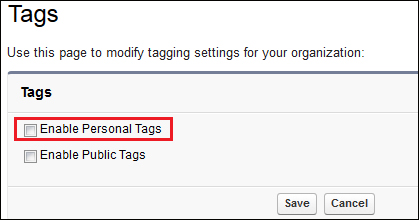
To use the tags feature, you need to enable it. To enable tags, follow these instructions:

  1. Navigate to Setup | Build | Customize | Tags | Tab Settings.

  2. Select Enable Personal Tags as shown in the following screenshot:

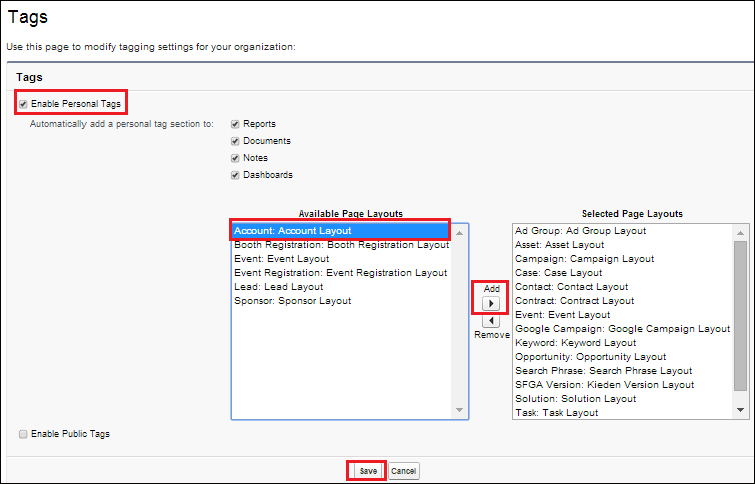
  3. Select the layout on which you want to show the tagging feature. In our case, select the Account Layout option and click on the Save button, as shown in the following screenshot:

  4. Now, go to any of the account record detail pages...

CONTINUE READING
83
Tech Concepts
36
Programming languages
73
Tech Tools
Icon Unlimited access to the largest independent learning library in tech of over 8,000 expert-authored tech books and videos.
Icon Innovative learning tools, including AI book assistants, code context explainers, and text-to-speech.
Icon 50+ new titles added per month and exclusive early access to books as they are being written.
Salesforce.com customization handbook
notes
bookmark Notes and Bookmarks search Search in title playlist Add to playlist font-size Font size

Change the font size

margin-width Margin width

Change margin width

day-mode Day/Sepia/Night Modes

Change background colour

Close icon Search
Country selected

Close icon Your notes and bookmarks

Confirmation

Modal Close icon
claim successful

Buy this book with your credits?

Modal Close icon
Are you sure you want to buy this book with one of your credits?
Close
YES, BUY

Submit Your Feedback

Modal Close icon
Modal Close icon
Modal Close icon