Sign In Start Free Trial
Account

Add to playlist

Create a Playlist

Modal Close icon
You need to login to use this feature.
  • Book Overview & Buying Mastering Kali Linux for Advanced Penetration Testing
  • Table Of Contents Toc
Mastering Kali Linux for Advanced Penetration Testing

Mastering Kali Linux for Advanced Penetration Testing - Fourth Edition

By : Vijay Kumar Velu
4.7 (27)
close
close
Mastering Kali Linux for Advanced Penetration Testing

Mastering Kali Linux for Advanced Penetration Testing

4.7 (27)
By: Vijay Kumar Velu

Overview of this book

Remote working has given hackers plenty of opportunities as more confidential information is shared over the internet than ever before. In this new edition of Mastering Kali Linux for Advanced Penetration Testing, you’ll learn an offensive approach to enhance your penetration testing skills by testing the sophisticated tactics employed by real hackers. You’ll go through laboratory integration to cloud services so that you learn another dimension of exploitation that is typically forgotten during a penetration test. You'll explore different ways of installing and running Kali Linux in a VM and containerized environment and deploying vulnerable cloud services on AWS using containers, exploiting misconfigured S3 buckets to gain access to EC2 instances. This book delves into passive and active reconnaissance, from obtaining user information to large-scale port scanning. Building on this, different vulnerability assessments are explored, including threat modeling. See how hackers use lateral movement, privilege escalation, and command and control (C2) on compromised systems. By the end of this book, you’ll have explored many advanced pentesting approaches and hacking techniques employed on networks, IoT, embedded peripheral devices, and radio frequencies.
Table of Contents (17 chapters)
close
close
15
Other Books You May Enjoy
16
Index

Managing collaborative penetration testing using Faraday

One of the most difficult aspects of penetration testing is remembering to test all of the relevant parts of the network or system target, or trying to remember whether the target was actually tested after the testing has been completed. In some cases, a single client may have multiple penetration testers performing scanning activities from multiple locations, and management would like to have a single view. Faraday can provide this, assuming all of the penetration testers are able to ping each other on the same network or on the internet for external assessment.

Faraday is a multiuser penetration test Integrated Development Environment (IDE). It is designed for testers to distribute, index, and analyze all of the data that is generated during the process of a penetration test or technical security audit to provide different views, such as Management, Executive Summary, and Overall Issues lists.

This IDE platform was developed in Python by InfoByte, and version 3.14.3 is installed by default in the latest version of Kali Linux. You can navigate, from the menu, to Applications, click on 12-Reporting tools, and then click on Faraday start. It should open up a new screen for you to enter your password to perform service changes. You should now be presented with the following screen to set up a username and password for the Faraday web portal.

Once the username and password are both set, the application should open the web browser, pointing to http://localhost:5985/

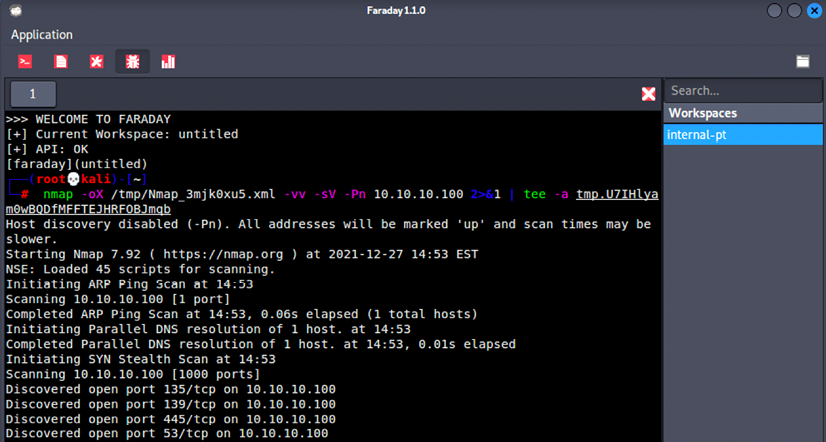
You will now be able to create workspaces for each project. The next step is to make sure all the testers that are to utilize the Faraday client perform all the tasks by running faraday-client in the terminal; it should prompt you to enter the credentials for the application. Use the same credentials that you just created, and you should now be able to see the same screen as that displayed in Figure 1.47:

Text  Description automatically generated

Figure 1.47: Running Nmap scan through the Faraday client

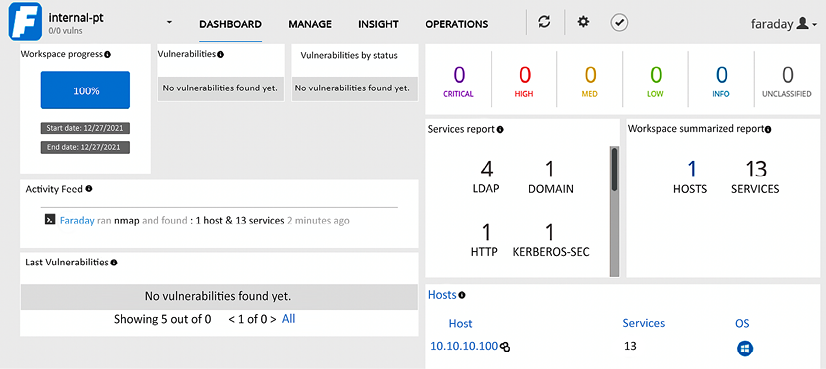
Following this screen, any scanning command-line activities that you or any other penetration testers in your team carry out can be visualized by clicking on the Faraday web application; this will display something similar to that shown in Figure 1.48:

Graphical user interface, text, application  Description automatically generated

Figure 1.48: The real-time dashboard of Faraday

There is a limitation of the free version of Faraday 3.15.0, where real-time operations, insights, and data analysis cannot be utilized by testers to visualize the whole list of issues in a single place.

CONTINUE READING
83
Tech Concepts
36
Programming languages
73
Tech Tools
Icon Unlimited access to the largest independent learning library in tech of over 8,000 expert-authored tech books and videos.
Icon Innovative learning tools, including AI book assistants, code context explainers, and text-to-speech.
Icon 50+ new titles added per month and exclusive early access to books as they are being written.
Mastering Kali Linux for Advanced Penetration Testing
notes
bookmark Notes and Bookmarks search Search in title playlist Add to playlist download Download options font-size Font size

Change the font size

margin-width Margin width

Change margin width

day-mode Day/Sepia/Night Modes

Change background colour

Close icon Search
Country selected

Close icon Your notes and bookmarks

Confirmation

Modal Close icon
claim successful

Buy this book with your credits?

Modal Close icon
Are you sure you want to buy this book with one of your credits?
Close
YES, BUY

Submit Your Feedback

Modal Close icon
Modal Close icon
Modal Close icon