Sign In Start Free Trial
Account

Add to playlist

Create a Playlist

Modal Close icon
You need to login to use this feature.
  • Book Overview & Buying The Ultimate Linux Shell Scripting Guide
  • Table Of Contents Toc
The Ultimate Linux Shell Scripting Guide

The Ultimate Linux Shell Scripting Guide

By : Donald A. Tevault
4.9 (7)
close
close
The Ultimate Linux Shell Scripting Guide

The Ultimate Linux Shell Scripting Guide

4.9 (7)
By: Donald A. Tevault

Overview of this book

Dive into the world of Linux shell scripting with this hands-on guide. If you’re comfortable using the command line on Unix or Linux but haven’t fully explored Bash, this book is for you. It’s designed for programmers familiar with languages like Python, JavaScript, or PHP who want to make the most of shell scripting. This isn’t just another theory-heavy book—you’ll learn by doing. Each chapter builds on the last, taking you from shell basics to writing practical scripts that solve real-world problems. With nearly a hundred interactive labs, you’ll gain hands-on experience in automation, system administration, and troubleshooting. While Bash is the primary focus, you'll also get a look at Z Shell and PowerShell, expanding your skills and adaptability. From mastering command redirection and pipelines to writing scripts that work across different Unix-like systems, this book equips you for real-world Linux challenges. By the end, you'll be equipped to write efficient shell scripts that streamline your workflow and improve system automation.
Table of Contents (27 chapters)
close
close
26
Index

Understanding Shells

So, you’re scratching your head and saying, “What is a shell, and why should I care?” Well, a shell is a program that acts as an intermediary between the user and the operating system kernel. A user types commands into the shell, which passes them into the kernel for processing. The output is then presented to the user via the computer terminal, which can also referred to as the screen. The most common shell on Linux systems is bash, but the Z shell (zsh) has been gaining popularity in recent years. (I’ll explain why in Chapter 22, Using the Z Shell.) You’ll find bash as the default shell on most Linux distros and certain Unix-like distros such as OpenIndiana, and zsh as the default on Kali Linux.

If you are brand new to the wild, wonderful world of Linux and its Unix or Unix-like cousins, you might be wondering what a distro is. Well, unlike Windows and macOS, which are proprietary and controlled by a single company, Linux and its cousins are primarily open source software, which means that anyone can take the source code and create their own implementations, or distributions. Red Hat Enterprise Linux, Fedora, and Ubuntu are examples of Linux distributions, and OpenIndiana and FreeBSD are examples of Unix-like distributions. But, we hard-core geeks rarely utter the word distribution, and instead just say distro, for short.

Also, the reason that I differentiate between Unix and Unix-like distros has to do with legal reasons that date back to the 1980s. This involves a rather complicated mess that I would rather not go into here. Suffice it to say that the creators of distros such as FreeBSD are not allowed to refer to their creations as Unix, even though they are mostly functionally equivalent. But, they can say that their creations are Unix-like.

The newest versions of macOS also have zsh set as the default shell. Fortunately, much of what you’ll learn about bash also works on zsh. The main difference is that zsh has a few cool features that bash doesn’t have. (Again, I’ll explain all about that in Chapter 22.) PowerShell, which originally was only available for Microsoft Windows operating systems, has also been available for Linux and macOS since 2016. PowerShell is a whole different animal, but you might find it quite useful, as you should see when we get to Chapter 23, Using PowerShell on Linux.

It’s common to hear people refer to bash as the bash shell. But, bash is short for Bourne Again Shell. So, when you say bash shell, you’re really saying Bourne Again Shell Shell, which is a bit awkward. This is the same as when people talk about going to the ATM machine to withdraw some money. What they’re really saying is that they’re going to the Automatic Teller Machine Machine, which is also awkward.

And, don’t even get me started on the people who talk about hot water heaters. I mean, if the water is already hot, why heat it?

On the other hand, if you find that you still need to say bash shell so that people will know what you’re talking about, I’ll understand and won’t condemn you for it. In fact, you might even see me do that on occasion.

The coolest thing about modern operating system shells is that they’re much more than just an interface tool. They’re also full-blown programming environments with many of the same programming constructs as more complex programming languages, such as Pascal, C, or Java. Systems administrators can make their jobs much easier by using shell scripts to automate complex, repetitive tasks.

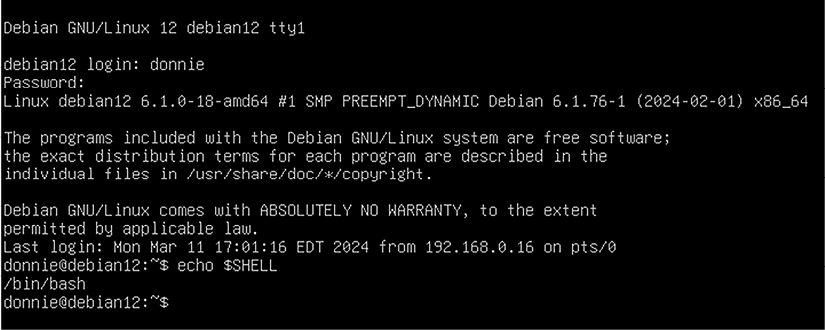
When you log into a text-mode Linux or Unix server, you’ll be presented with a black screen and some text, which looks like this:

Figure 1.1: Plain bash on a text-mode Debian Linux machine

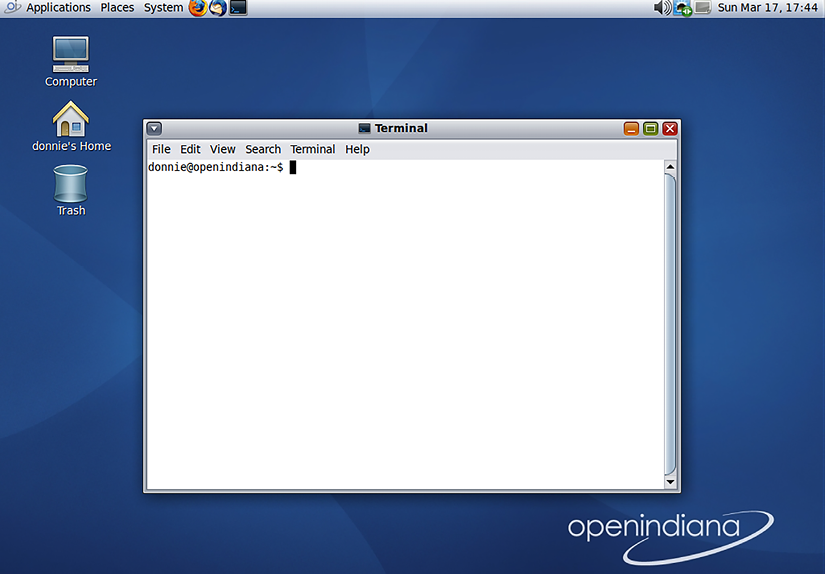
This is the unadorned, plain-jane shell. Machines with desktop environments installed will interface with the shell via a terminal emulator, which will look something like this:

Figure 1.2: A terminal emulator that interfaces with bash on an OpenIndiana machine

The name of the terminal emulator will differ from one desktop environment to the next, but all do the same job. The advantage of using a terminal emulator is that you’ll have the luxury of using scroll bars, customizing the display, and using copy-and-paste for the command-line.

In any case, you can see which shell you’re using by typing:

donnie@fedora:~$ echo $SHELL
/bin/bash
donnie@fedora:~$

In this case, you see that you’re using bash.

CONTINUE READING
83
Tech Concepts
36
Programming languages
73
Tech Tools
Icon Unlimited access to the largest independent learning library in tech of over 8,000 expert-authored tech books and videos.
Icon Innovative learning tools, including AI book assistants, code context explainers, and text-to-speech.
Icon 50+ new titles added per month and exclusive early access to books as they are being written.
The Ultimate Linux Shell Scripting Guide
notes
bookmark Notes and Bookmarks search Search in title playlist Add to playlist download Download options font-size Font size

Change the font size

margin-width Margin width

Change margin width

day-mode Day/Sepia/Night Modes

Change background colour

Close icon Search
Country selected

Close icon Your notes and bookmarks

Confirmation

Modal Close icon
claim successful

Buy this book with your credits?

Modal Close icon
Are you sure you want to buy this book with one of your credits?
Close
YES, BUY

Submit Your Feedback

Modal Close icon
Modal Close icon
Modal Close icon