Sign In Start Free Trial
Account

Add to playlist

Create a Playlist

Modal Close icon
You need to login to use this feature.
  • Book Overview & Buying Kali Linux Cookbook
  • Table Of Contents Toc
  • Feedback & Rating feedback
Kali Linux Cookbook

Kali Linux Cookbook - Third Edition

By : Corey P. Schultz
close
close
Kali Linux Cookbook

Kali Linux Cookbook

By: Corey P. Schultz

Overview of this book

This hands-on guide will help you become a penetration testing expert by gaining command of the powerful tools of Kali Linux, from versions 2024.3 through 2025.1, aligned with the latest features introduced and applying them in real-world security assessments. This cookbook’s third edition is updated to include the latest advancements in cybersecurity. The author leverages their 20 years of industry experience to guide you through installing Kali on multiple platforms, setting up lab environments, and using modern tools, such as Nmap, Metasploit, Wireshark, OpenVAS, and AI-driven reconnaissance. You’ll also explore automated social engineering, wireless hacking, web and database exploitation, and advanced persistence techniques, delivering a comprehensive and up-to-date penetration testing resource. Recognizing the critical role of human factors in security, this edition expands on social engineering tactics, including psychological principles and AI-driven automation, to craft highly effective attack campaigns. By the end of this book, you’ll have strengthened your grasp of the entire penetration testing process, from environment setup and reconnaissance to vulnerability analysis, exploitation, and maintaining access, and be equipped with industry-standard tools to enhance your effectiveness as a security professional.
Table of Contents (17 chapters)
close
close
15
Other Books You May Enjoy
16
Index

Installing Metasploitable3 Linux and Windows VMs

In this recipe, you will add machines that you can use for targets by installing Metaspoloitable3 VMs. Metasploitable3 Linux and Windows machines are vulnerable VMs designed for penetration testing and security research. Built by Rapid7, Metasploitable3 has outdated software, misconfigurations, and security vulnerabilities.

It is a practical environment for users to explore and exploit various security flaws and is effective for vulnerability scanning, exploitation, privilege escalation, and post-exploitation activities. It also provides an ideal platform to practice attack vectors and tools such as Kali Linux. Using this VM helps you identify and exploit weaknesses in Linux and Windows operating systems.

Getting ready…

You need the following to complete this recipe:

  • VirtualBox shut down
  • A stable internet connection
  • Temporarily disabled antivirus
  • 80 GB of free disk space

How to do it…

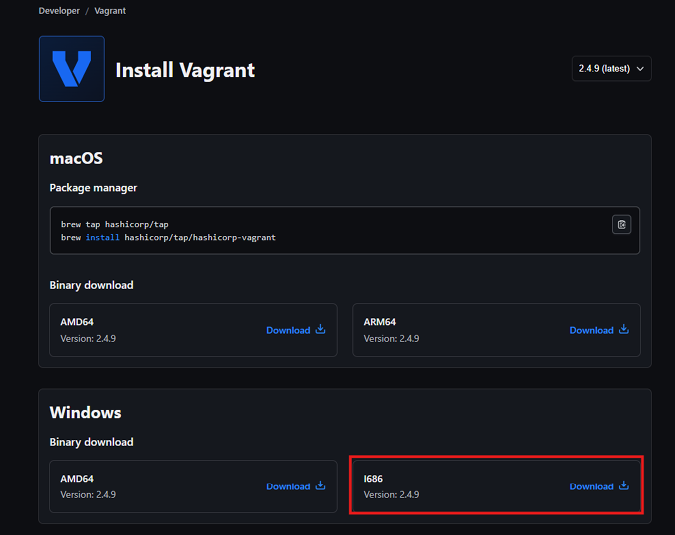
  1. Open your web browser and navigate to https://developer.hashicorp.com/vagrant/install?product_intent=vagrant.
  2. Find the appropriate download for your host and download Vagrant.

A screenshot of a computer

Description automatically generated

Figure 1.34 – Vagrant download

  1. Once the file has been downloaded, close your web browser. Navigate to the Vagrant file you downloaded and double-click it to begin installation.
  2. Accept the license agreement and click Install.
  3. Once the installation is completed, click Finish.
  4. You will then be asked to reboot – select Yes to reboot the host.
  5. Once the host computer is back up, log in and open the command prompt.

Tip

A quick way to open a command window is to type command or cmd into the search window.

  1. Navigate to your default VM location from within the command window. In this
    example, it’s on the D: drive. From there, we must add a new workplace directory, naming it metasploitable3-workplace, and cd into it, as shown.

    d:

    cd kali_cb_vms

    mkdir metasploitable3-workplace

    cd metasploitable3-workplace

  2. Now, download the Vagrant file, which will be used to create our VMs using the following.

    powershell Invoke-WebRequest -Uri "https://raw.githubusercontent.com/rapid7/metasploitable3/master/Vagrantfile" -OutFile "Vagrantfile"

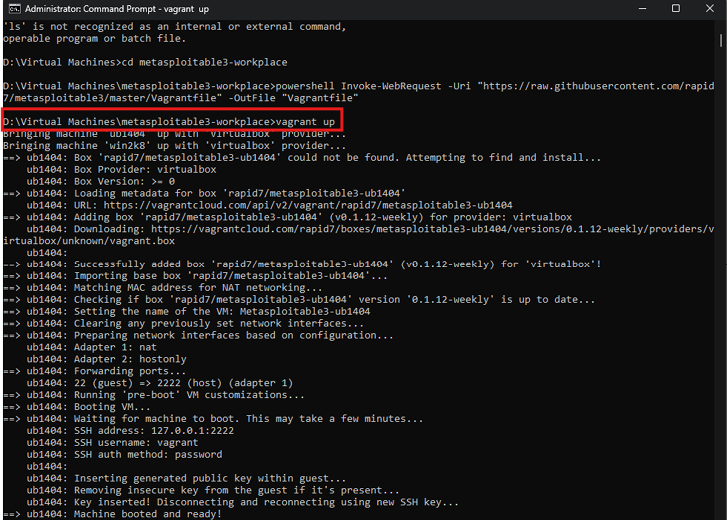
  3. Once the Vagrant file has been downloaded, you can bring the VMs online with the following command:

    vagrant up

Figure 1.35 – vagrant up

Figure 1.35 – Vagrant up

The process will take a significant amount of time, and there will be some warnings generated due to configuring a host-only network before installing Metasploitable3.

  1. Once complete, launch VirtualBox by double-clicking the icon on your desktop.
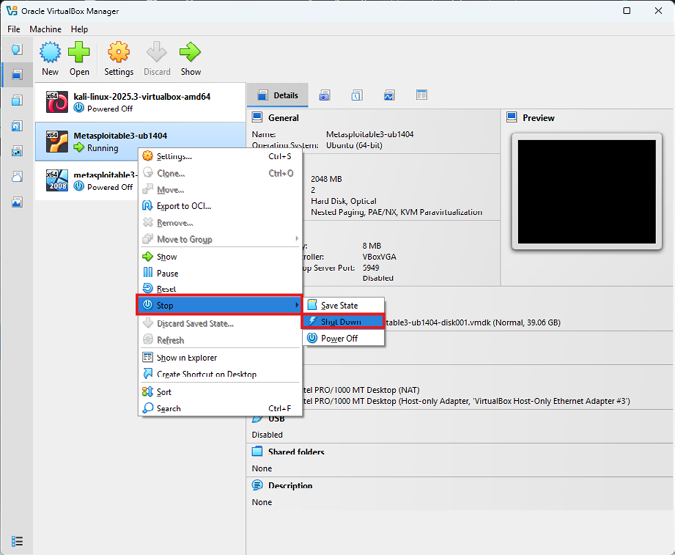
  2. You will notice two new VMs from VirtualBox Manager with names beginning with metasploitable3.

If either of those VMs is running, you will want to shut them down. The easiest way is to select the VM and right-click and select Stop, and click Shutdown.

Figure 1.36 – Stop VMs

Figure 1.36 – Stop VMs

  1. When asked if you really want to do this, click Shutdown.
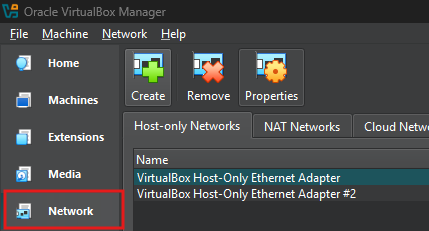
  2. Clean up the host-only network by selecting the options icon on tools and clicking Network.
Figure 1.37 – VirtualBox networking

Figure 1.37 – VirtualBox networking

  1. Now, if you see two VirtualBox host-only Ethernet adapters, then remove the second one that has the suffix #2 by selecting it and clicking Remove.

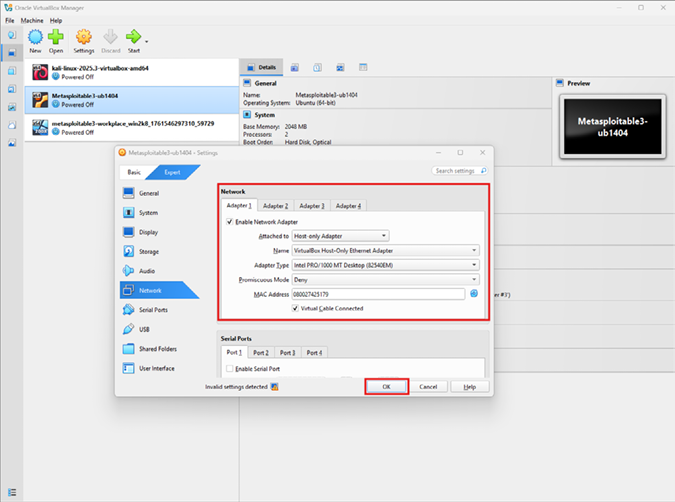
Now, to clean up each VM, we select the VM and click on the Network icon.

  1. Check each network adapter. The only one that should be enabled is Adapter 1, and it should be connected to the host-only Ethernet adapter. When finished, click OK. Do this for each of the Metasploitable3 VMs.
Figure 1.38 – VM network settings

Figure 1.38 – VM network settings

  1. Now, you may launch each VM and try logging into each. For the Linux workstation, the username and password are vagrant. For the Windows machine, both the administrator and Vagrant user’s password are vagrant.

Note

Remember not to expose vulnerable machines directly to the internet.

  1. Once complete, shut down the VM as before by using the Shutdown option.

How it works…

Vagrant is an open source software product for building and maintaining virtualized development environments. Vagrant was used to deploy the pre-built Metasploitable3 VMs within VirtualBox quickly and straightforwardly.

There is more…

Vagrant is a useful tool, and I would recommend reviewing the website for additional information on useful options as you continue with the lab:

https://developer.hashicorp.com/vagrant/intro

There is plenty of useful information on the Metasploitable3 GitHub pages located at https://github.com/rapid7/metasploitable3?tab=readme-ov-file and https://github.com/rapid7/metasploitable3, and specific information about the vulnerabilities can be found on the wiki at https://github.com/rapid7/metasploitable3/wiki/Vulnerabilities.

Visually different images
CONTINUE READING
83
Tech Concepts
36
Programming languages
73
Tech Tools
Icon Unlimited access to the largest independent learning library in tech of over 8,000 expert-authored tech books and videos.
Icon Innovative learning tools, including AI book assistants, code context explainers, and text-to-speech.
Icon 50+ new titles added per month and exclusive early access to books as they are being written.
Kali Linux Cookbook
notes
bookmark Notes and Bookmarks search Search in title playlist Add to playlist download Download options font-size Font size

Change the font size

margin-width Margin width

Change margin width

day-mode Day/Sepia/Night Modes

Change background colour

Close icon Search
Country selected

Close icon Your notes and bookmarks

Confirmation

Modal Close icon
claim successful

Buy this book with your credits?

Modal Close icon
Are you sure you want to buy this book with one of your credits?
Close
YES, BUY

Submit Your Feedback

Modal Close icon
Modal Close icon
Modal Close icon